应用 LUTApplying a LUT
9 steps
简介Overview
LUT(Lookup Table,查找表)本质上是一张颜色转换表。它接收输入颜色(R/G/B 值),通过查表换算后输出对应的颜色。LUT 分两种:1D LUT 和 3D LUT。1D LUT 比较简单,只是把 R/G/B 三个通道的输入值各自映射成另一个输出值;3D LUT 更复杂,会给每个通道赋予 RGB 三组值,运算更复杂,但能承载更多信息。A Lookup table, or LUT, is in essence a conversion chart that converts color values. It takes the input color (the red, green, and blue values), converts those using a chart, and produces the conversion onscreen. There are two different types of LUTs: 1D and 3D. A 1D LUT works very simply by changing the red, green, and blue channels input values to another value for output. A 3D LUT is more complex, as it gives each color channel an RGB value, so the math is more complex, yet the LUT is able to hold more information.
乍看之下 LUT 很像 still(静帧)——都能套在片段上改变画面的色彩和反差。但 LUT 不会显示调色的中间过程,它像一个打不开的盒子,只能整体应用,无法拆解。At first glance, a LUT appears very similar to a still since it can be applied to a clip and change the look of the color and contrast in the shot. Unlike a still, though, a LUT does not show the stages of a grade; it is in essence a locked box that cannot be broken down, merely applied.
LUT 的用途很广,而且和 still 不同,它可以在 DaVinci Resolve 之外使用。例如相机以 Log 曲线拍摄时,很难直接判断画面在最终交付色彩空间下的效果,这时可以把 LUT 加到监视器上,让拍摄团队预览到接近影院或电视屏幕的画面,同时相机仍以 Log 记录完整的光影和色彩信息。However, LUTs have many uses, and unlike stills they can work outside of the DaVinci Resolve software. For example, if a camera is shooting in a Log profile it may be difficult to judge what the shot looks like in a deliverable color space. So a LUT can be added to an output monitor to give the production crew an idea of what the shot will look like on a cinema or television screen, while the camera still records the Log profile with all its contrast and color information still intact.
你也可以创建自定义 LUT,保存后上传到 Blackmagic Design 相机上,这样在拍摄时就能实时预览接近成片的效果。You can even create a custom LUT, save it, and upload it onto a Blackmagic Design camera, where you can shoot the scene while seeing an approximation of how the final footage will look.
应用 LUT:LUT 能快速重校画面像素数据的显示方式,相当于另一种色彩管理或调色手段。DaVinci Resolve 自带大量不同色彩空间之间互转的 LUT,在 Color页面就能直接套用。Applying a LUT Lookup tables allow you to quickly recalibrate how your color pixel data is displayed, essentially providing another form of color management or color correction. Conveniently, DaVinci Resolve comes equipped with many different LUTs for converting one color space to another, and you can easily apply these LUTs from the color page.
NOTE · 注意
提示:因为 LUT 只是数据表,承载不了 RGB 之外的信息,所以像 Power Window(二级调色窗口)这类工具不会被包含在 LUT 里,它无法理解窗口信息。Because a LUT is a table of information, it cannot contain any complexities that go beyond RGB values. That means secondary grading tools such as power windows are not included in a LUT because it cannot understand the window information it is being sent.
- 在时间线上选中 clip 18。Select clip 18 in the timeline.
- 点击界面左上角的
LUTs按钮,打开 LUT 浏览器。In the top left corner of the interface, click theLUTsbutton to reveal the LUTs browser.
当前片段虽然启用了色彩管理,但画面反差仍偏弱,可以尝试用 LUT 取得更好的效果。The clip you are looking at is using color management; however, it still appears to have little contrast. You could try using a LUT, which may get a better result.
LUT 浏览器按不同相机和色彩空间分类。当使用某款相机拍摄、需要把它转成适合显示的影调时,可以从对应相机的分类里选择 LUT。这里素材是 DJI 拍摄的,所以我们从 DJI 分类中挑选。The LUTs browser is divided into different cameras and color space categories. When you’re working with a specific camera and need to convert it to look appropriate for your display, you can apply one of the LUTs from your camera’s category. We are using a DJI clip, so we will choose from the DJI LUT category.
在套用 LUT 之前,要确保该片段未启用色彩管理,否则色彩转换会被执行两次,结果就不对了。Before applying the LUT, we need to make sure the shot is not color managed; otherwise, the color conversion will be performed twice and will be incorrect.
- 右键缩略图 23,在菜单中选择
Input Color Space > Project Rec.709(scene)。Right-click thumbnail 23 and, from the menu, choose Input Color Space > Project Rec.709 (scene).
这表示色彩管理会按项目设置处理该片段,不做任何转换,画面会重新呈现 log 图像的样子。This means the color management will use the project settings for this clip, so it will not perform any conversion, and the clip will look like a log image again.
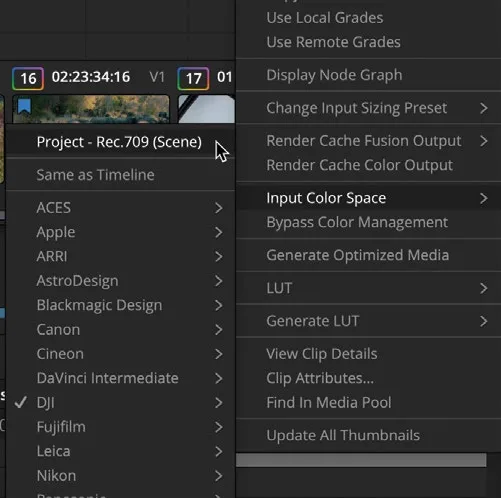
- 在 LUT browser 中选择 DJI 分类。In the LUT browser, select the DJI category.
- 点击并拖动 LUT browser 右上角的滑块,让缩略图略微放大。Click and drag the slider in the top right corner of the LUT browser to make the thumbnails slightly bigger.
- 在 browser 中找到 DJI_X7_DLOG2Rec709 LUT,将鼠标指针在缩略图上来回移动,在 viewer 中预览 LUT 效果。In the browser, locate the DJI_X7_DLOG2Rec709 LUT and move your mouse pointer back and forth over the thumbnail to preview the LUT in the viewer.
- 右键 LUT 缩略图,选择 Apply LUT to Current Node。Right-click the LUT thumbnail and choose Apply LUT to Current Node.
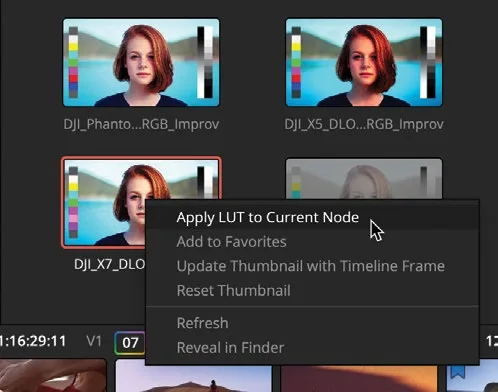
LUT 已应用到 01 节点,但和色彩管理一样,LUT 并不清楚如何设置画面的阴影与高光,也无法判断白平衡是否正确。应用 LUT 后仍需对画面进行平衡调整。The LUT is applied to node 01, but just like using color management, LUTs do not know where to set your shadows and highlights. The LUT doesn’t know if your white balance is correct. You still need to balance the shot after applying a LUT.
NOTE · 注意
始终牢记:LUT 只是用自身存储的数值将一组 RGB 值转换为另一组。如果用 LUT 从宽色域相机转换到更窄的交付色域,大量色彩信息会被丢弃。因此使用 LUT 时,最好先完成调色,再应用 LUT,以确保仍能利用相机的完整色彩空间。Always keep in mind that a LUT is converting one set of RGB values to another using the values contained in the LUT itself. So, if you go from a wide camera gamut to a much narrower delivery gamut through a LUT, much of the color information will be discarded. When using LUTs, it is often better to grade before using them to ensure that you can still use a camera’s full color profile.
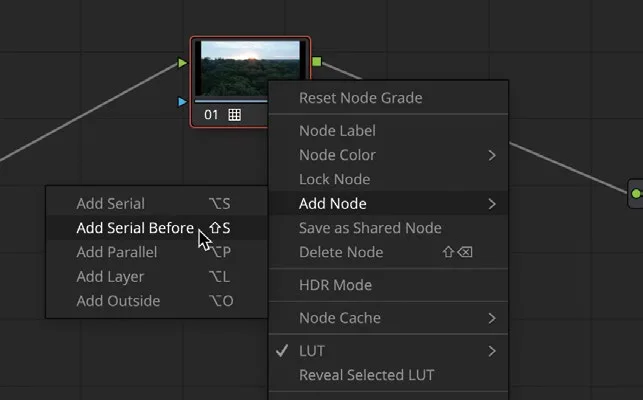
- 保持 01 节点选中状态,右键选择
Add Node > Add Serial Before,在 LUT 节点前添加一个节点。With node 01 still selected, right-click and choose Add Node > Add Serial Before to add a node before the LUT. - 在左侧窗口中,将
Contrast滑块向右拖到约 1.250,将 Pivot 向左拖到约 0.250。In the left window, drag theContrastslider right to around 1.280 and the Pivot left to around 0.250.
将 Color Boost 向右拖到约 14,直到画面色彩更丰富。Drag the Color Boost right until it is around 14 or the shot has more color in it.
本卡术语Terms in this card
时间线Timeline 色彩管理Color Management 调色页Color page 色彩空间Color Space 对比度Contrast 曲线Curves 白平衡White Balance 窗口Power Window 二级调色Secondary Correction 调色Grade LUT(查找表)LUT 静帧Still 项目设置Project Settings 节点Node 帧Frame 色域Gamut 像素Pixel
相关知识卡Related Cards
时间线Timeline 色彩管理Color Management 窗口Power Windows 二级调色Secondary Color Correction