导入与导出调色风格Importing and Exporting Grades
17 steps
简介Overview
使用 still(静帧)的一大优势是可以随时导入导出。你可以把硬盘里一整组 still 应用到任何项目上。由于 still 保存了调色的每一步,它能套到任意片段上再灵活微调。One of the big advantages of using stills is the ability to import them into and export them out of the project. You could have a folder of stills on a hard drive that could be applied to any project, and because a still saves each step of the grade, it can be applied to any clip and adjusted accordingly.
后期公司在做电视剧时常用多套 gallery(调色库)来保证不同场景、不同集数之间的色彩统一。从 still 出发,调色师能快速拿到一个起点,不必每次从零开始。调色师也可能为同一镜头准备多张 still,从中挑选最合适的创意风格。Post-production houses often use multiple galleries in episodic television work so they can get color continuity correct across different scenes and different episodes. Using stills gives the colorist a good starting point rather than having to start the grade from scratch each time. Colorists may also have multiple stills for the same shot so they can choose a creative look.
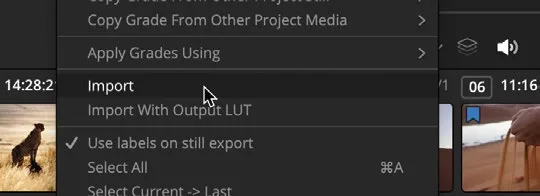
- 在 gallery 中右键单击,选择 Import。Right-click in the gallery and choose Import.
- 在训练素材中进入 Lesson 06 文件夹,选中 STILLS 文件夹。Go into the Lesson 06 folder in the training materials and select the STILLS folder.
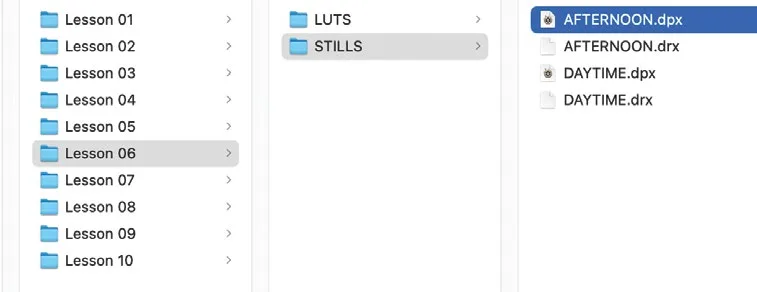
- 选中名为 AFTERNOON 的 .dpx 文件。Select the .dpx file called AFTERNOON.
- 点击
Import按钮,stills 即被导入到 gallery 中。Click the Import button, and the stills will be imported into the gallery. - 确保时间线上第 16 个片段处于选中状态。Make sure clip 16 in the timeline is selected.
- 在 AFTERNOON still 上右键单击,选择 Apply Grade。Right-click over the AFTERNOON still and choose Apply Grade.
和之前一样,grade(调色)的所有步骤——包括 power window(功率窗口)——都已套用到该片段上。不过现在你想为这个镜头打造一种完全不同的氛围,所以可以借助已有的节点,把傍晚感改造成清晨感。As before, all the steps of the grade, including the power windows, have been applied to the clip. However, you want to create a totally different look for this shot, so you can use the nodes already there to create a shot that feels like morning rather than evening.
- 选中节点 01 BALANCE,在 Primary Color Wheels(主色轮)窗口右上角点击
Reset All按钮。此操作只重置该节点上的色彩,不会影响 power window。Select node 01 BALANCE and, in the top right corner of thePrimary Color Wheelswindow, click theReset Allbutton. This will reset the color on the node but not the power window.
现在你希望这个片段更亮一些,呈现清晨的感觉。You now want this clip to be brighter to have more of an early morning feeling.
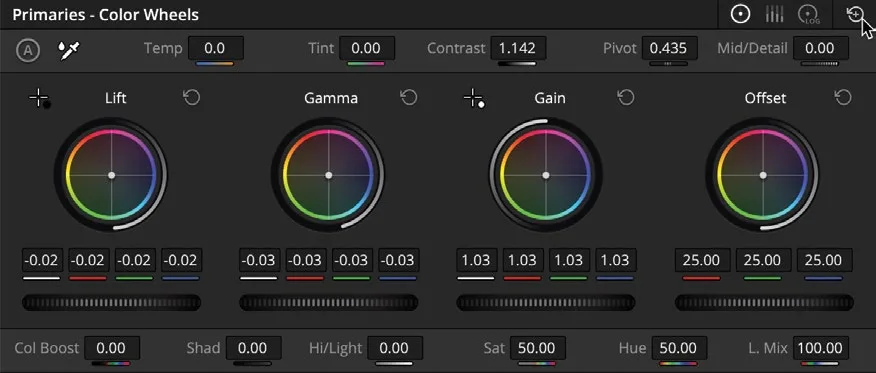
- 把 Gamma master wheel(Gamma 主轮)向右拖动,提升画面亮度,直到参数读数大约为 0.04,或直到你觉得画面亮度合适为止。Drag the Gamma master wheel to the right to lift the brightness of the shot. Drag until the parameter reads around 0.04 or until you feel the shot is suitably brighter.
- 选中 Node 02 SHADOWS,在左侧窗口中点击 HDR 色轮。Select Node 02 SHADOWS and click the HDR wheels in the left window.
- 用 Shadow(阴影)色轮,把中心点从橙色向青蓝色方向拖动,让画面整体偏冷。Using the Shadow color control wheel, drag the center away from orange across toward teal to give the shot a colder look.
- 选中节点 03 CONTRAST。Select node 03 CONTRAST.
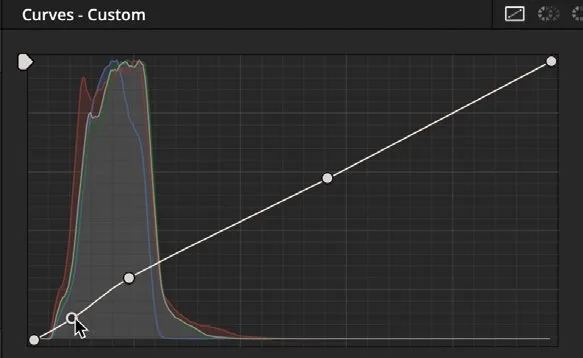
画面现在冷色调明显了,但对比度过高,阴影拉得过长,应该更平一些。The shot looks much cooler now; however, there is a little too much contrast, giving the shadows a longer feel when they should be much flatter.
- 在中间窗口点击 Curves(曲线)按钮。Select the Curves button in the middle window.
- 在曲线上右键单击从左数第二个控制点,删除它。Right-click the control point second from the left on the curve to delete it.
- 在曲线上第二个控制点处,略微向上拖动,让画面对比度看起来比较平。Now on the second point in the curve, drag it upward slightly to get the contrast in the shot looking reasonably flat.
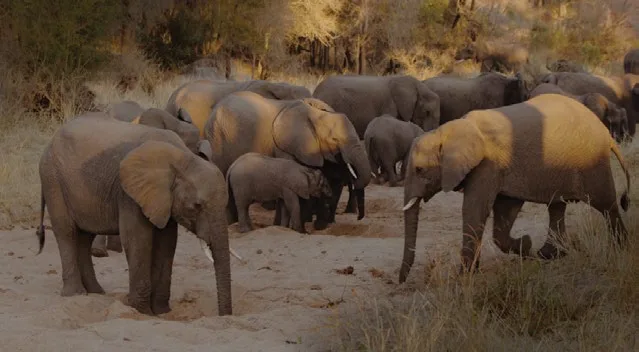
这个清晨冷色调的效果可以另存为静帧,方便以后使用。This cool morning look can now be saved as a still for use later.
- 在 viewer 上右键单击,选择 Grab Still(抓取静帧),静帧会出现在 Gallery 中。Right-click the viewer and choose Grab Still. The still will appear in the gallery.
- 右键单击该静帧,选择 Change Label(修改标签),把标签改为 MORNING。Right-click the still and choose Change Label. Label the still MORNING.
- 在 clip 上再次右键单击,确保勾选了 "Use labels on still export"(导出静帧时使用标签)选项。Right-click the clip again and ensure that the option “Use labels on still export” is checked.
TIP · 提示
Project Settings > General Options中包含自动为静帧添加标签的选项,可配置多个参数实现自动标签。The Project Settings > General Options includes an option to label your stills automatically. There are several parameters that you can configure to automatically label a still.
保持菜单打开,选择 Export,将静帧保存回 Lesson 06 文件夹中的 STILLS 文件夹。Keep the menu open and choose Export. Save the still back to the STILLS folder in the Lesson 06 folder.
从以上流程可以看出,使用静帧(stills)非常省时。虽然导入的调色与原片差异很大,但借助原静帧中保存的节点来调整画面以匹配创意风格,过程反而更快捷。As you can see from this process, using stills can be timesaving. Even though the look you imported was very different from the one saved, it was a quicker process to adjust the clip to the creative look by using the nodes that were contained within the original still.
本卡术语Terms in this card
时间线Timeline 导出Export 调色轮Color Wheels 对比度Contrast 曲线Curves Gamma(中间调)Gamma HDR 色轮HDR Wheels Lift(暗部)Lift 窗口Power Window 调色Grade 静帧Still 项目设置Project Settings 节点Node 帧Frame
相关知识卡Related Cards
时间线Timeline HDR 色轮HDR Wheels 一级调色轮Primary Color Wheels 窗口Power Windows