用 Outside 节点反转选区Reversing Selections with Outside Nodes
6 steps
简介Overview
很多时候你希望把调整范围切换到 Power Window 之外的区域。比如天空已经调出戏剧感了,接下来可能要调草地。这时候可以用 outside 节点——它接收前一个窗口创建的 mask(遮罩),并自动把选区反转。Often, you will want to switch your attention to the area outside of your window. For example, now that the sky looks dramatic in this shot, you might want to adjust the grass area. For this purpose, you can use an outside node, which takes the mask created by the window and inverts the selection.
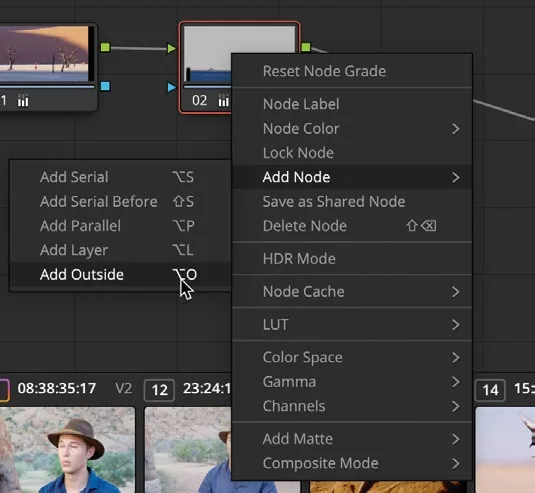
- 在 Node Editor 中选中 node 02,右键选择
Add Node > Add Outside,或者按 Option-O(macOS)/ Alt-O(Windows)。With node 02 selected in the Node Editor, right-click it and choose Add Node > Add Outside or press Option-O (macOS) or Alt-O (Windows).
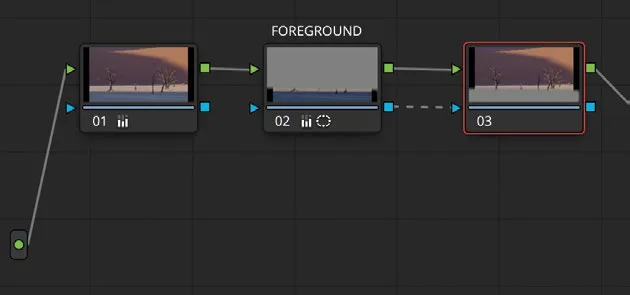
Node Editor 中现在出现了第三个节点。和之前一样,它通过绿色 RGB 输入/输出圆点与上一个节点相连。但这次会多出一种新的连线:蓝色的 key 输入/输出三角。key 就是用窗口工具抠出来的那部分画面。创建 outside 节点时,它会接收上一个节点的 key,并自动将其反转。A third node is now present in the Node Editor. As with previous nodes you’ve created, it will connect with the preceding node via the green RGB input/output circles. However, this time you’ll see a new connection: the key input/output blue triangles. The key is the portion of the image that you isolated using the window tool. When you create an outside node, it receives the key from the previous node and automatically inverts it.
- 选中 node 03,右键选择 Node Label,把节点命名为 BACKGROUND。With node 03 selected, right-click and choose Node Label, and then name the node BACKGROUND.
想更清楚地看到当前调整范围,可以临时开启 viewer 的 Highlight 模式。To more clearly visualize the area you are adjusting, you can briefly enable the viewer’s Highlight mode.
- 在 viewer 左上角点击
Highlight按钮。In the viewer’s upper left corner, click theHighlightbutton.
Highlight按钮会高亮你即将修改的区域,并用灰色像素覆盖受保护、不受本次调整影响的区域。The Highlight button shows the area you will be changing and displays gray pixels over the area that will be protected from your adjustments.
- 在 primary controls 中,把 Contrast 向右拖到约 1.200,拉开沙漠的阴影。Using the primary controls, drag the Contrast control right to around 1.200 to lengthen the shadows in the desert.
- 拖动 Gamma 色轮中心向橙色方向,直到沙漠看起来更暖。Using the Gamma control wheel, drag the center toward orange until the desert starts to look warmer.
- 再次点击
Highlight按钮,关闭 Highlight 模式。Click the Highlight button again to disable the Highlight mode.
重复使用 key 数据是节点式工作流的一大优势:只需建立一个 mask,就能多次复用,从而显著加快调色速度。The ability to reuse key data is a beneficial component of node-based workflows. It speeds up the grading process by requiring you to create a single mask and reuse it multiple times.
本卡术语Terms in this card
覆盖Overwrite 变速Speed 对比度Contrast Gamma(中间调)Gamma 窗口Power Window 调色Grade 节点Node 像素Pixel