使用一级调色器Using the Primary Corrector
5 steps
简介Overview
一级调色器(primary corrector)是创建不同风格、平衡画面最常用的工具组,包含了大量控件,因此你在 Color页面上的大部分时间都会花在这个工具面板上。第一个练习,我们先做几处调整来熟悉这些控件。The most popular controls for creating different looks and balancing your shots are found in the primary corrector. Because DaVinci Resolve includes many controls in the primary corrector, you’ll spend much of your time using this palette of tools while you’re on the color page. In this first exercise, you’ll make a few adjustments just to get a feel for the controls.
- 在时间线上,确保选中的是缩略图 01 那段素材。In the timeline, make sure thumbnail 01 is the selected clip.
一级调色器分为四个区域:Lift、Gamma、Gain 和 Offset。每个区域都包含两组控件——用于调整画面色调的色彩平衡控件,以及用于调整亮度的主轮(master wheel)。The primary corrector is divided into four regions: Lift, Gamma, Gain, and Offset. Each region is split into the color balance controls for adjusting the tint of the image and the master wheels for adjusting the tonality or brightness.
Offset 调整的是整张画面的整体明暗。第一段素材整体偏亮,可能是拍摄环境所致;画面中较暗的区域有些发灰,尤其是背景和羚羊身上的暗部。需要改变整体明暗时,使用色轮下方的主轮即可。The Offset adjusts the overall picture. In this first clip, the overall shot looks a little bright, probably due to the conditions in which it was filmed. The darker areas of the image look a little gray, particularly the background and the darker sections of the antelope. To make an entire image brighter or darker, you use the master wheel, located under the color wheel.
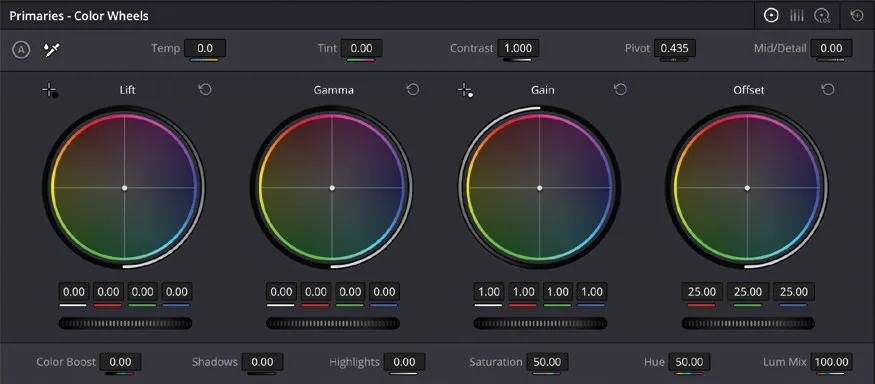
- 把 Offset 的主轮向左拖动,直到画面不再过亮、暗部接近纯黑。主轮上方的 R、G、B 数值最终应落在 10.00 左右。这段素材动态范围较大,你也可以压得更深一些。Drag the Offset master wheel to the left until the image is not as bright and the shadows appear to be black. The red, green, and blue number fields above the master wheel should end up around 10.00. There is quite a lot of range in the clip, so you can go darker if you wish.
这样就拉开了画面的影调范围(tonal range)。所谓影调范围,指的是把画面当作黑白图像时亮度值的分布。不过这一步只动了明暗,并没有改变颜色——画面看上去仍然明显偏蓝,我们希望它更接近中性灰。This improves the tonal range. When you hear the term tonal range, we are talking about brightness values as if the image were black and white. What this has not done is affect the color in the image. We can see this as the image looks quite blue, and we want something a little more neutral in color.
- 在 Offset 色轮中心找到色彩指示点,向黄色方向拖动,直到画面里的蓝色褪去,整体色彩变得中性。Drag the color indicator at the center of the Offset color wheel left toward yellow until the blue hue in the image fades and the image looks more neutral in color.
TIP · 提示
这一步的原理是为画面添加互补色。互补色在色轮上正好相对,所以蓝色对应的互补色是黄色。如果你不确定如何消除偏色,可以先判断画面中偏哪种颜色,然后在色轮上向其相反方向添加颜色即可。This process involves adding a complementary color to an image. Complementary colors sit opposite a specific color on the color wheel, so in this case, yellow is the complementary color of blue. If you are ever unsure about how to remove a color cast, decide on the color of the cast in the image and then start by adding a color that is directly opposite in the color wheel.
色彩平衡控件的调整幅度通常很细微,多数情况下只需把指示点向目标颜色的反方向移动几像素。Adjustments made in the color balance controls are subtle. In most cases, you are just moving the indicator a few pixels away from the color you want to reduce.
- 想对比调整前后的效果,点击 Viewer 右上角的
Bypass按钮,把调色暂时关闭。To turn the correction you have applied on and off to see the before and after, click theBypassbutton in the upper right corner of the viewer to turn the grade off. - 再次点击
Bypass按钮,重新打开调色。Click the Bypass button again to turn it back on.
TIP · 提示
操作完成后记得把 Bypass 重新打开,因为它会关闭时间线上所有片段的调色效果。Always remember to turn the Bypass back on because it turns off the grading for all the clips in the timeline.
以上调整虽然可以直接在画面中看到效果,但 DaVinci Resolve 还提供了专门的工具来精确显示画面中正在发生的变化,帮助你更清楚地判断哪里需要进一步校正,这就是 video scopes(示波器)的用武之地。While these adjustments have been made by what you can see in the viewer, DaVinci Resolve includes tools that can show exactly what is happening in the image and therefore give you a better understanding of where corrections may be needed. This is where the video scopes come in.
本卡术语Terms in this card
时间线Timeline 淡入淡出Fade 调色页Color page Gain(亮部)Gain Gamma(中间调)Gamma Lift(暗部)Lift 偏移Offset 一级校色器Primary Corrector 示波器Scopes 调色Grade 动态范围Dynamic Range 像素Pixel