理解视频示波器Understanding Video Scopes
7 steps
简介Overview
刚才的调色是靠肉眼观察画面来判断需要做哪些调整,但这其实很困难——比如某个偏色可能只出现在画面较亮的部分,而非整张图像。要判断这种情况,就需要借助视频示波器(Video Scopes)来获取画面的准确数据,从而辅助你做出更精确的调色决策。The correction you just made was performed by looking at your viewer and deciding which changes were needed. However, this can be quite difficult to do by eye—for example, a color cast may only be in the brighter areas of the image and not in the entire image. But how can you determine this? Video scopes can give you information about the clip you’re looking at to help make accurate decisions when grading.
DaVinci Resolve 提供了多种示波器:Waveform(波形图)、Parade(分量图)、Vectorscope(矢量示波器)、Histogram(直方图)和 CIE 色度图,分别用于监看画面的亮度、曝光、色相、饱和度与色彩空间信息。There are several scopes at your disposal: Waveform, Parade, Vectorscope, Histogram, and CIE chart to check a clip’s luminance, exposure, hue, saturation, and color space.
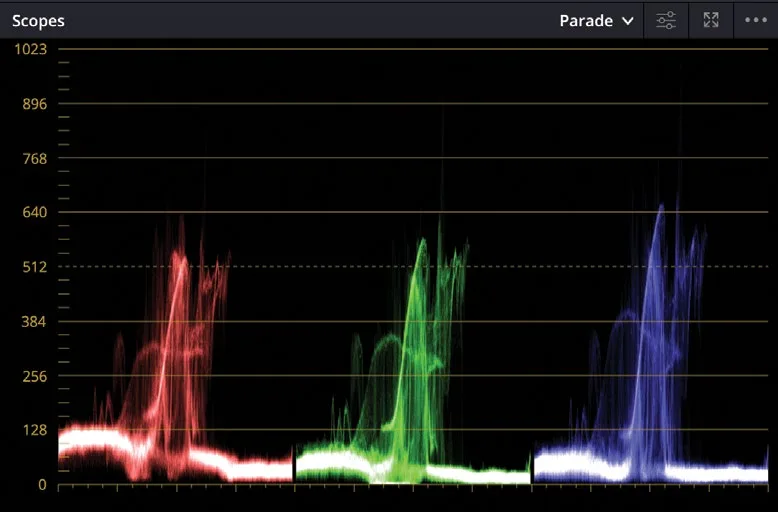
接下来我们用 Parade 示波器来辅助平衡画面。You will use the Parade scope to help balance a shot.
- 在时间线上确认已选中 02 这段素材。In the timeline, make sure thumbnail 02 is the selected clip.
- 在右下角的窗口中,点击工具栏最右侧的
Scopes按钮。In the lower right window, click theScopesbutton on the far right of the toolbar. - 点击展开箭头,打开 Video Scope 下拉菜单。Click the disclosure arrow to open the
Video Scopedropdown menu.
你可以根据监看需要,在这个菜单中切换使用五种不同的示波器。You can switch between the five different scopes using the menu, depending on what you want to monitor.
- 选择 Parade。Choose Parade.
如果觉得示波器在界面上偏暗、看不清,可以适当调亮一些。You may just want to make your scopes a little brighter in the interface so they can be seen more clearly.
- 点击
Settings按钮。Click the Settings button. - 在 Settings 菜单中,把
Parade滑块向右拖动,让示波器在界面上看起来更清晰舒适。From the Settings menu, drag theParadeslider to the right to make the scopes a little brighter so you can see them comfortably in the interface. - 再次点击
Settings按钮,关闭菜单。Click the Settings button again to close the menu.
Parade(分量示波器)分别显示每个颜色通道的波形图。波形从下往上读,底线 0 代表绝对黑,顶线 1023 代表绝对白。在调色时,示波器中的图像(称为 trace 波形迹线)理想情况下不应低于 0 或高于 1023,否则画面会出现 clipping(裁切),丢失图像数据,造成细节损失。The Parade scope graphs each color channel individually. The graph is read from bottom to top with absolute black at line 0 and absolute white at line 1023. When balancing shots, the image in the parade, called the trace, ideally should not go below 0 or above 1023. Otherwise, the image will clip—cut off parts of the image data—and lose detail.
TIP · 提示
提示:可以切回 Keyframes Editor(关键帧编辑器)并隐藏视频示波器,以释放显卡的 GPU 资源,提升回放性能。You can switch back to the Keyframes Editor and hide the video scopes to free up your graphics card’s processor and improve playback performance.
从左往右阅读 Parade 波形时,每个通道都与 Viewer(检视器)中的画面一一对应。例如,红色、绿色和蓝色波形迹线的左侧分别对应画面的左侧区域。这种排列方式让你在查看示波器时能一眼判断当前正在评估的是画面中的哪个区域。Reading the Parade from left to right, each channel corresponds to the image displayed in the viewer. For instance, the left part of the red, green, and blue trace corresponds to the image’s left part. This layout makes it easy to look at the scope and know exactly which area you are evaluating.
本卡术语Terms in this card
时间线Timeline 关键帧Keyframe 色彩空间Color Space 饱和度Saturation 示波器Scopes 窗口Power Window 调色Grade 帧Frame
相关知识卡Related Cards
时间线Timeline Parade 示波器Parade Scope 矢量示波器Vectorscope 视频示波器Video Scopes