TASK 1Task 1
查找键位功能Inspect Key Assignments
6 steps
- 选择 DaVinci Resolve > Keyboard Customization,或按下 Option-Command-K(macOS)/ Alt-Ctrl-K(Windows)。Choose DaVinci Resolve > Keyboard Customization or press Option-Command-K (macOS) or Alt-Ctrl-K (Windows).
弹出 Keyboard Customization窗口后,你可以选择要使用的快捷键方案、查看可用的快捷键,或者创建自己的自定义快捷键。The Keyboard Customization window opens, where you can choose which set of keyboard shortcuts you want to use, discover which keyboard shortcuts are available, or create your own custom keyboard shortcuts.
DaVinci Resolve 内置了若干套预设,用于模拟其他非线性编辑(NLE)软件的快捷键风格。DaVinci Resolve provides a set of presets that emulate the various keyboard shortcuts used by other nonlinear editing (NLE) systems.
- 点击
Keyboard Customization窗口右上角的下拉菜单,查看可选方案。Click the dropdown menu in the top right corner of theKeyboard Customizationwindow to reveal the options.
如果你熟悉其中任何一款 NLE,可以载入相应的预设。但这并不是 100% 的完整映射——因为每个系统的功能设计略有差异,其他系统中存在的某些功能可能在 DaVinci Resolve 中并不存在,因此无法为其分配快捷键;反之,If you’re familiar with any of the listed NLEs, you can load the appropriate preset. However, note that this is not a 100% remapping of the shortcuts. Because each system operates slightly differently, some functions available in one or more of these other systems may not be available in DaVinci Resolve. Therefore, it is impossible to map the shortcut to the non-existent function; or DaVinci Resolve may include
DaVinci Resolve 中也有其他系统不具备的功能,原生预设中默认分配的快捷键在其他方案的映射里可能会被覆盖。建议花时间探索和学习默认快捷键,因为它们通常经过精心设计,能帮助你更高效地使用软件。functions not available in these other systems, and the shortcuts assigned by default in the DaVinci Resolve preset may be overridden in the other settings. It is always worth exploring and learning the default keyboard shortcuts since they have often been thought out carefully for you to get the best out of the software.
不过,在某些情况下,你确实需要自定义快捷键。Nevertheless, there are times when you will want, and even need, to customize the shortcuts.
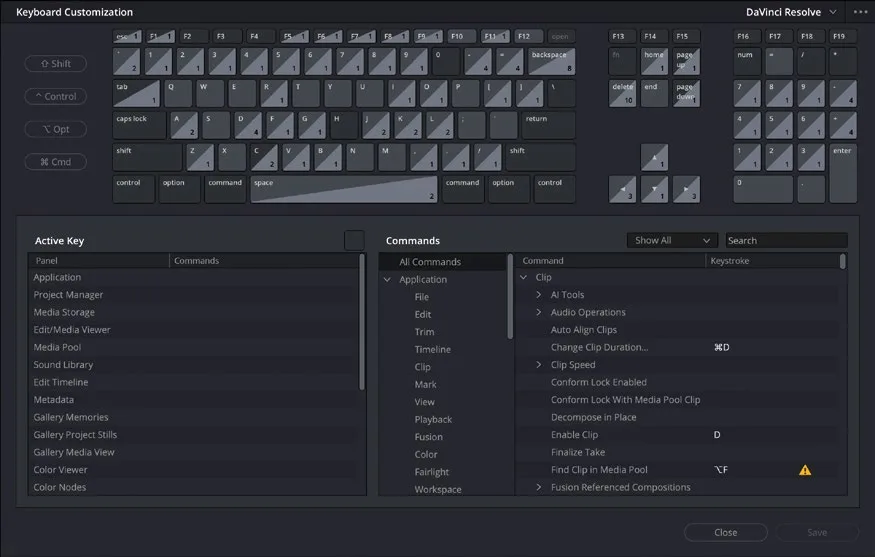
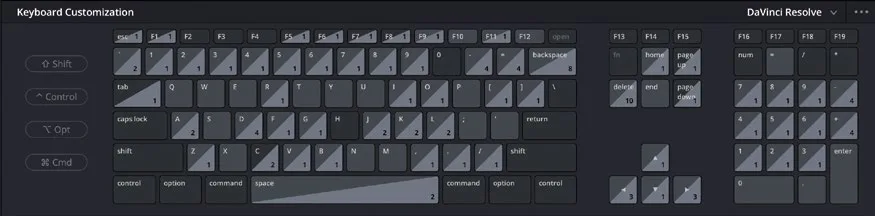
Keyboard Customization窗口的上半部分提供了一组可交互的键盘图,方便你探索快捷键。The upper part of the Keyboard Customization window provides you with an interactive keyboard for exploring keyboard shortcuts.
没有分配功能的按键显示为深色;已分配功能的按键则颜色稍浅。右下角带数字的按键表示该键在多个页面下都拥有功能。Keys that do not have an assigned function are displayed in a dark shade; those that do have an assigned function are a slightly lighter shade. The keys displaying a number at the bottom right represent keys that have functionality in more than one page.
你可以通过点击这些按键来开始浏览各项功能。You can begin exploring the functions by selecting the keys on the keyboard.
- 在屏幕上的键盘中点击 D 键。Click the D key using the onscreen keyboard.
TIP · 提示
你可以按住物理键盘上的按键,以获得更直观的交互体验。You can hold down keys on your physical keyboard for a more interactive experience.
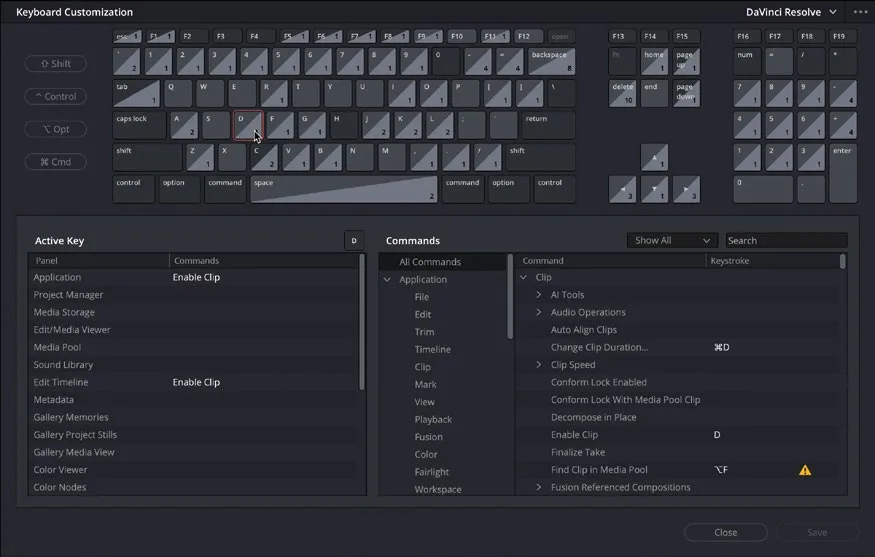
Keyboard Customization窗口会根据你的选择做出响应,在下半部分的 Active 区域显示该快捷键对应的功能,以及可以使用该快捷键的面板。例如 D 键可以在 Edit page 时间线和 Fairlight 时间线上切换 Enable Clip 功能。As you can see, the Keyboard Customization window responds to the selection you make and, in the Active area in the bottom half of the window, displays the function assigned to this keyboard shortcut, next to the panel in which you can use it. In this case, the D key will toggle the Enable Clip function in the edit page timeline and in the Fairlight timeline.
你也可以查看搭配不同 modifier 按键使用的快捷键组合。You can also explore the keyboard shortcuts that utilize the different modifier keys for your system.
- 在屏幕键盘上再次点击 D 键取消选中,然后点击
Shift按钮。Click the D key again on the onscreen keyboard to deselect it and then click theShiftbutton.
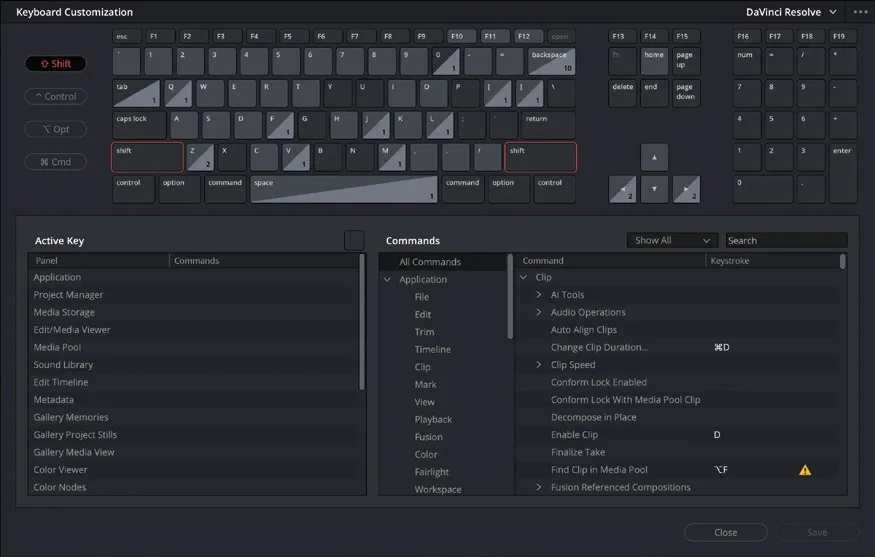
键盘布局上的 Shift按钮会高亮,映射也会切换为按住 Shift 时可用的快捷键。The Shift buttons for your keyboard layout are highlighted and the mapping shifts to reflect the shortcuts that are available while holding the Shift key.
- 再次点击
D按钮,查看 Shift+D 组合键对应的功能。Click the D button again to reveal the function activated by the Shift-D key combination.
如前所述,Shift+D 会在所有片段上 bypass 调色效果,且在整个软件中通用。As you are already aware, Shift-D bypasses the grades on all clips and works across the application.
- 再次点击 D 和
Shift按钮,取消两者的选中状态。Click the D and Shift buttons again to deselect them.
搜索键盘快捷键:相比从快捷键反查命令,更常见的需求是搜索某个命令,找出它是否绑定了快捷键。Searching Keyboard Shortcuts Instead of discovering the command associated with a shortcut, it’s much more common to search for a command to discover what keyboard shortcut (if any) is assigned.
本卡术语Terms in this card
时间线Timeline 预设Preset 编辑页Edit page 覆盖Overwrite 窗口Power Window 调色Grade 键盘快捷键Keyboard Shortcuts Fairlight 音频Fairlight 映射(调色)Mapping