使用 Chroma Warper(色度扭曲器)Using the Chroma Warper
9 steps
本卡概念Key Concepts
Chroma Warper 是一种在单一工具内操纵大量色调的工具,能保证颜色之间的过渡平滑,并可固定特定颜色使其不受影响。A tool for manipulating numerous hues within one tool, ensuring smooth roll-off between colors with the ability to pin certain colors to remain unaffected.
简介Overview
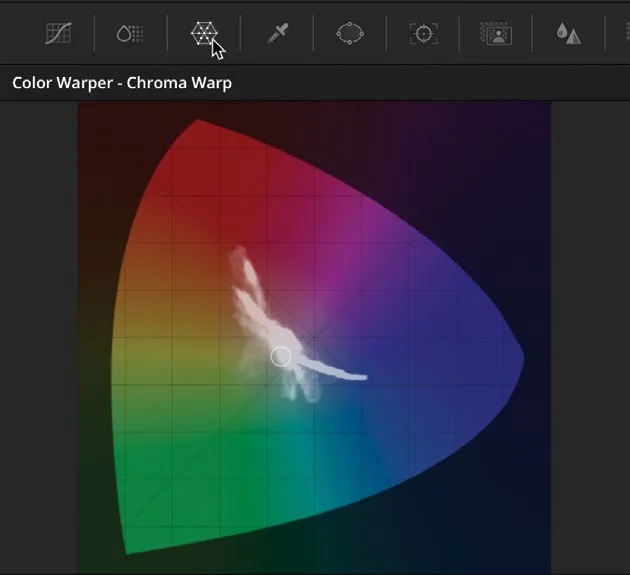
Chroma Warper 与 Color Warper 非常相似,都是用来在色彩范围之间做平滑、精确的调整。两者主要区别在于:Chroma Warper 用笔触在 chromaticity diagram(色度图)上操作,而不是网格,这样能直观看到色彩输出的调整效果。The Chroma Warper works very similarly to the Color Warper in that it is designed to make smooth and accurate changes between color ranges. The main difference between the two is that the Chroma Warper uses strokes on a chromaticity diagram rather than a mesh, giving you a good idea of how you are adjusting the color output.
- 在时间线上选中片段 09,从中间窗口中选择 Color Warper 工具,默认进入 Chroma Warper 界面。Select clip 09 in the timeline and select the Color Warper tool from the middle window. It will default to the Chroma Warper.
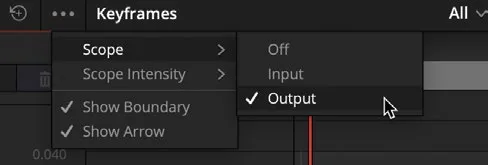
- 点击窗口右上角的 Scope options,选择
Scopes > Output,这样可以在色度图里看到色彩的变化情况。Click the Scope options in the top right corner of the window and choose Scopes > Output. This will allow you to see the changes happening to the color in the chromaticity display.
在 Chroma Warper 中可以看到色度指示明显偏向蓝色和红色,因为这两个颜色是画面中最突出的颜色。You can see in the Chroma Warper that chroma indicators point very much toward blue and red, as they are the two most prominent colors in the shot.
- 用 Eyedropper(吸管)工具选中图像左上角的蓝天,Chroma Warper 中会生成一个调整点。Using the Eyedropper tool, select the blue sky in the top left corner of the image, which will apply an adjustment point in the Chroma Warper.
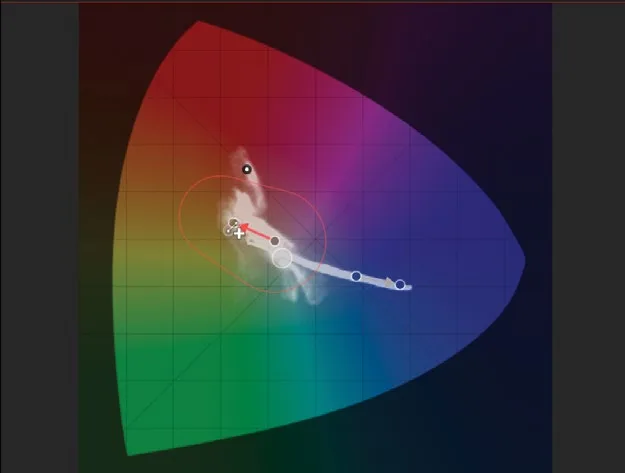
- 小心地点击并拖动这个点到 Chroma Warper 中偏蓝色的位置。随着画面中的天空变得更蓝,你会看到第二个点出现,两个点之间有一根箭头相连,分别显示原始采样的颜色和调整后的目标颜色。Carefully click the added point and drag it toward blue in the Chroma Warper. As the sky turns more blue in the image, you should see a second point appear with an arrow between the two. This shows us where the original sampled color was and where we have adjusted it to.
TIP · 提示
删除点的方法是直接在点上右键,点即消失。注意:必须用创建该点的同一个工具来选中并删除。To delete a point, simply right-click on the mouse, and the point will disappear. The selection must be done with the same tool that created the point.
接下来我们想给沙漠部分多推一点暖调,但同时要保持红色裙子原本的独特颜色,不让它随整体一起变。Now we want to push a little more warmth into the desert but keep the red dress its same distinctive color and not change it with the rest of the shot.

- 在 Chroma Warper 工具中选择 Add Pin Point(添加锁定点)工具。In the Chroma Warper tool, select the Add Pin Point tool.
- 再次使用 Eyedropper,点击画面中红色裙子的主体部分,会添加一个 pin point。顾名思义,pin point 用来在 Chroma Warper 中钉住某个色相,使其不受其他调整影响。Using the Eyedropper again, click the main body of the red dress in the image, and a pin point will be added. The pin point, as the name suggests, pins a selected hue in place in the Chroma Warper so it is not affected by any other adjustments.
- 在 Chroma Warper 中选择 Add Stroke Normal Mode(普通模式添加笔触)工具。Select the Add Stroke Normal Mode tool in the Chroma Warper.
- 点击人物左侧的沙漠地面,又会生成一个点。Select the desert floor to the left of the subject, and another point will appear.
- 按住并拖动该点向橙色方向移动,给沙漠画面增加暖色调。Click and drag the point toward orange to add warmth to the desert.
你会注意到,被钉住的裙子颜色不会随画面其他部分一起改变。如果觉得背景中较暗的山丘被推入了过多橙色,也可以再调整。You will notice that as the dress color is pinned, it does not change with the rest of the image. You might feel that the darker hills in the background have had a little too much orange hue pushed into them, but this can be adjusted.
把 Tonal Range Low滑块拖到大约 0.170,或者调到背景山丘略微偏蓝为止。Tonal Range Low 只影响所选色相中的较暗区域,较亮区域保持不变。Click and drag the Tonal Range Low slider until it reads around 0.170 or until the hills in the background have a slightly more blueish hue. The Tonal Range Low affects the darker areas of the selected hue, leaving the lighter areas unchanged.
NOTE · 注意
Chroma Warper 和标准 Color Warper 不能在同一个节点上使用。如果要组合使用两者,必须分别放在不同的节点上。The Chroma Warper and standard Color Warper cannot be used on the same node. If you want to combine the two, they must be used on separate nodes.
本卡术语Terms in this card
时间线Timeline 示波器Scopes 色度扭曲器Chroma Warper 色彩扭曲器Color Warper 窗口Power Window 节点Node 采样Sampling