TASK 2Task 2
恢复时间线备份Restore Timeline Backup
3 steps
- 如有必要,选择 Timeline > Find Current Timeline in Media Pool,在 bin 中定位激活的时间线。If necessary, choose Timeline > Find Current Timeline in Media Pool to reveal the active timeline in its bin.
- 右键点击该时间线,选择 Restore Timeline Backup。Right-click the timeline and choose Restore Timeline Backup.
会弹出一份备份列表,每个备份都标注了创建时的日期和时间。A list of backups is revealed, date and time-stamped when the backup was created.
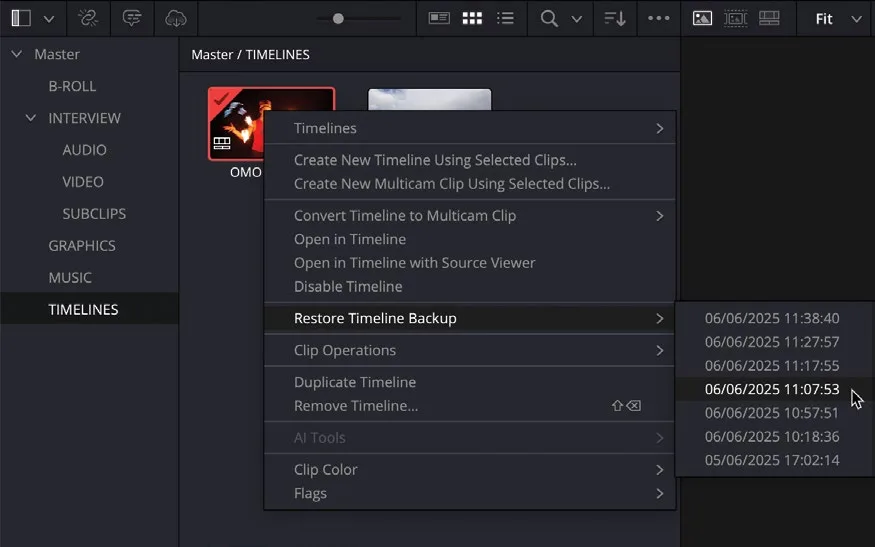
- 选择要恢复的备份时间线。Choose a backup timeline to restore.
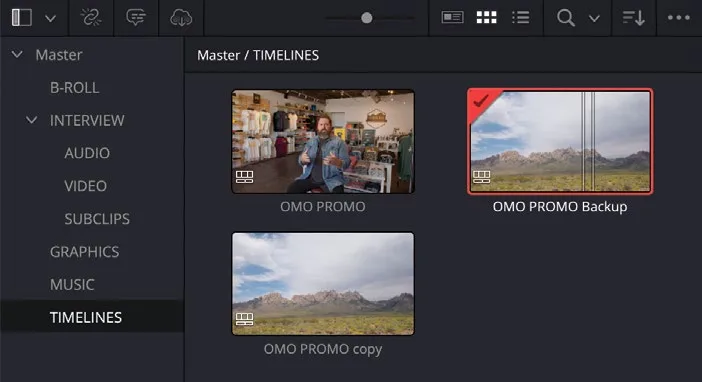
备份时间线不会覆盖原始时间线,而是作为一条独立的时间线添加到当前 bin 中,并在时间线名称后加上 "Backup" 字样。The backup timeline doesn’t overwrite the original timeline but adds the restored timeline to the current bin as a separate timeline with the word “Backup” added to the timeline name.
NOTE · 注意
如果 Restore Timeline Backup 选项不可用,说明该时间线暂无备份。此时可做几次修改后过几分钟再查看。每次备份的时间间隔可在 DaVinci Resolve 的 User Preferences 中查看和调整,具体内容将在第 7 课详细讲解。If the Restore Timeline Backup option isn’t available, then no backups are available for that timeline. In this case, make a few changes and check again after a few minutes’ work. The time increments between each timeline backup can be viewed and adjusted by using DaVinci Resolve’s User Preferences, which you will explore in more detail in Lesson 7.
禁用未使用的时间线。项目常包含多条时间线:同一剪辑的不同版本、同一素材的不同剪辑版本(如 "Director's Cut")、独立场景的时间线,以及需要恢复的备份。保留这些时间线很有用,尤其是在需要恢复已删除的场景时,可以避免从头重新剪辑。Disabling Unused Timelines Projects often contain many timelines: different versions of the same edit you create yourself, possibly different cuts of the same material (such as a “Director’s Cut”), timelines containing separate scenes, and even backups you need to restore. You might want to keep many of these timelines in the project in case they are useful later, especially if you ever need to restore a deleted scene without having to re-edit it from scratch!
可以用 bin 来整理这些重复的时间线,随时清楚当前应该使用哪一条;也可以直接禁用暂时不用的时间线。You can use bins to help organize these duplicated timelines so that you always know which timeline you should be working on. Alternatively, you can always disable a timeline you’re not using.