尺寸 · 空间分辨率Size · Spatial resolution
学习目标LEARNING OBJECTIVES
学完你能说清「分辨率」到底在说什么——画面有多少像素——以及为什么把导出尺寸调大,画面并不会变清晰。
概念说明CONCEPTS
画面有多少像素:连续的现实被切成的网格,一格就是一个像素;「尺寸」说的就是这张网格有多大。
轴上的数值:
- 480p(约 640×480)——老视频、小窗口、素材预览
- 720p(1280×720)——流媒体低档、代理(proxy)
- 1080p(1920×1080)——今天最通用的交付尺寸
- 2160p / 4K(3840×2160)——平台高规格、影院、重构图余量
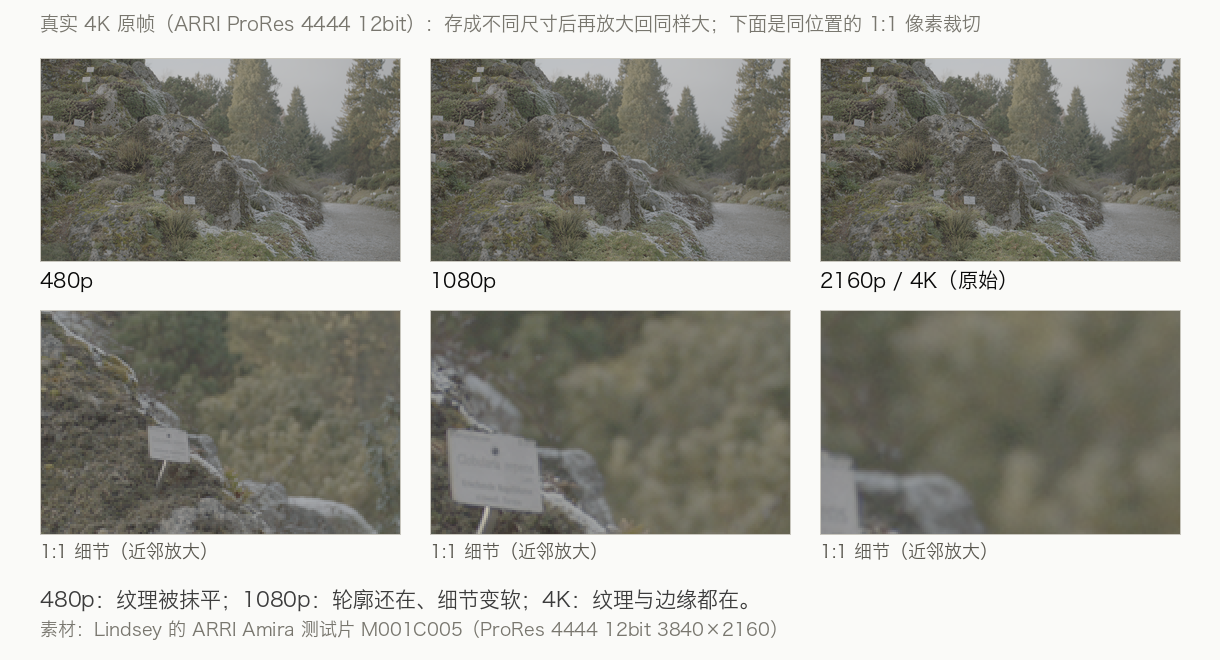
同一机位、同一素材:480p 纹理被抹平 → 1080p 变软 → 4K 细节都在。(素材:ARRI Amira,ProRes 4444 12bit 3840×2160)
五个方向合起来看:▶ 五维图交互演示(按 1/2/3/4 切换四种素材)。
操作步骤STEPS
- 把画面拉到 200%,看细节站不站得住
- 缩放时留意插值伪影——变软、锯齿
- 核对序列与导出分辨率是否一致(别让导出尺寸替你做决定)
练习PRACTICE
动手任务
把同一段素材分别放进 1080p 和 4K 时间线各导出一次,对比文件大小与清晰度,回答:它变 4K 了吗?
自检清单
做完任务后逐条自查,全部能打勾才算过。 做完任务后逐条自查,全部能打勾才算过。
常见问题FAQ
放进 4K 时间线、导出 4K,素材就变成 4K 了吗?
像素可以被放大(从最近的像素借),细节不能被发明——两个场都有同学这样问。
怎么判断素材够不够清晰?
拉到 200% 看细节;缩放时盯伪影。
Learning Objectives学习目标
After this card you can say what "resolution" means — how many pixels the picture has — and why exporting at a bigger size does not make the picture sharper.
Concepts概念说明
How many pixels the frame has: continuous reality cut into a grid, one cell per pixel. "Size" is how big that grid is.
Values on this axis:
- 480p (~640×480) — old video, small windows, previews
- 720p (1280×720) — low streaming tier, proxies
- 1080p (1920×1080) — today's default delivery size
- 2160p / 4K (3840×2160) — premium platforms, cinema, reframing headroom
Same camera, same take: 480p wipes texture → 1080p softens → 4K keeps it all. (Source: ARRI Amira, ProRes 4444 12bit 3840×2160)
All five axes together: ▶ the five-axis interactive chart (press 1/2/3/4).
Steps操作步骤
- Zoom the picture to 200% and check whether detail holds
- When scaling, watch for interpolation artifacts — softening and aliasing
- Make sure sequence and export resolution match (don't let the export size decide for you)
Practice练习
Hands-on task
Export the same clip from a 1080p and a 4K timeline, compare file size and sharpness, and answer: did it become 4K?
Self-check
Work through the task, then tick every line; all checked means you own this card. Work through the task, then tick every line; all checked means you own this card.
FAQ常见问题
Put it on a 4K timeline, export 4K — did the footage become 4K?
Pixels can be borrowed from their neighbours; detail cannot be invented — asked by classmates in both sessions.
How do I judge whether footage is sharp enough?
Zoom to 200% and look at the detail; watch artifacts while scaling.
本卡术语Terms in this card
时间线Timeline 导出Export ProResProRes 分辨率Resolution 窗口Power Window 帧Frame 像素Pixel PNGPNG 代理Proxy