TASK 2Task 2
保存预设Save Settings as Preset
6 steps
- 重新打开
Project Settings窗口,点击 Options(…)菜单,选择 Save Current Settings as Preset。Reopen the Project Settings window, click the Options (…) menu and choose Save Current Settings as Preset. - 在
Preset Name窗口中输入 1080HD 23.976 RCM。In the Preset Name window, type 1080HD 23.976 RCM.
NOTE · 注意
这个命名概括了当前的项目设置——分辨率(1080 HD)、帧率(23.976)以及启用了 Resolve Color Management(RCM)。不过预设命名并没有硬性规则。This naming convention summarizes the current project settings— resolution (1080 HD) and frame rate (23.976) — and that Resolve Color Management (RCM) is enabled. However, there are no definitive rules regarding how you should name your presets.
- 点击 OK。Click OK.
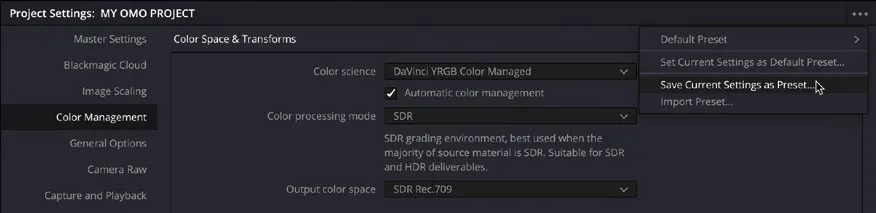
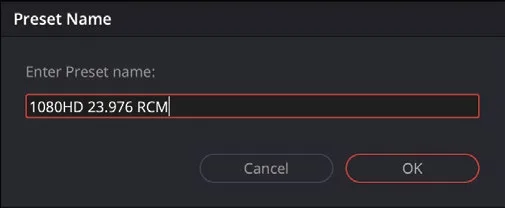
当前项目的所有设置已保存为预设,可随时快速加载。All the settings for the current project are now saved as a preset that you can quickly load.
- 再次点击 Options 菜单,选择
Default Preset > Load Preset。Click the Options menu again and choose Default Preset > Load Preset.
这会重新载入默认项目设置,Timeline Format 恢复为初始值:1920 x 1080、24 fps,Color Science 设为 DaVinci YRGB。This reloads the default project settings, returning the Timeline Format settings to their starting values, with the Timeline Format set to 1920 x 1080 and 24 frames per second and the Color Science set to DaVinci YRGB.
- 点击 Options 菜单,选择 1080HD 23.976
RCM > Load Preset,重新载入本项目要使用的预设。Click the Options menu and choose 1080HD 23.976 RCM > Load Preset to reload the saved preset you’ll use for this project. - 点击 Save 保存当前项目设置的修改(如未修改则点 Cancel),然后关闭
Project Settings窗口。Click Save to save any changes you’ve made to the current project’s settings (or Cancel if no changes have been made) and close theProject Settingswindow.
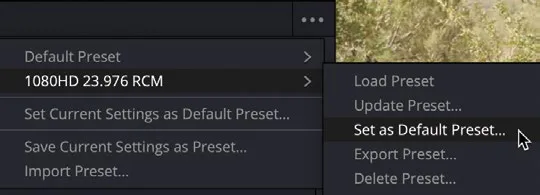
如果经常做项目,每条项目大概率会用同样的设置。与其在创建项目时逐一调整,不如在当前项目库中指定一个项目预设作为默认。在 Project Settings 的 Options 菜单里选择需要的预设,然后选 Set as Default Preset 即可。Changing the Default Project Settings and Managing Project Presets If you regularly work on projects, it’s likely that each project will have the same settings. Instead of customizing the project settings for each project you create, you can specify a project preset as the default for the current project library. Simply choose the preset from the Project Setting’s Options menu and choose Set as Default Preset.
你也可以导出项目预设,方便在另一台 DaVinci Resolve 20 系统上快速载入相同的项目设置。选择 Export Preset 后会生成一个包含项目设置的 .preset 文件,把这个文件传到另一台 DaVinci Resolve 上,用 Import Preset 选项导入即可。You can also export a project preset that you can use to quickly load the same project settings onto another DaVinci Resolve 20 system. Choosing the Export Preset option will create a .preset file containing the project settings. This can then be transferred and imported into another DaVinci Resolve system using the Import Preset option.
本卡术语Terms in this card
项目库Project Library 时间线Timeline 导出Export 帧率Frame Rate 预设Preset 分辨率Resolution 色彩管理Color Management 窗口Power Window 项目设置Project Settings 帧Frame