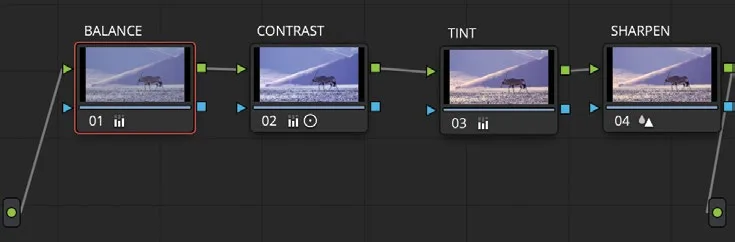
为节点命名Labeling Nodes
3 steps
简介Overview
对片段做的调整越多,所需的节点也越多。节点树复杂后容易看花眼,所以建议从一开始就为节点命名,方便一眼看出每个节点做了什么调整。The more adjustments you make on a clip, the more nodes you are likely to need. After a while, you could have a complex-looking node tree, so it’s a good idea to start labeling nodes to give you an indication of what adjustments may have been made on each node.
- 仍在 01 片段上,右键点击节点 01,从右键菜单中选择 Node Label。Still on clip 01, right-click node 01 and choose Node Label from the contextual menu.
- 将节点命名为 BALANCE,然后按 Return(Enter)键退出文字输入。Label the node BALANCE and press Return (Enter) on the keyboard to exit the text entry.
- 按同样方法,依次将节点 02 命名为 CONTRAST,节点 03 命名为 TINT,节点 04 命名为 SHARPEN。Repeat the process, labeling node 02 CONTRAST, node 03 TINT, and node 04 SHARPEN.
命名完成后,每个节点对应的调色一目了然,随时都能在正确的节点上做调整——比如想把整体色调变冷,直接在 TINT 节点上操作即可。Now you have a good idea of which grade is on which node, so you can make an adjustment on the correct node at any time—for example, changing the overall color to a cooler look can be done on the TINT node.