保存渲染预设Saving a Render Preset
7 steps
简介Overview
如果经常使用同一套自定义设置,可以将其保存为自定义渲染预设(Custom Render Preset)。If you use the same custom settings regularly, you might prefer to save a Custom Render Preset.
- 点击 Render Settings 的 Options(…)菜单,选择 Save As New Preset。Click the Render Settings’ Options (…) menu and choose Save As New Preset.
- 在 Render Preset 对话框中,输入 ProRes Loudness 作为新预设的名称。In the Render Preset dialog, type ProRes Loudness to name your new preset.
- 为该预设选择一个图标,然后勾选 Add to Quick Export,以便从
Quick Export窗口快速调用。Choose an icon for the preset and click Add to Quick Export to make your preset easily accessible from theQuick Exportwindow. - 点击 Save。Click Save.

新预设会出现在 Render Settings 的预设列表中。The new preset is added to the list of presets in the Render Settings.
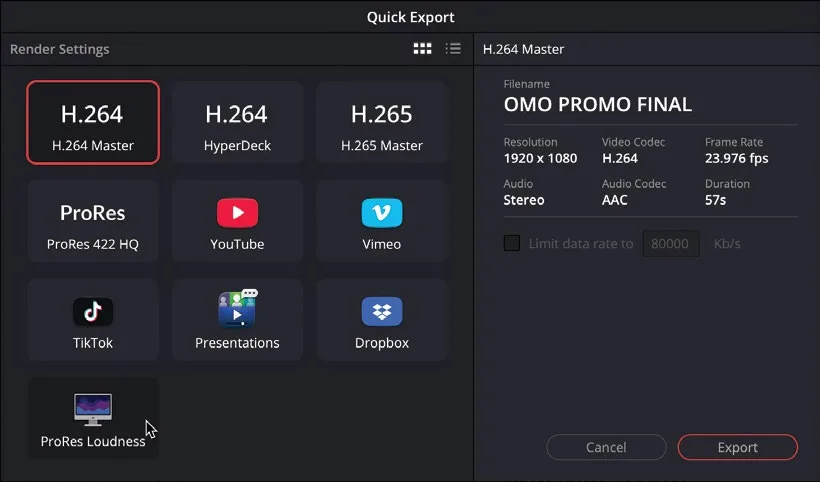
- 切换到 Edit page,打开
Quick Export窗口,确认预设已经同步添加。Switch to the edit page and open theQuick Exportwindow to verify that your preset has also been added.
- 关闭
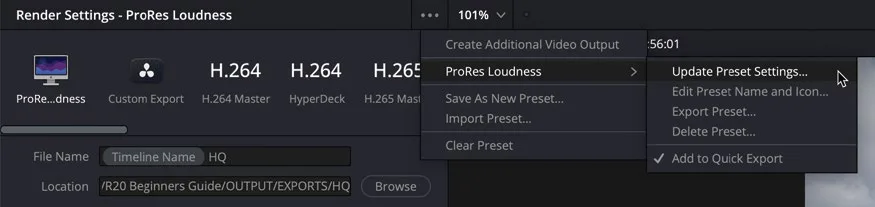
Quick Export窗口,返回 Deliver page。Close the Quick Export window and return to the deliver page. - 再次点击 Render Settings 的 Options 菜单,此时可以看到针对该预设的选项:Update(如保存后做过修改)、编辑名称与图标、Export、Delete,以及从
Quick Export窗口移除。Click the Render Settings’ Options menu again. Here, you can now access options to update (if you’ve made any changes since it was saved), edit the preset’s name and icon, export or delete the preset, or remove it from theQuick Exportwindow.
TIP · 提示
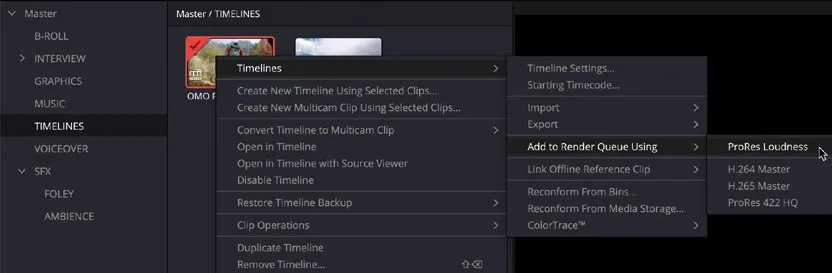
如果不想用 Quick Export 立即开始导出,也可以在 Edit page 右键点击时间线,选择 Timelines > Add to Render Queue Using > [你的预设],快速把时间线加入 Render Queue。Rather than using Quick Export, which starts the export process immediately, timelines can instead be quickly added to the Render Queue using a custom preset in the edit page by right-clicking the timeline and choosing Timelines > Add to Render Queue Using > [Your Preset].
把时间线加入 Render Queue,可以更精细地管理导出任务。Adding the timeline to the Render Queue allows for more careful management of your exports.
本卡术语Terms in this card
时间线Timeline 交付页Deliver page 导出Export 响度Loudness 预设Preset ProResProRes 渲染队列Render Queue 渲染Render 编辑页Edit page 快速导出Quick Export 窗口Power Window