项目归档Project Archive
4 steps
简介Overview
前面介绍的媒体管理方式很实用:你可以把整个文件夹及其内容(包括 .drt 文件)复制到另一块硬盘做归档。DaVinci Resolve 还提供另一种更便捷的方式,可将媒体和项目一起打包成 .DRA(DaVinci Resolve Archive)文件。Creating a Project Archive In many ways, managing your media files as detailed in the preceding section is useful since you can now copy the folder and its contents (including the .drt files) to another hard drive that you can use for archiving. However, DaVinci Resolve has another feature for easy archiving of both media and projects together as a .DRA (DaVinci Resolve Archive).
归档项目会复制全部源文件(即使分布在不同硬盘上),并和项目文件一起放入归档文件夹。该过程不生成 trimmed 版本,因此建议先完成媒体管理,再创建 .DRA。Archiving a project copies all the source files (even if they are on different drives) and places them in the archive folder along with the project file. Because this process does not create trimmed versions of the files, you are advised to manage your used media files first, and then create the .DRA.
不管哪种方式,创建 DaVinci Resolve Archive 只能在 Project Manager窗口中完成。Either way, you can only create a DaVinci Resolve Archive using the Project Manager window.
- 选择
File > Project Manager,或按 Shift-1 打开 Project Manager。Choose File > Project Manager, or press Shift-1, to open the Project Manager. - 在 OMO Promo MM 项目上右键,选择 Export Project Archive。Right-click the OMO Promo MM project and choose Export Project Archive.
- 在 Archive Project 对话框中,导航到 R20 Beginners Guide / OUTPUT / ARCHIVE,点击 Save。In the Archive Project dialog, navigate to R20 Beginners Guide / OUTPUT / ARCHIVE and click Save.
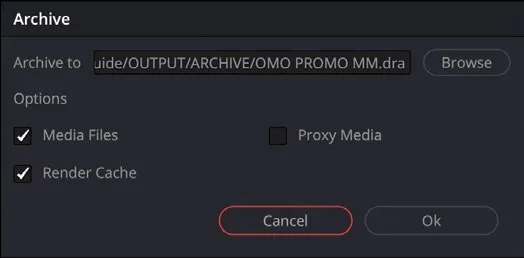
Archive 对话框中可以勾选要一并打包进归档的元素。The Archive dialog opens, where you can choose which elements you want to include with your archive.
- 在 Options 中取消勾选 Render Cache,因为它可以轻易重新生成,通常无需归档,然后点击 OK。In the Options, deselect the Render Cache since that is easily re-created and generally doesn’t need to be archived, and then click OK.
归档过程中,项目对应的所有相关媒体文件连同项目本身的 .drp 文件会被复制到一个扩展名为 .dra 的文件夹中。该文件夹包含在另一台电脑上打开项目所需的全部内容。During the Archive process, all the project’s appropriate media files, along with a .drp file of the project itself, are copied into a folder that’s given the extension .dra. This folder contains everything you need to open your project on another computer.
NOTE · 注意
还原归档项目的步骤参见第 4 课。To restore an archived project, follow the steps in Lesson 4.
本卡术语Terms in this card
项目文件.drp 项目管理器Project Manager 归档Archive 导出Export 媒体管理Media Management 渲染Render 窗口Power Window