使用元数据重命名片段Renaming Clips with Metadata
9 steps
简介Overview
摄像机或几乎所有采集设备生成的片段名通常是一串字母数字,含有片段创建的日期和时间,描述性不强,剪辑时往往需要重新命名。手动输入名称是方法之一,但并非最高效的方式。Clip names from a camera, or almost any capture device, are often an alphanumeric string that typically includes the date and time that the clip was created. They are not always the most descriptive names and often must be changed for editing purposes. Entering clip names manually is one way to address this, but it is not the only way (or even the most efficient way) to rename them.
变量(Variables)是对片段上其他元数据的引用,如场景(Scene)、镜头(Take)和镜头编号(Shot number),之所以叫变量,是因为每个片段的取值都不同。在片段名中插入变量后,Resolve 会自动调用对应元数据(前提是该元数据存在)。我们将利用变量,把 Media Pool 中通用的片段名替换为基于元数据的描述性名称。Variables are references to other metadata that exist on the clip, such as scene, take, and shot number—so called because variables are not the same for each clip. You can enter a variable into the clip name, and Resolve will reference the correct information for each clip (provided the information is present). You will use variables to change the generic names of the clips in the media pool to more descriptive names based on their metadata.
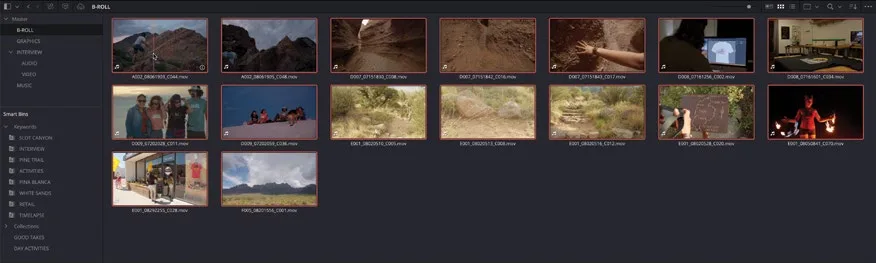
- 选中 B-ROLL bin,选中其中一个片段,按 Command-A(macOS)或 Ctrl-A(Windows)全选该 bin 内的所有片段。Select the B-ROLL bin, select a clip, and press Command-A (macOS) or Ctrl-A (Windows) to select all the clips in this bin.
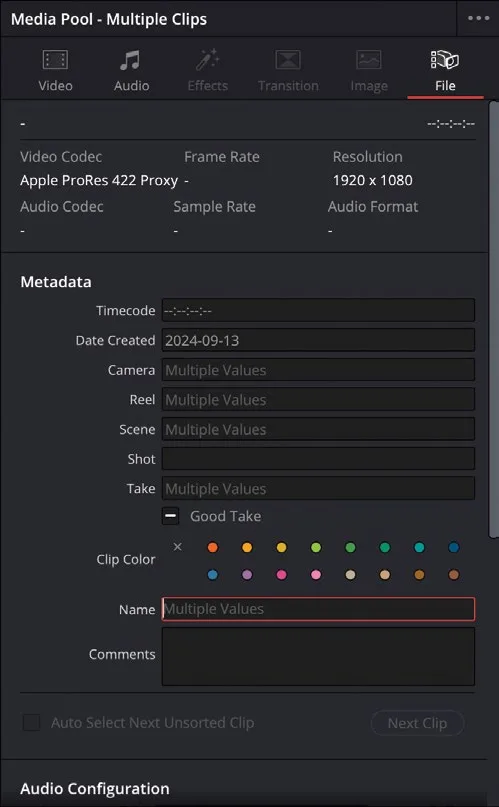
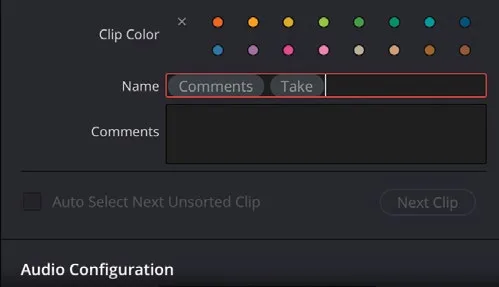
- 在 Inspector 中点击 Name 字段。In the Inspector, click the Name field.
该字段当前显示 "Multiple Values",因为所选片段数量较多,且各自的片段名不同。This field currently shows “Multiple Values” because you have many clips selected, all with different clip names.
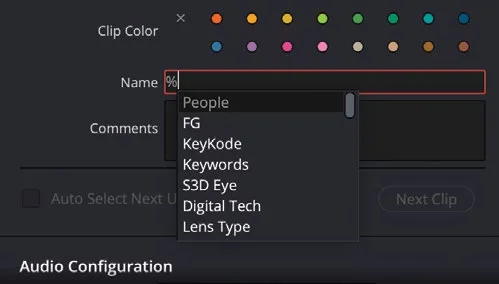
- 在 Name 字段中输入 %(百分号)。In the Name field, type % (percentage sign).
输入 % 表示即将输入一个变量。此时会弹出变量列表。Entering % indicates that you are about to enter a variable. When you enter that %, a list of variables appears.
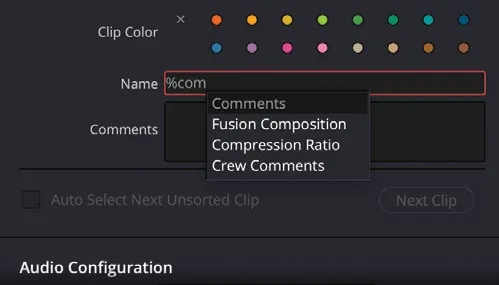
- 输入 com。Type com.
列表中会出现所有包含 "com" 字母的可用变量。A list of potential variables appears that contain the letters “com.”
- 在弹出菜单中点击 Comments,将其加入 Clip Name 字段。In the dropdown menu, click Comments to add it to the Clip Name field.
- 按空格键在该变量后添加一个空格,然后输入 %take,并在变量列表中选择 Take。Press the Spacebar to add a space after this variable, and then type %take and choose Take from the list of variables.
- 点击 Name 字段以外的位置,确认输入。Click away from the Name field.
现在片段名同时显示 Comments 和 Take 两个元数据字段的内容。The clip names now show a combination of each clip’s Comments and Take metadata fields.
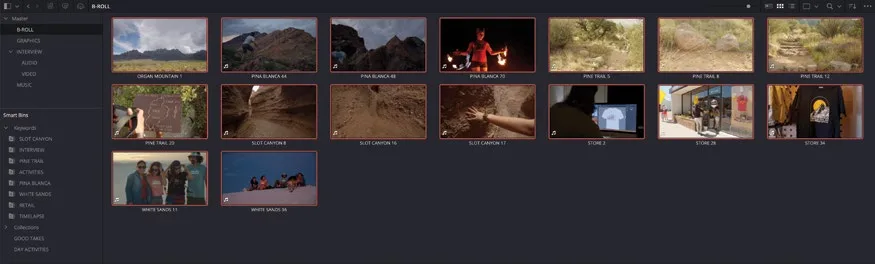
在项目中修改片段名不会改动磁盘上原始媒体文件的名称。剪辑师常用片段名来更直观地识别某个片段或某组片段。片段名本质上也是元数据的一种,因此同样可以用于创建自定义 smart bin。从 Resolve 导出的 EDL、XML 或 AAF 始终引用原始文件名。Changing the clip names in this way does not change the names of the original media files. Editors often use clip names within a project to provide a more user-friendly way of identifying a clip or series of clips. Clip names are, of course, just one more piece of metadata, so you can also use them when creating custom smart bins. EDLs, XMLs, or AAFs generated from within Resolve will always reference the original filename.
TIP · 提示
若要在整个项目中切换显示片段名或原始文件名,选择 View > Show File Names。To switch between viewing the clip names and original file names across the project, choose View > Show File Names.
你还可以在变量之外手动输入文字,与变量组合成更具描述性的片段名。You can also combine text that you enter along with the variables to create a more descriptive clip name.
- 选中 INTERVIEW 关键字 smart bin 中的全部片段。Select all the clips in the INTERVIEW keyword smart bin.
你也可以从 VIDEO bin 中选同样的片段,不过既然已经归入 smart bin,直接使用更方便。You could just as easily select the same clips from the VIDEO bin, but now that you have them, you might as well use the smart bins.
- 在 Inspector 的 Name 字段中输入 CL %Keywords Tk%Take,并在弹出选项中分别选择 Keywords 和 Take。In the Name field in the Inspector, type CL %Keywords Tk%Take, selecting the options for Keywords and Take as they appear.
在 Name 字段外点击一下确认输入。Click away from the Name field.
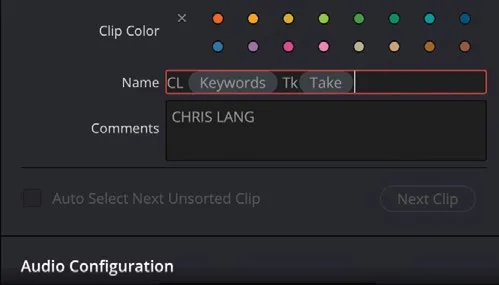
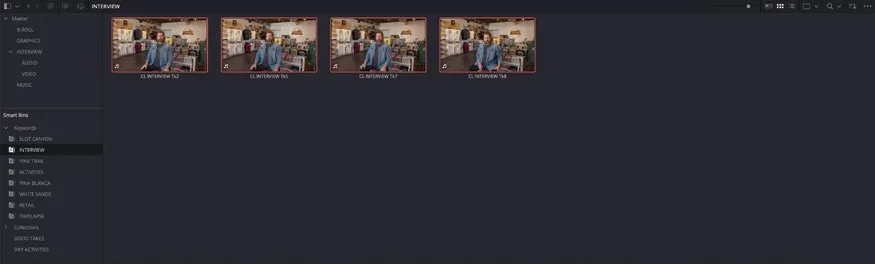
现在 Chris 的所有采访片段都已用他的姓名缩写、关键字和 Take 编号重命名。借助变量批量重命名可以省下大量手动输入时间,并让片段名本身就携带清晰、可读的描述信息,无需再去翻查元数据。Now all of Chris’s interview clips have been renamed with his initials and the clip’s keywords and take number. Renaming clips with variables like this can save hours of manual typing and provide clear, descriptive information about a clip without having to dig deeper into its metadata.
TIP · 提示
如需撤销已应用的自定义片段名,只需在 Inspector 的 Name 字段中清空文字——由于片段必须有名字,系统会自动恢复为原始文件名。To reset any custom names you’ve applied to any clips, delete the text in the Name field in the Inspector, and, because a clip must have a name, the original filename will be substituted.
可以看到,配合元数据功能,Resolve 提供了既灵活又强大的搜索手段,找到所需媒体并不困难。但有一点要提醒:元数据搜索的效果完全取决于原始元数据的质量。哪怕只是一个拼写错误(小笔误),就可能让以上所有便利功亏一篑。As you can see, coupled with an understanding of metadata, Resolve has some flexible and powerful searching functions, so you should always be confident that you’ll be able to find your media. One word of caution, however, is that metadata searches are only as good as the quality of the metadata provided in the first place. Sometimes, a simple spelling mistake (a mere typo) can thwart all these potential benefits!
本卡术语Terms in this card
B-roll 素材B-roll 媒体夹Bin 媒体池Media Pool 元数据搜索Metadata Search 智能媒体夹Smart Bins 导出Export 检查器Inspector 关键词Keywords 元数据Metadata 合成Compositing 引用(剪辑)Reference