AFCT TECH TEAM · LTMO · ADVANCED 01

画面技术
素养扫盲

Log · LUT · 色彩空间 · 噪点
W6 · 10-21 中文场 / 10-22 英文场 · SIP AS116 Mac Lab
AFCT TECH TEAM · LTMO · ADVANCED 01

Picture Quality
Demystified

Log · LUT · Colour Space · Noise
W6 · Oct 21 (zh) / Oct 22 (en) · SIP AS116 Mac Lab
上次 · 导览课
画质是一块「体积」
尺寸 · 帧率 · 动态范围 · 色彩容量 · 色彩精度
今天不讲体积的边,讲体积里边发生的事——从相机到屏幕,中间那一路。
▶ 打开五维图交互新窗口
Last time · Orientation
Picture quality is one volume
Size · Frame rate · Dynamic range · Colour volume · Colour precision
Today is not about the edges of the volume. It is about what happens inside it — the road from camera to screen.
▶ Open the five-axis chartnew tab
RECAP · 第一课讲过
五个方向围成的
那块「体积」
画质是五个方向围出来的空间。任何一个方向塌下去,整块体积就缺一角。
四种素材都是示意值,只说明形状差异。满格 = 100%,按 1 / 2 / 3 / 4 键切换。
RECAP · from session one
The volume five
axes enclose
Picture quality is the space those five axes enclose. Collapse any one and a corner of the volume is missing.
All four profiles are illustrative. Full ring = 100%. Press 1 / 2 / 3 / 4 to switch.
RECAP · 第一课讲过
白点:什么算「白」
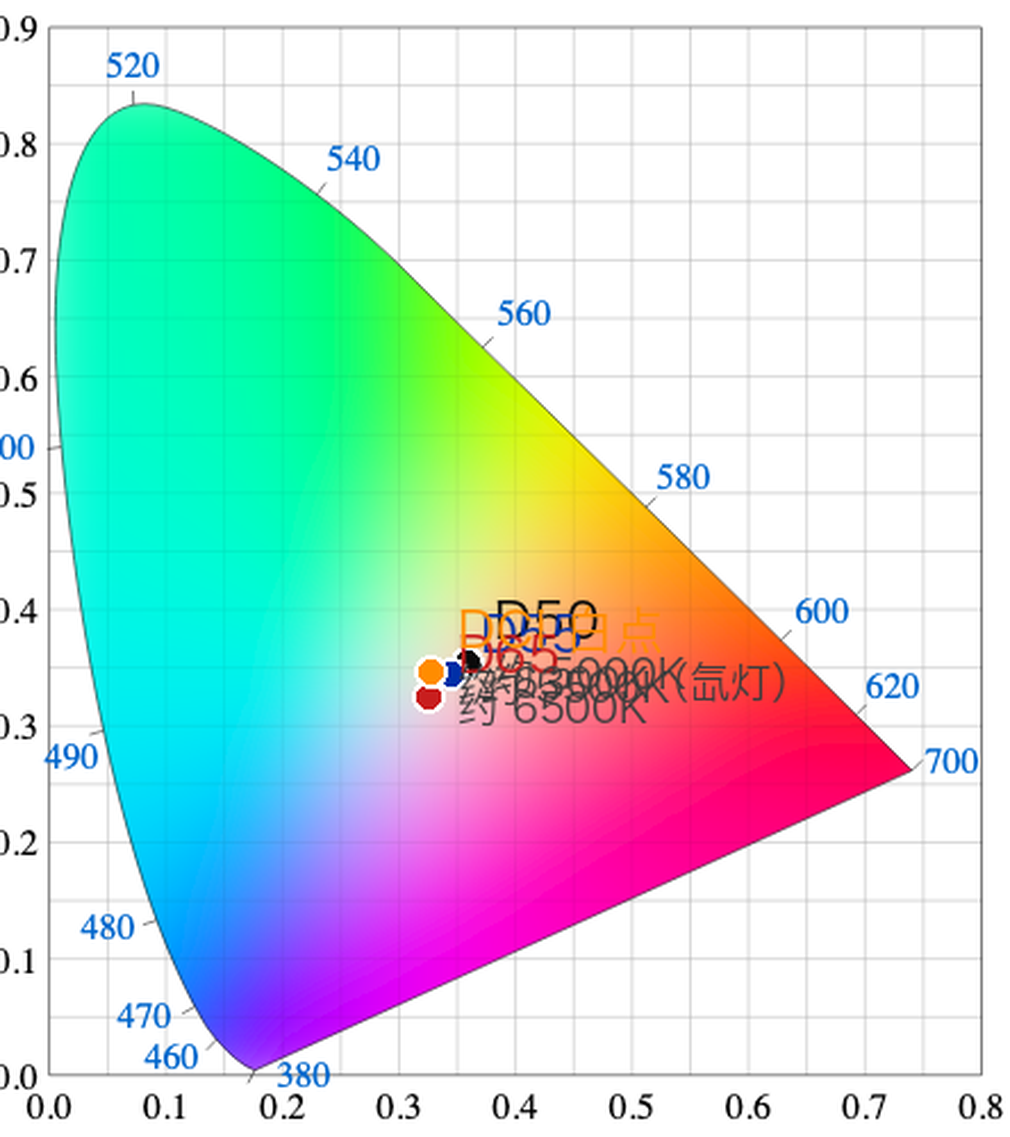
CIE 白点 D50/D55/D65/DCI
白点是色彩标准里「什么算白」的约定:D50 · D55 · D65(约 6500K)· DCI。
白点不匹配,整片统一偏暖或偏冷——而且错得很一致,所以特别难发现。
第一课看过这张图,今天不重讲,只记一件事:白点错了,是原点错了,不是某个颜色错了。
RECAP · from session one
White point: what counts as white
CIE white points D50/D55/D65/DCI
The white point is the convention for what counts as white: D50, D55, D65 (about 6500 K), DCI.
Get it wrong and the whole frame goes warm or cool — consistently, which is exactly why it is so hard to spot.
You saw this in session one. We are not re-teaching it; just remember one thing: a wrong white point is the origin being wrong, not one colour being wrong.
一个问题框架
相机记录的光,和屏幕上看到的光,中间发生了什么?
01传感器光变成数
→
02文件数被装进容器
→
03解读数被翻译回颜色
→
04屏幕颜色变成光
业界版:文件准备 → 转码 → 合板 → 套底 → 后期前置 → 部门配合
One framing question
What happens between the light the camera records and the light on the screen?
01Sensorlight becomes numbers
→
02Filenumbers get packed
→
03Interpretnumbers become colour
→
04Screencolour becomes light
Industry version: prep → transcode → sync → conform → post handover → department turnover
先看整机,再拆零件
七件零件,一条光路
先看整台机器:七个零件,光从左边进去,从右边出来。点一个,看它管什么——接下来我们一件一件拆开。
The whole machine first
Seven parts, one path for the light
The whole machine first: seven parts, light in on the left, out on the right. Tap one to see what it controls — then we take it apart, piece by piece.
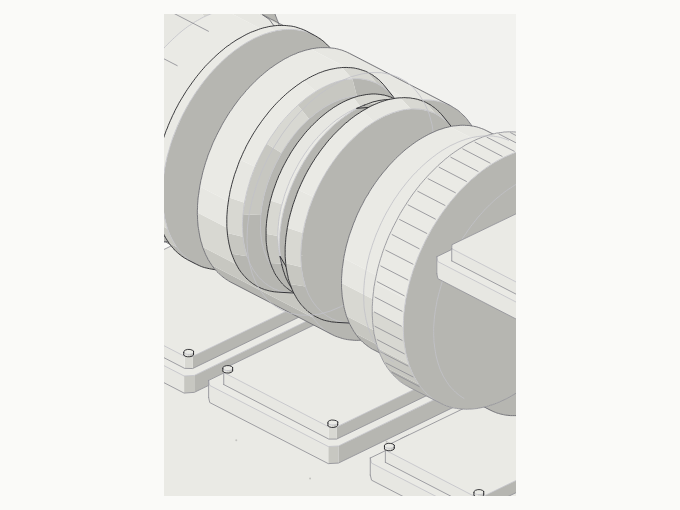
零件 01 / 07 · LENS HOOD
遮光罩
套在镜头最前面的一圈遮光筒,把画面以外的斜射光挡在外面。
影响
斜光进了镜片会在片间反复反射,整幅发灰、出现光斑。画面发灰不一定是素材烂,也可能只是没装遮光罩。
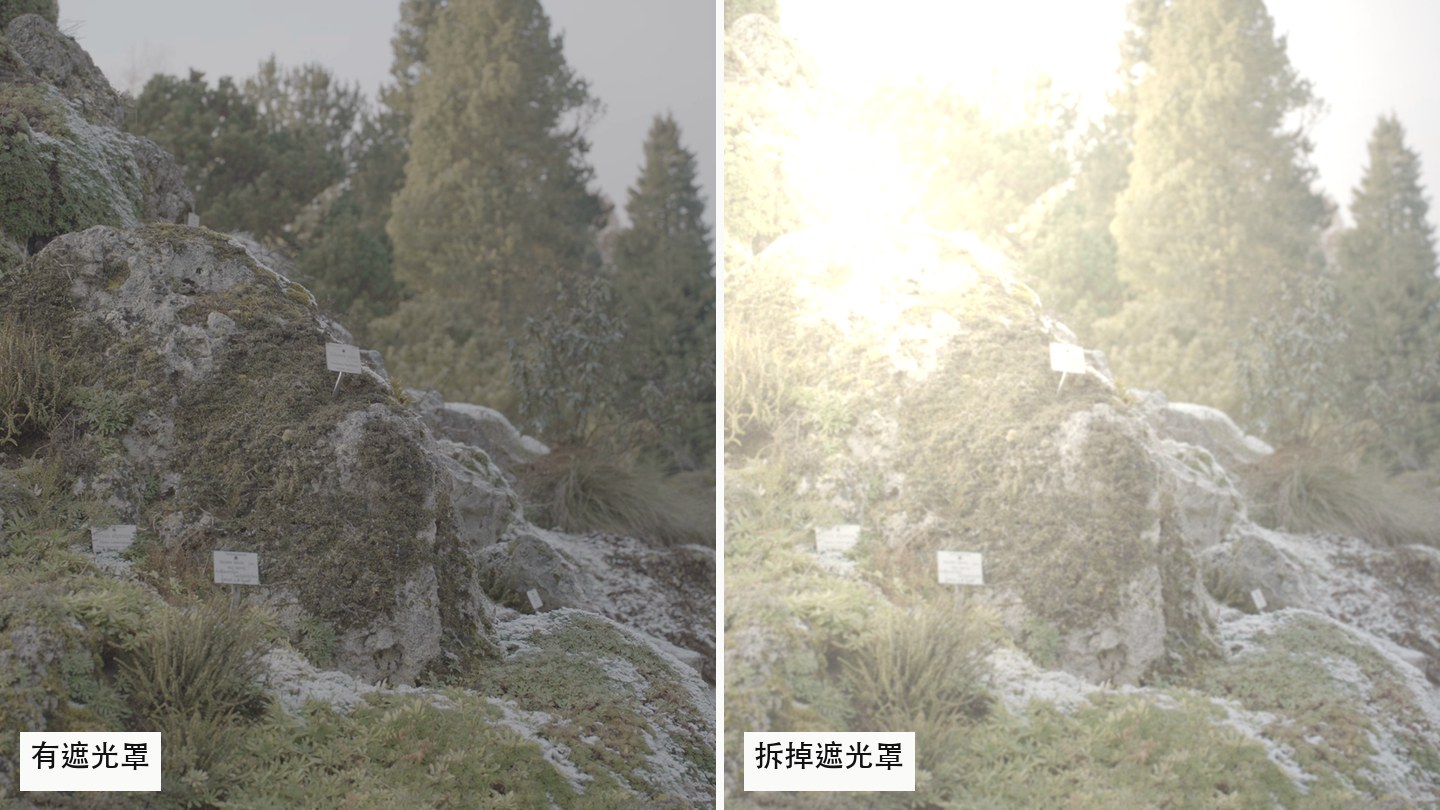
真片帧 · 眩光示意(合成,非实拍漏光)
PART 01 / 07 · LENS HOOD
Lens hood
A tube in front of the glass that blocks light coming from outside the frame.
Affects
Stray light bounces between elements: contrast lifts and flare blooms. A washed-out frame is not always bad footage — sometimes it is just a camera without a hood.
real frame · flare simulated (composite)
零件 02 / 07 · FRONT CELL
镜片组
真正成像的玻璃。焦距、最大光圈、像场都由它决定。
影响
焦距决定视角;像场必须盖住传感器,盖不住边角就是黑的。换镜头是换视角,不是换画质。
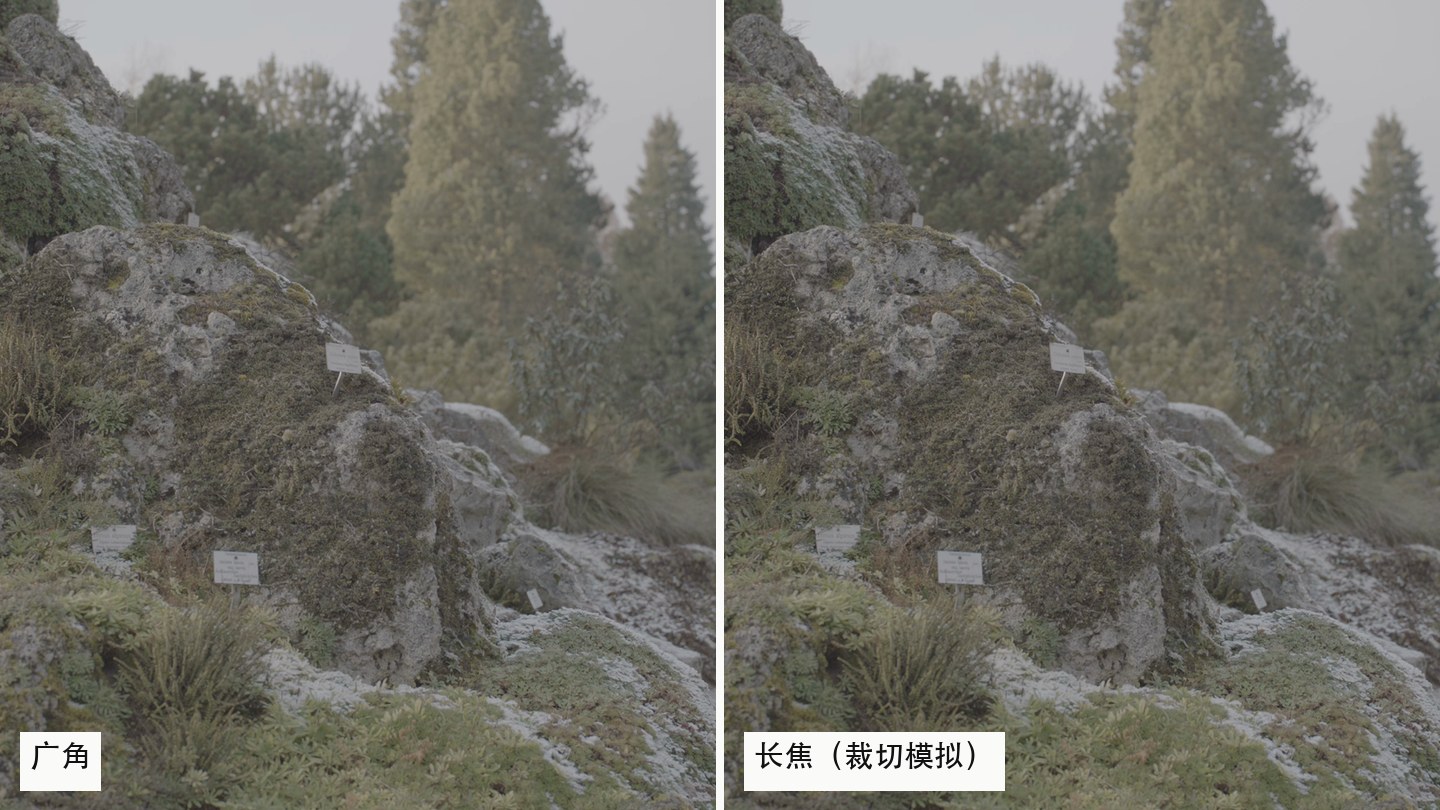
真片帧 · 中心裁切模拟长焦视角(示意)
PART 02 / 07 · FRONT CELL
Front cell
The glass that actually forms the image. Focal length, maximum aperture and image circle all live here.
Affects
Focal length sets the field of view; the image circle has to cover the sensor or the corners go dark. Changing a lens changes the view, not the quality.
real frame · centre crop standing in for a long lens (simulated)
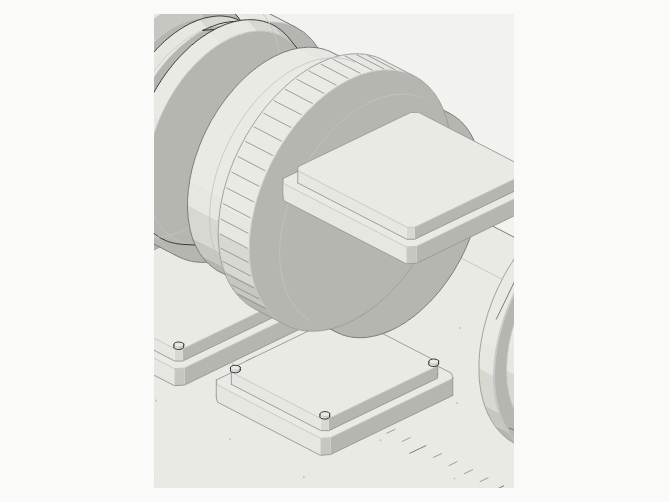
零件 03 / 07 · BARREL
镜筒
外筒、对焦环、光圈环。把玻璃固定在正确的位置上,并让你转动它们。
影响
对焦环移动的是焦点平面——清晰与虚化的那条分界线。焦点错了,后期救不回来,只能挨着用。
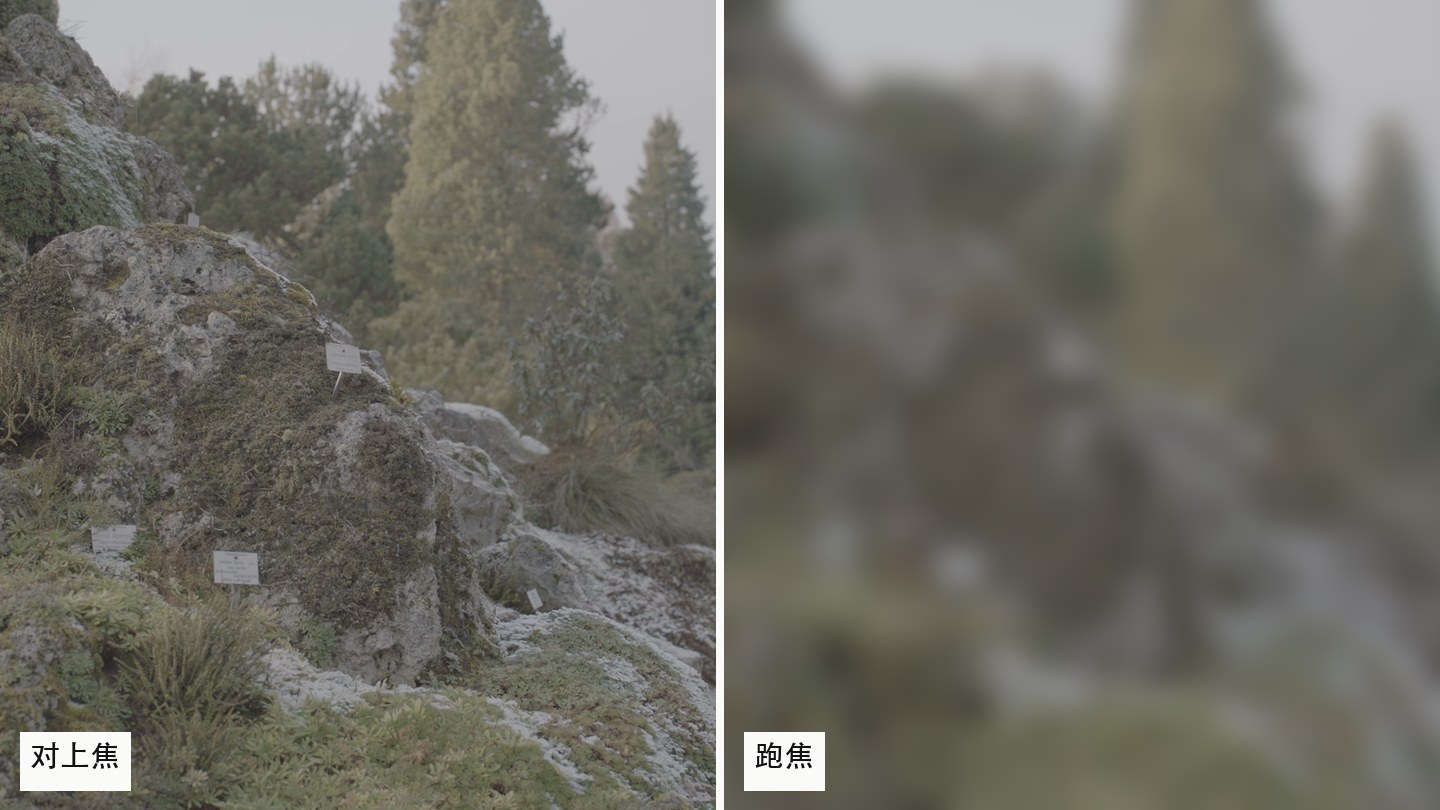
真片帧 · 失焦示意(合成)
PART 03 / 07 · BARREL
Barrel
Outer tube, focus ring, iris ring — it holds the glass in the right place and lets you turn it.
Affects
The focus ring moves the plane of focus: the line between sharp and soft. Get it wrong and no grade brings it back.
real frame · defocus simulated (composite)
零件 04 / 07 · IRIS
光圈
多片叶片围成的可变圆孔,每档差 √2 倍面积。
影响
①进光量:f/1.4 到 f/16 差 128 倍 ②景深:孔越小景深越深 ③孔太小时反而变软(衍射)。光少了就得放大更多——这就是 ISO 和噪点的入口。
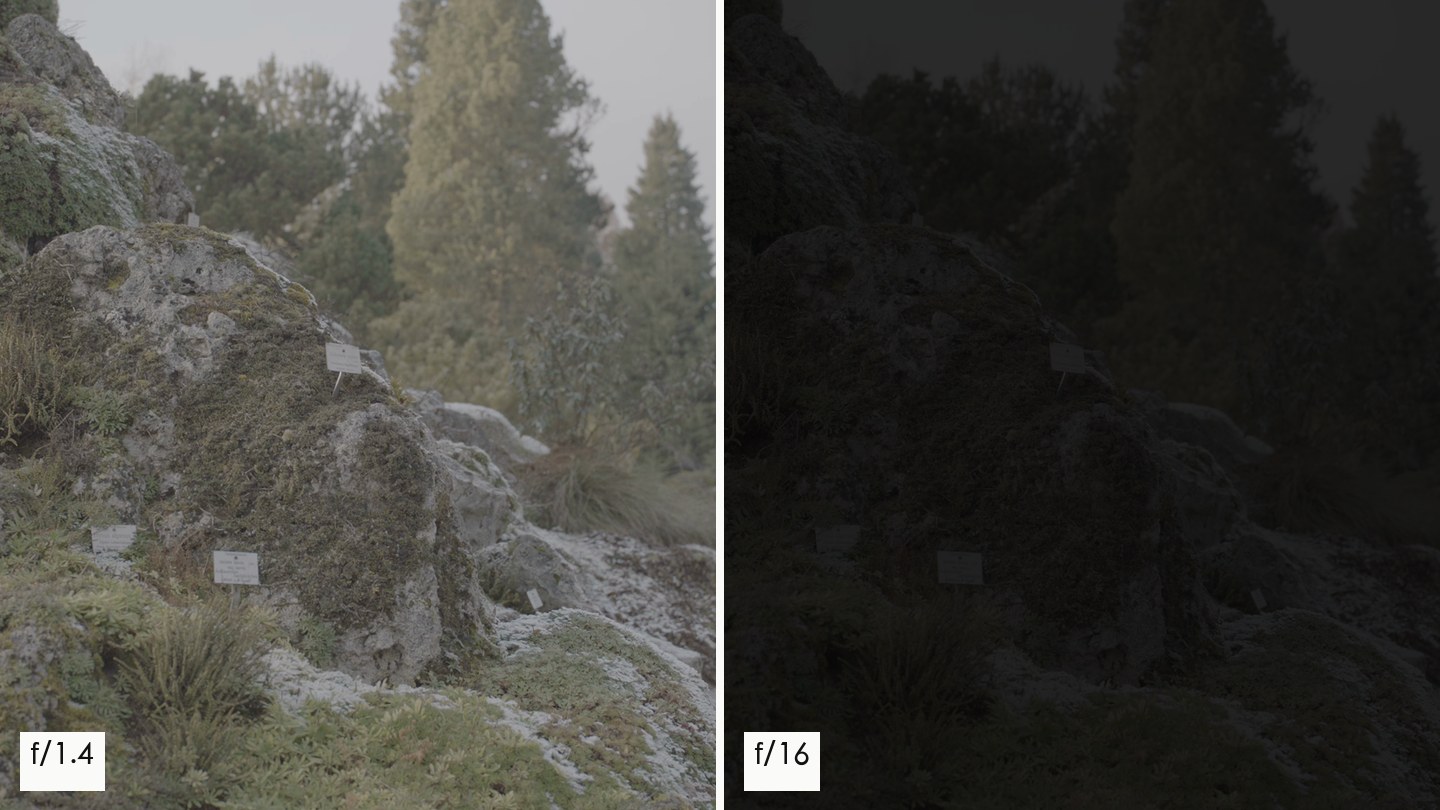
光圈f/4 · 1/8 光
真片帧 · 降两档曝光示意(合成)
PART 04 / 07 · IRIS
Iris
A ring of blades forming a variable hole; each stop is √2 in area.
Affects
How much light gets in (f/1.4 to f/16 is 128×), how deep the depth of field goes, and — stopped right down — diffraction softening. Less light means more amplification: that is where ISO and noise enter.
irisf/4 · 1/8 light
real frame · two stops down, simulated (composite)
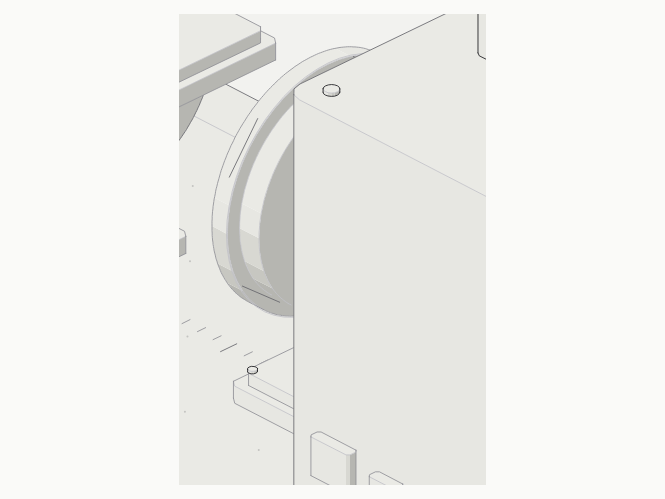
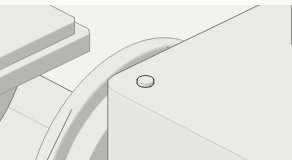
零件 05 / 07 · MOUNT
卡口
镜头与机身之间的机械加电子接口,定义法兰距——卡口到传感器的距离。
影响
法兰距决定你能装哪些镜头、要不要转接环。转接会改法兰距,可能边角劣化、无限远不合焦;它同时把光圈和对焦指令从机身传给镜头。
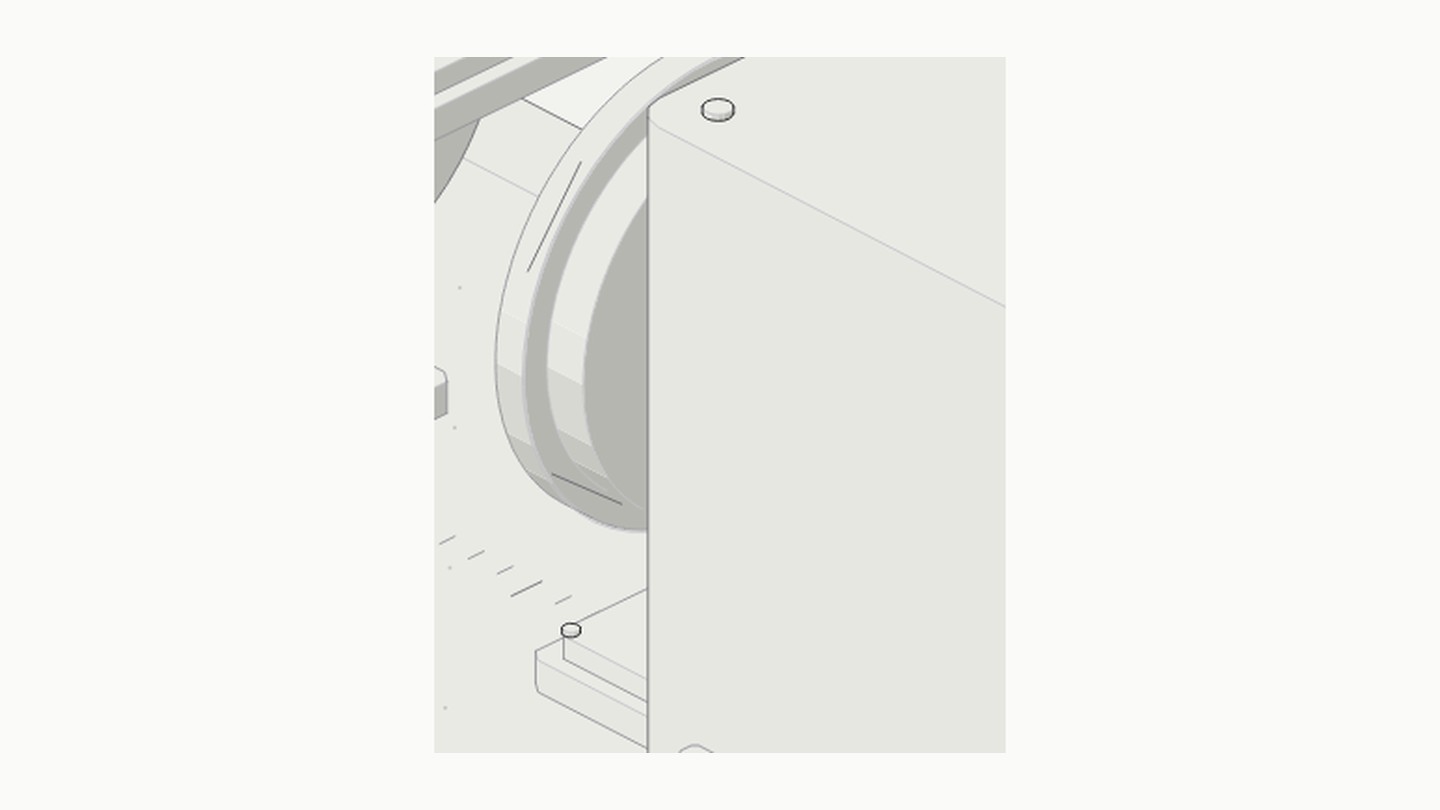
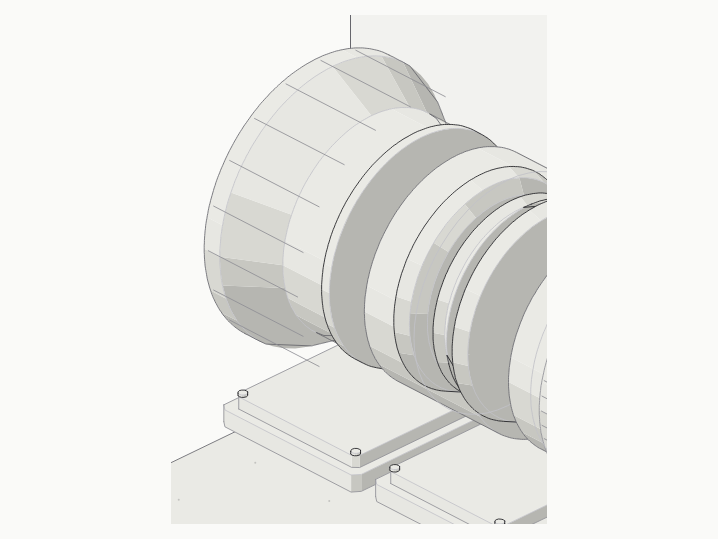
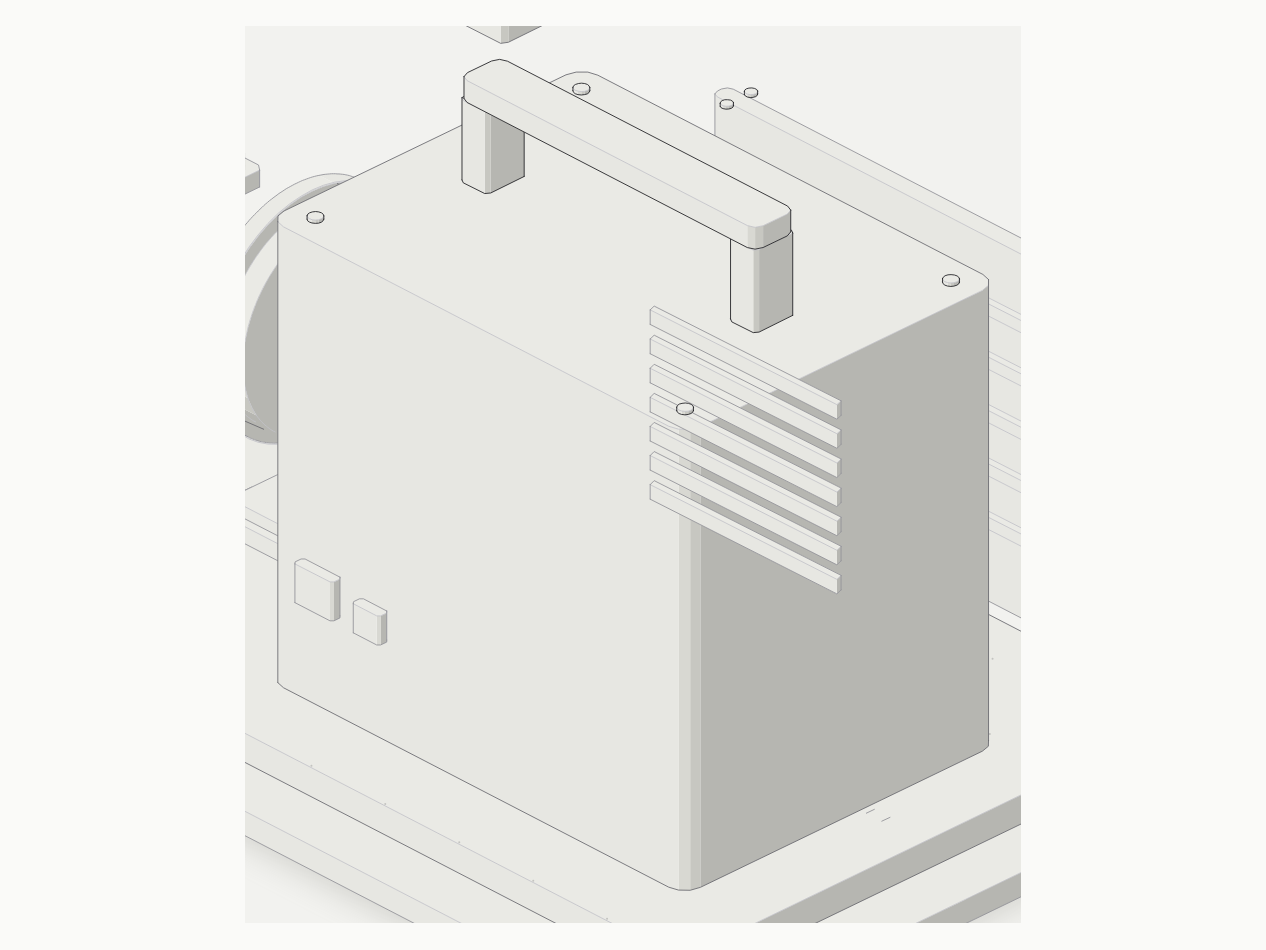
等距图局部 · 镜头端面与机身
PART 05 / 07 · MOUNT
Mount
The mechanical and electronic interface between lens and body. It defines the flange distance.
Affects
Flange distance decides which lenses fit and whether you need an adapter. Adapters shift it: soft corners, or no infinity focus. It also carries iris and focus commands from body to lens.
detail of the figure · lens end and body
零件 06 / 07 · BODY
机身
记录单元、散热、接口、监看。传感器装在它里面,但画面质量不归它管。
影响
机身决定记录格式:编码、位深、色度采样、码率。同一台机器录 ProRes 4444 和录 8bit 4:2:0,后期能调的余地完全不同——B 块和 D 块就是从这儿分出去的。
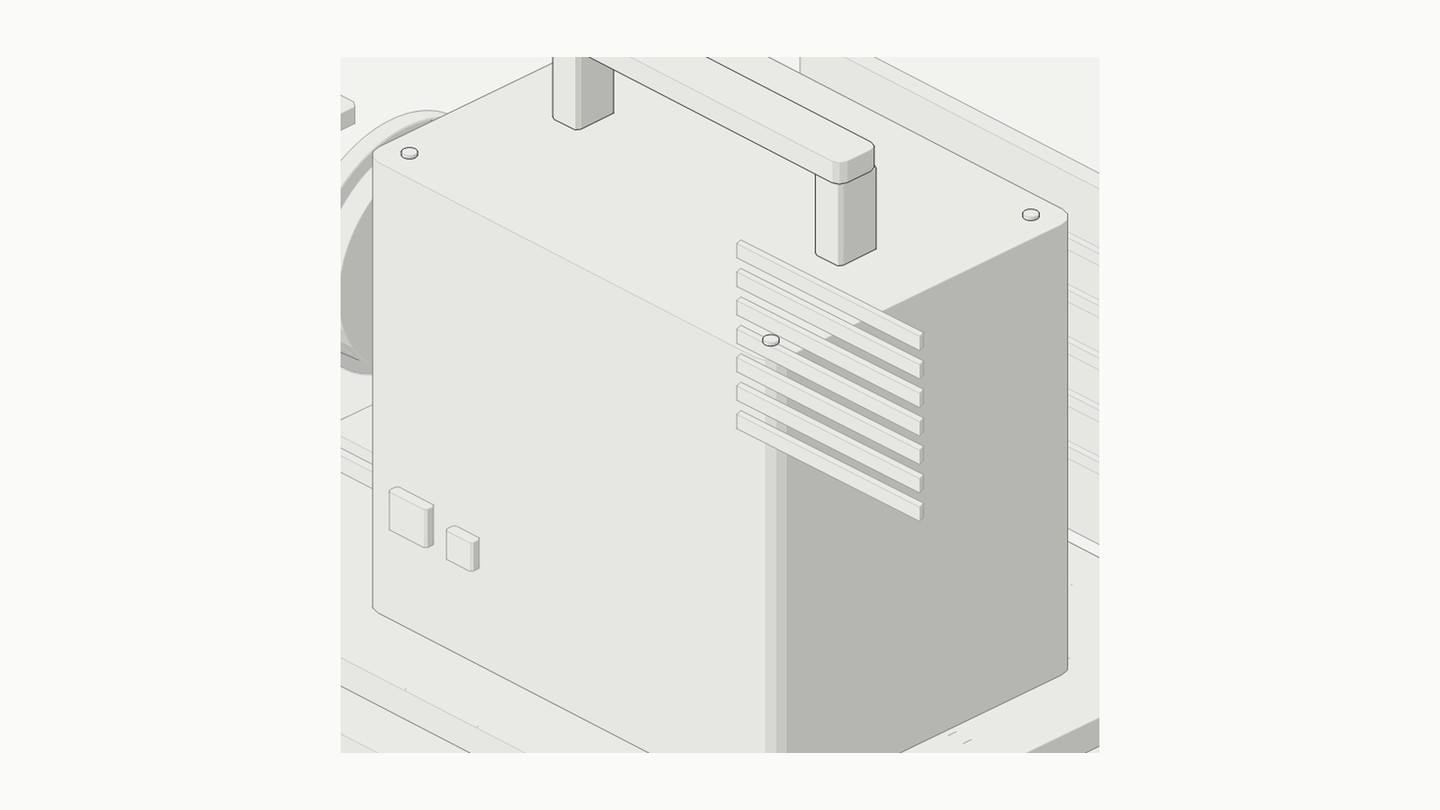
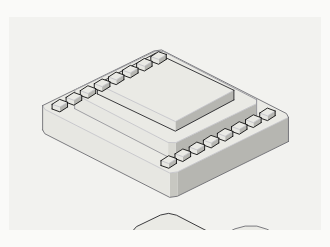
等距图局部 · 机身记录单元
PART 06 / 07 · BODY
Body
Recorder, cooling, ports, monitoring. The sensor sits inside it, but image quality is not its job.
Affects
The body sets the recording format: codec, bit depth, chroma subsampling, bitrate. ProRes 4444 and 8-bit 4:2:0 out of the same camera leave very different room to grade.
detail of the figure · the recording unit
零件 07 / 07 · SENSOR
CMOS
把光子变成电荷的硅片。每个像素都在数光子。
影响
①分辨率=像素数 ②动态范围=一个像素能装多少电荷 ③噪点=光子少的时候统计涨落占比变大。读出电路把电荷放大多少倍就是 ISO——放大多少,噪点也一起放大。
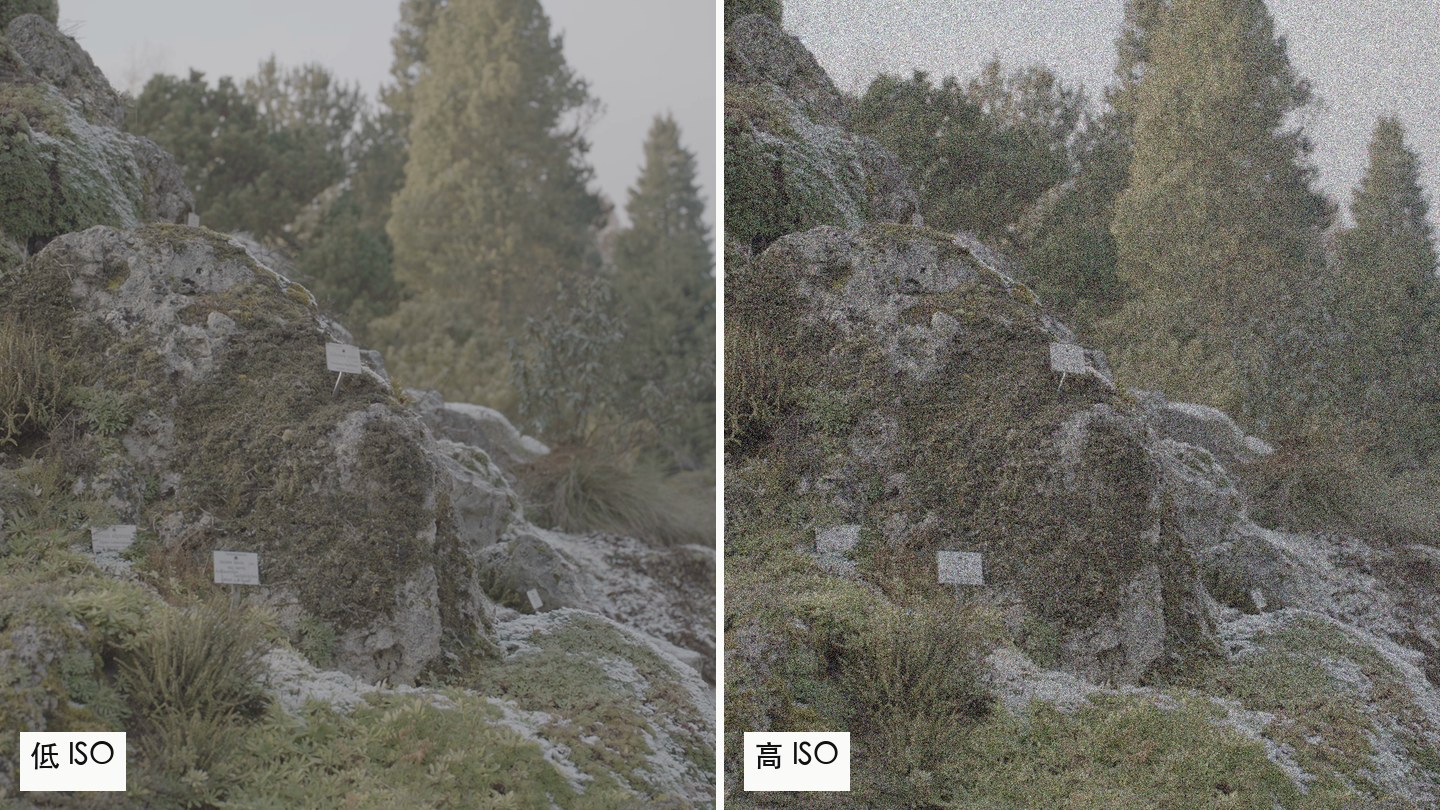
真片帧 · 高 ISO 噪点示意(合成)
PART 07 / 07 · SENSOR
Sensor
A silicon chip turning photons into charge. Every pixel counts photons.
Affects
Resolution is pixel count; dynamic range is how much charge one pixel holds; noise is what happens when photons are few and the statistical spread dominates. How hard the readout amplifies that charge is ISO — and the noise is amplified with it.
real frame · high-ISO noise simulated (composite)
第一幕 · ACT 1

四个烂画面

只展示,不解释。你遇到过几个?
今天所有坏画面都是我故意做出来的。错是设计好的,不是素材烂。
ACT 1

Four broken pictures

Show only, no explanations yet. How many have you met?
Every broken picture today is broken on purpose. The mistakes are designed, the footage is not bad.
烂画面 1 / 4
手机传到电脑
颜色变了
同一条视频,两个颜色。
现场 DEMO
Broken picture 1 / 4
Phone → computer
the colours shifted
Same clip, two colours.
LIVE DEMO
烂画面 2 / 4
相机拍的
灰蒙蒙
像蒙了一层纱,还不如手机好看。
现场 DEMO
Broken picture 2 / 4
The camera footage
looks grey
A veil over everything — worse than a phone.
LIVE DEMO
烂画面 3 / 4
套了 LUT
反而难看
别人用着是电影感,我用着是事故。
现场 DEMO
Broken picture 3 / 4
Applied a LUT
it got worse
Cinematic for them, a car crash for me.
LIVE DEMO
烂画面 4 / 4
暗部一拉
全是彩噪
救暗部,救出一锅底噪。
现场 DEMO
Broken picture 4 / 4
Lift the shadows
chroma noise blooms
Rescued the shadows, unearthed the noise.
LIVE DEMO
猜一猜
四个问题,各卡在哪一站?
01传感器④ 彩噪
→
02文件② 灰片
→
03解读③ LUT 翻车
→
04屏幕① 颜色变了
把你们的猜测留在黑板上,第二幕结束回来对答案。
Take a guess
Which station is each problem stuck at?
01Sensor④ noise
→
02File② grey
→
03Interpret③ LUT crash
→
04Screen① shifted
Leave your guesses on the board. We check the answers after Act 2.
第二幕 · ACT 2

揭开四个概念

色彩空间 · Log · LUT · 噪点 —— 其实是一件事。
ACT 2

Under the hood

Colour space · Log · LUT · Noise — really one thing.
地基 1 / 3 · 导览课讲过色深,这里只补一件事
位深:视频只用了 220 级
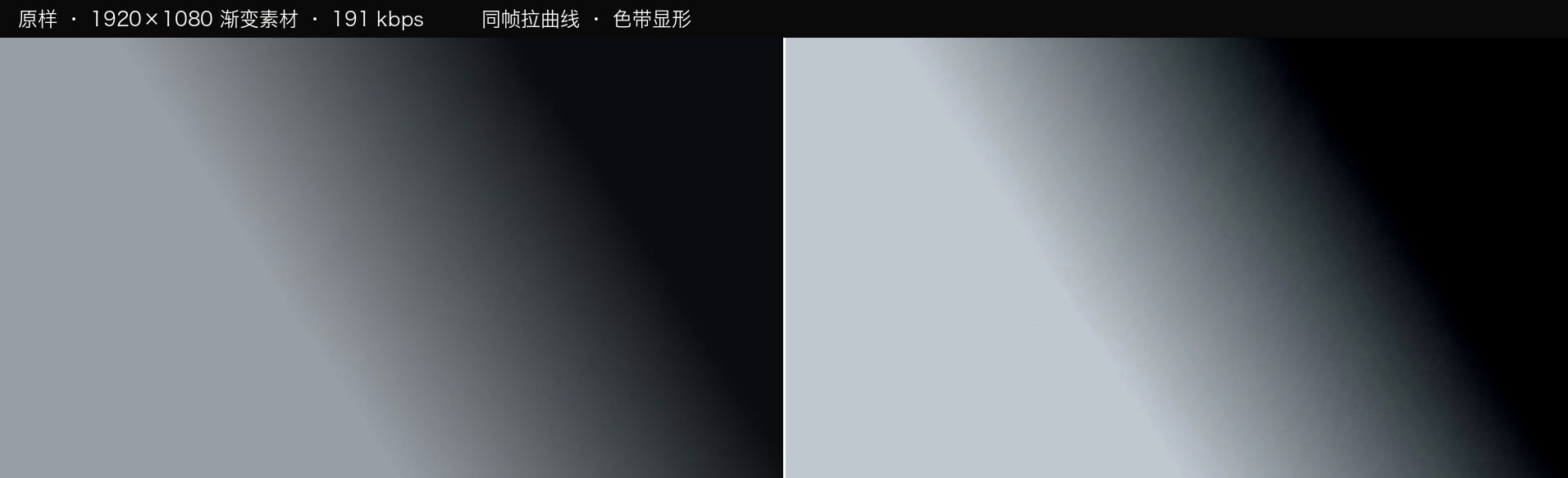
同一条渐变,8bit 与 10bit 拉同一组曲线
1920×1080 渐变素材 · 191 kbps · 同一组曲线
导览课讲过 256 / 1024 / 4096 级。这里补的是:视频级只占 16–235 这一段,所以 8bit 名义 256 级,实际只有约 220 级能用。
台阶不够 + 曲线拉得狠 = banding。拉曲线,等于把台阶之间的距离再拉开。
Foundation 1 / 3 · you had bit depth in the orientation; one thing to add
Bit depth: video only uses 220 of them
Same gradient, 8-bit and 10-bit, same curve
1920×1080 gradient · 191 kbps · same curve
The orientation covered 256 / 1024 / 4096. What is new here: video levels occupy only 16–235, so 8-bit has a nominal 256 but roughly 220 usable.
Too few steps plus a hard curve = banding. Pulling a curve stretches the distance between steps.
地基 2 / 3
码率 =
每秒给画面
多少数据
低码率一调就烂。
伪影是方形的、固定的;噪点是颗粒状的、随机的——伪影降噪没用,它是没有信息。
在哪设
拍:机器里选编码/压缩比 → 决定能调多狠
交:交付页 → 渲染设置 → 质量 → 决定文件多大
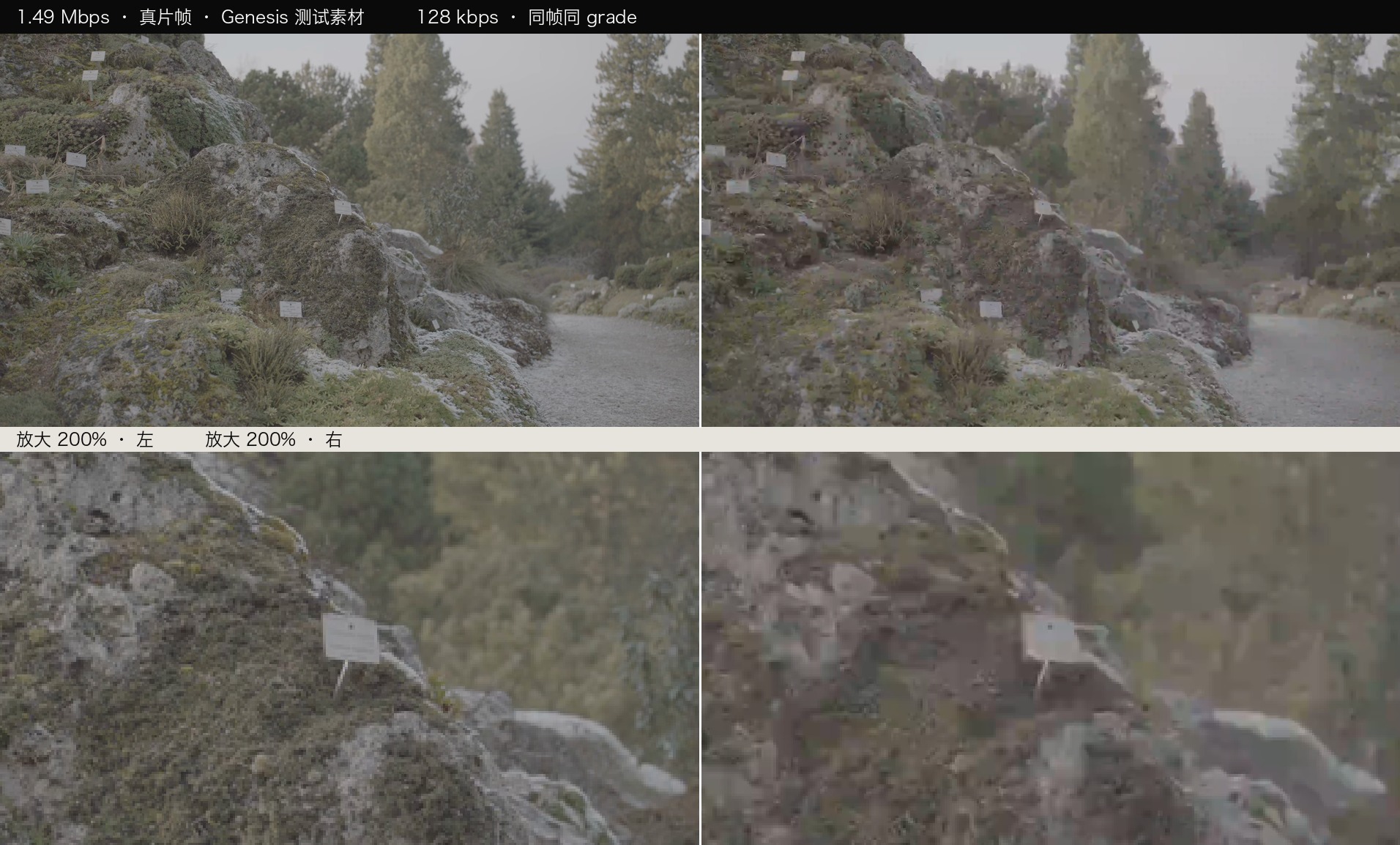
1.49 Mbps 与 128 kbps 同帧对比
同一帧、同一组调色 · 下排为 200% 放大
Foundation 2 / 3
Bitrate =
how much data
each second gets
Low bitrate falls apart the moment you grade it.
Artifacts are blocky and fixed; noise is grainy and random — denoising does nothing for artifacts.
Where to set it
On set: codec / compression ratio → how hard you can grade
On delivery: Deliver page → Render settings → Quality → how big the file is
1.49 Mbps vs 128 kbps, same frame
same frame, same grade · bottom row at 200%
地基 3 / 3
采样 = 颜色可以少采
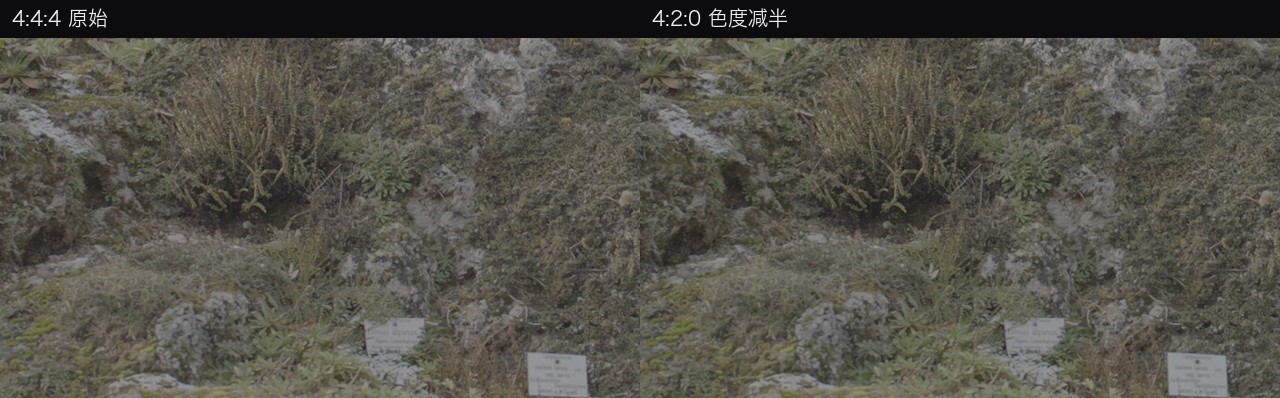
同构图 4:4:4 与 4:2:0 的边缘对比
4:4:4(左)与 4:2:0(右)· 真片帧
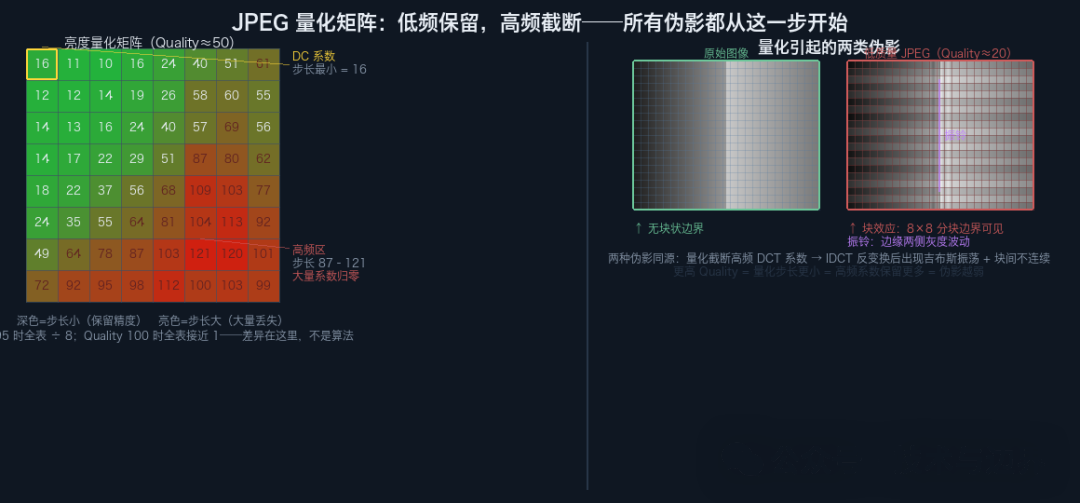
JPEG 量化矩阵:低频保留,高频截断
JPEG 量化矩阵 · 低频保留,高频截断
4:2:0 = ½ × ½ = 1/4 色度信息。能播,不能抠——键控在色度上做判断,色度只剩四分之一,边缘的颜色是猜的。
那丢掉的去哪了?DCT 不丢,量化才丢,丢的是高频。高频系数被粗暴截断 → 块内细节失真、块间连续性断掉、边缘振铃——和傅里叶级数截断产生吉布斯现象是同一个数学原因。
同一个 4:2:0,视频里也是这个意思;量化的道理,图片和视频一样。
Foundation 3 / 3
Chroma subsampling: colour can be sampled less
4:4:4 and 4:2:0 edge comparison
4:4:4 (left) vs 4:2:0 (right) · real frame
JPEG quantisation matrix: low frequencies kept, high frequencies cut
JPEG quantisation matrix · low kept, high cut
4:2:0 = ½ × ½ = a quarter of the chroma. It plays back, it does not key — the edge colours were interpolated guesses to begin with.
Where do the discarded bits go? The DCT loses nothing; quantisation is the only lossy step, and it takes the high frequencies. Truncating high-frequency coefficients distorts detail inside each block, breaks continuity between blocks and rings at edges — the same mathematics as Gibbs ringing in a truncated Fourier series.
The same 4:2:0 means the same thing in video; quantisation works the same way for stills and video alike.
概念 1 / 4 · 回扣烂画面 ①
色彩空间是坐标系
同一组数字,在不同坐标系里是不同的颜色。
sRGB · Rec.709 · DCI-P3 · Rec.2020
不声明坐标系,数字本身没有意义。
Concept 1 / 4 · back to ①
A colour space is a coordinate system
The same numbers are different colours in different systems.
sRGB · Rec.709 · DCI-P3 · Rec.2020
Without a declared system, the numbers mean nothing.
概念 1 的补充 · 导览课讲过色域,这里补那条曲线
同一个数,两台设备两个亮度
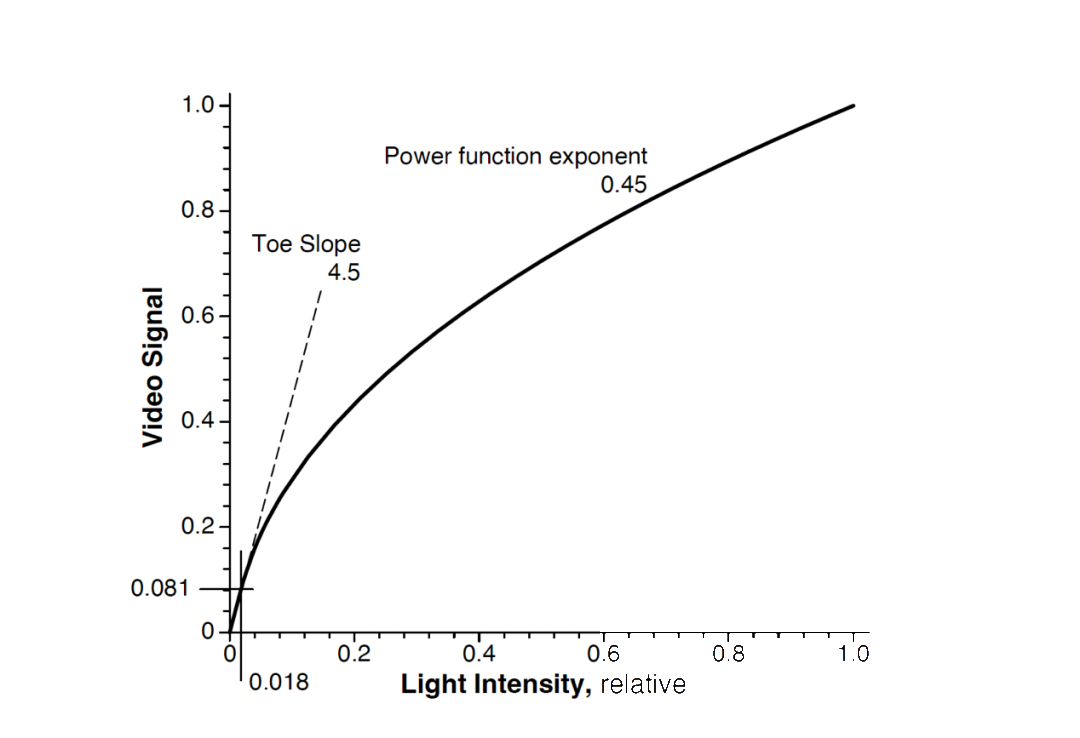
Rec.709 传递函数:0.45 次幂,近黑线性段 toe slope 4.5
Rec.709 传递函数 · Power function exponent 0.45 · Toe Slope 4.5
导览课讲过三角大小(709 < P3 < 2020)。这里补的是第三件:传递函数。同一个数值,在不同曲线上代表不同的亮度——709 用 0.45 幂,sRGB 是分段曲线,显示器实际按 BT.1886(γ≈2.4)。
这就是「同一个文件、两台设备、两种颜色」的另一半原因:要么三角不够大,要么曲线不一样。
视频系统通过对RGB信号施加 0.45 次幂变换,来模拟人眼的明度感知响应,这与 L* 定义的 1/3 次幂函数特性相近。 —— Charles Poynton
Filling in concept 1 · you had gamut in the orientation; here is the curve
Same number, two devices, two brightnesses
Rec.709 transfer function: 0.45 power with a toe slope of 4.5
Rec.709 transfer function · power function exponent 0.45 · toe slope 4.5
The orientation covered triangle size (709 < P3 < 2020). What is new: the transfer function. The same number means a different brightness on a different curve — 709 uses a 0.45 power, sRGB is piecewise, and displays actually follow BT.1886 (γ≈2.4).
That is the other half of “one file, two devices, two colours”: either the triangle is too small, or the curve is different.
Video systems apply a 0.45 power to the RGB signal to mimic the eye’s lightness response, close to the 1/3 power in the L* definition. — Charles Poynton
概念 2 / 4 · 回扣烂画面 ②
Log 是打包方式
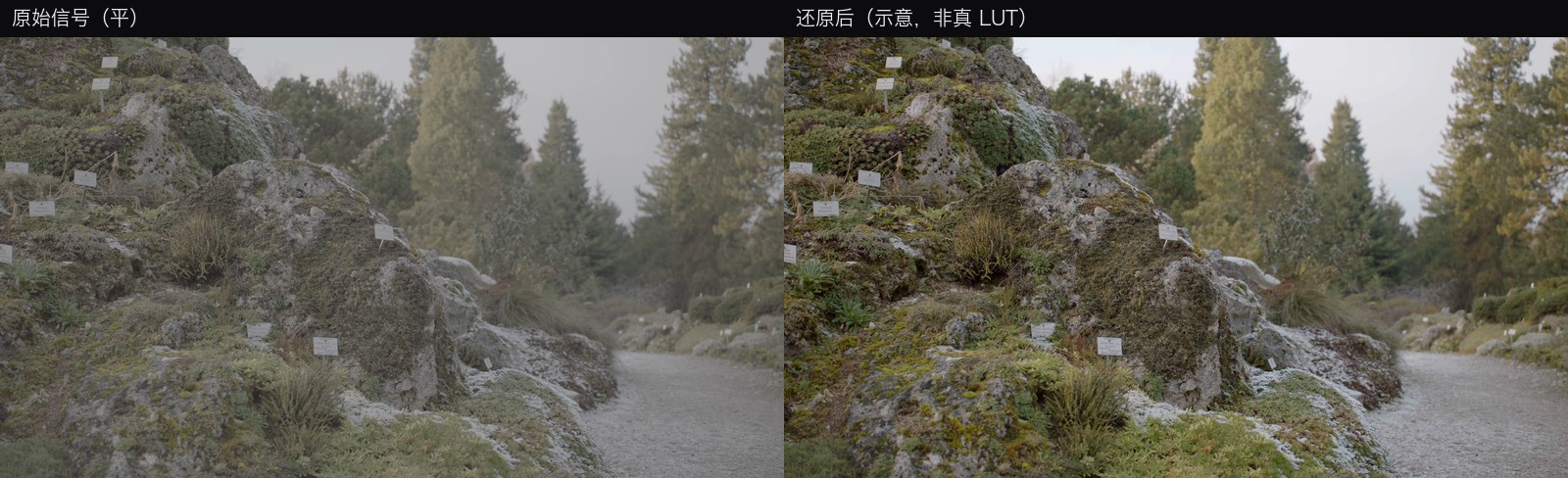
Log 原始信号与还原后的对比
真片帧:原始信号(左,平)· 还原后(右,示意,非真 LUT)
灰不是坏了,是还没翻译。曝光是乘法、感知是对数,所以用对数存——ARRI LogC γ≈0.51,14 档动态范围要塞进 1024 级。
Concept 2 / 4 · back to ②
Log is a packing method
Log signal and a restored version
real frame: original (left, flat) · restored (right, schematic, not a real LUT)
Flat is not broken, it is untranslated. Exposure is multiplicative and perception is logarithmic — ARRI LogC γ≈0.51 packs 14 stops into 1024 levels.
曲线形状
暗部抬起来
高光压下去
同样的数值范围,装进更大的亮度范围。
中间调拉平,所以看起来灰。
曲线还带了一个前提:观看环境。视频标准默认你在昏暗环境里看,所以端到端的幂函数指数取 1.1–1.2 来抵消对比的主观效应。
同一张图在明亮的电脑前看会显得反差偏大——不是文件坏了,是环境变了。这就是「从网上下载的图像看起来反差过大」的由来。
Scene luminance → Recorded value → Linear Gamma Log shadows lifted highlights compressed
The curve
Shadows lifted
highlights compressed
The same range of values holds a bigger range of brightness.
Midtones go flat — hence the grey look.
The curve carries an assumption: the viewing environment. Video standards assume you watch in a dim room, so the end-to-end power is around 1.1–1.2 to cancel the subjective contrast effect.
The same image viewed at a bright desk looks too contrasty — not a broken file, a changed environment.
Scene luminance → Recorded value → Linear Gamma Log shadows lifted highlights compressed
混个脸熟
名字不同,思路一样
SONYS-Log3
CANONC-Log
PANASONICV-Log
ARRILogC
DJID-Log
IPHONEApple Log
你的设备拍的是哪一种?回去查一下。
Get familiar
Different names, same idea
SONYS-Log3
CANONC-Log
PANASONICV-Log
ARRILogC
DJID-Log
IPHONEApple Log
Which one does your device shoot? Look it up tonight.
回到五维图
Log 坐在两条轴上:动态范围 × 色彩精度
动态范围决定装多少光,位深决定切多少级。
Log 就是这两条轴之间的搬运工。
▶ 打开五维图 · 看第 2 和第 5 条轴新窗口
Back to the five axes
Log sits on two axes: dynamic range × bit depth
Dynamic range is how much light fits; bit depth is how fine the steps are.
Log is the porter between the two.
▶ Open the chart · look at axes 2 and 5new tab
概念 3 / 4 · 回扣烂画面 ③ · 导览课讲过「只查表」,这里补边界
LUT 为什么做不了降噪和锐化
LUT 是「逐像素」的——每个像素只看自己那三个数,不看邻居。
所以任何需要看周围像素的运算,它都做不了:降噪、锐化、局部调整、蒙版、窗口。这不是 LUT 的缺陷,是它的定义。
3D LUT 是一张格点表
常用 17³ / 33³ / 65³。格点越密越准,文件也越大。格点之间靠插值——所以两个格点中间的颜色,是算出来的,不是查到的。
Concept 3 / 4 · back to ③ · you had “lookup only”; here is the boundary
Why a LUT cannot denoise or sharpen
A LUT is per-pixel — each pixel sees only its own three numbers, never its neighbours.
So anything that needs surrounding pixels is impossible: denoising, sharpening, local adjustments, masks, windows. That is not a weakness of LUTs, it is their definition.
A 3D LUT is a lattice
Commonly 17³ / 33³ / 65³. Denser means more accurate and bigger. Points in between are interpolated — calculated, not looked up.
技术 LUT
做翻译
Log → Rec.709
色彩空间 A → 色彩空间 B
目的是「对」
风格 LUT
做化妆
某种电影感 · 某种色调
前提是脸已经洗干净
目的是「美」
Technical LUT
Translates
Log → Rec.709
Colour space A → B
The goal is «correct»
Creative LUT
Decorates
A film look, a tone
Only works on a clean face
The goal is «beautiful»
翻车复盘
LUT 不知道你的素材对不对。
曝光不对、白平衡不对、输入空间不对——
表照查,错照出。
先校正,再上 LUT。顺序就是话语权。
DEMO · 顺序事故现场
Crash review
A LUT has no idea whether your footage is right.
Wrong exposure, wrong white balance, wrong input space —
the table looks up anyway, wrong anyway.
Correct first, LUT second. Order is authority.
DEMO · the order accident
概念 4 / 4 · 回扣烂画面 ④
噪点是信号的地板
光太弱,光子本身就忽多忽少(散粒噪声)
电路读数再叠一层误差(读出噪声)
散粒噪声 ∝ √光子数:光少一半,信噪比掉 3 dB。暗部为什么脏,是算术问题。
Underexposed Expose to the right noise floor after lift → floor comes up too noise floor far from the floor, stays clean
前期没有光,就补光。
别指望相机设置帮你降噪。
ISO、降噪、拉曲线,一个都不能真的增加光子。唯一治本的动作,是让更多光真的落到传感器上。
Concept 4 / 4 · back to ④
Noise is the floor of the signal
In low light, photons arrive unevenly (shot noise).
The circuitry adds its own error (read noise).
Shot noise ∝ √photons: halve the light and SNR drops 3 dB. Shadows are dirty by arithmetic.
Underexposed Expose to the right noise floor after lift → floor comes up too noise floor far from the floor, stays clean
No light? Add light.
Do not expect a camera setting to denoise for you.
ISO, noise reduction and curve-pulling cannot add a single photon. The only fix that works is more light actually reaching the sensor.
概念澄清
ISO 是放大器,不是灯
开高 ISO 不制造光,只把已有信号连同噪点一起放大。
什么是「原生 ISO」
传感器有一档模拟增益最低的位置。在这一档,信号几乎不经过额外放大就直接记录下来——所以它动态范围最大、噪点最低。这是这台机器最「诚实」的位置。
「双原生」是什么
CMOS 有两套读出电路,各有一个最佳工作点(例如 400 / 3200)。这两档都干净;中间值是插值出来的——所以别停在中间。
但原生 ISO 只是「在既有的光里,选最好的那一档」。
它不制造光。
顺序永远是:① 先问光够不够 → 不够就补光 → ② 光够了才选 ISO,而且选原生那档。
Clearing it up
ISO is an amplifier, not a lamp
Higher ISO creates no light. It amplifies the signal you already have, noise included.
What "native ISO" is
The sensor has one stop where analogue gain is lowest. The signal is recorded with almost no extra amplification — so this stop has the most dynamic range and the least noise. It is the most honest position the camera has.
What "dual native" is
The sensor has two readout circuits, each with its own sweet spot (e.g. 400 / 3200). Both are clean; the values between are interpolated — so do not sit between them.
But native ISO only picks the best stop
out of the light you already have. It creates no light.
The order is always: ① is there enough light? If not, add light. ② Only then choose ISO — the native stop.
六台机器对照 · 数字不一样,规律一样
基准档,就是最干净的那一档
机型 基准 ISO 双原生 宽容度 传感器
ARRI ALEXA Mini † EI 800 —(单基准) 14+ 档 Super 35 · 3.4K
Kinefinity MAVO LF 800 800 / 5120 14+ 档 全画幅 6K
Sony FX6 800 800 / 12800 15+ 档 全画幅 4K
Sony FX3 800 800 / 12800 15+ 档 全画幅 4K
Sony BURANO 800 800 / 3200 16 档 全画幅 8.6K
Sony A7 III (M3) ISO 100 —(照相机) 15 档 全画幅 24MP
数字 ≠ 好坏
三种口径,不能横向比
规律一致
那一档都是「几乎不加增益」
双原生 = 两个干净点
不是两倍感光
往上调 → 放大电压
噪声一起放大
往下调 → 先过曝再压暗
高光更早撞顶
中间值 → 数字插值
没有物理电路对应
基准档是底线。两头都不如它。
† ARRI 增益固定,调 EI 只挪中灰——EI 160–3200 全程 14+ 档。
Six cameras · different numbers, same rule
The base setting is the cleanest one
Camera Base ISO Dual native Latitude Sensor
ARRI ALEXA Mini † EI 800 — (single) 14+ stops Super 35 · 3.4K
Kinefinity MAVO LF 800 800 / 5120 14+ stops Full frame 6K
Sony FX6 800 800 / 12800 15+ stops Full frame 4K
Sony FX3 800 800 / 12800 15+ stops Full frame 4K
Sony BURANO 800 800 / 3200 16 stops Full frame 8.6K
Sony A7 III (M3) ISO 100 — (still camera) 15 stops Full frame 24MP
Numbers ≠ quality
three conventions, not comparable
Same rule
that step is “almost no gain”
Dual native = two clean points
not twice the sensitivity
Up → more gain
noise amplified too
Down → overexpose then pull
highlights clip sooner
In between → digital interpolation
no circuit behind it
The base setting is the floor. Both ends are worse.
† ARRI gain is fixed; EI only moves middle grey — EI 160–3200 all 14+ stops.
从机器出来以后 · 一 · 位深是会算得出来的
RAW 不一定更大——大的是「没压缩」
拿一条真实的 6K BRAW 素材来算:6144×3456 = 21.2 MP,24fps,每帧 4.04 MB。
存法 每帧 15 秒 和实际比
16bit Bayer 未压缩
RAW 的本质:每像素只有 1 个通道
42.5 MB 15.3 GB 10.5 : 1
8bit 4:2:0 未压缩
709 交付:3 通道,但色度只采 1.5 当量
31.9 MB 11.5 GB 7.9 : 1
BRAW 实际值 4.04 MB 1.45 GB —
反直觉的那一条:16bit RAW 只比 8bit 709 大 1.33 倍。因为 Bayer 每像素只有一个通道——它不是 RGB 三份。真正让文件变大的不是位深,是压缩率。这条 6K RAW 压了 10.5 倍,所以它比未压缩的 8bit 709 还小。
所以「RAW 一定占地方」是错觉。占地方的是不压缩,不是 RAW。
换个角度看同一件事:码率。这条 6K RAW 跑 775 Mbps——一张 128 GB 的卡,能录 约 22 分钟。
那转成 ProRes 会更省吗?不会,更费。6K 的 ProRes 422 HQ 大约 1900 Mbps,是这条 BRAW 的 2.5 倍——同样一张卡只能录 9 分钟。
所以「转成中间格式省空间」是个流传很广的误解。你付出了更大的文件,还永久丢掉了后期余地——两头都亏。
After the camera · one · bit depth is arithmetic
RAW is not necessarily bigger — uncompressed is
Take a real 6K BRAW clip: 6144×3456 = 21.2 MP, 24fps, 4.04 MB per frame.
Storage form Per frame 15 sec vs actual
16-bit Bayer uncompressed
RAW as it is: one channel per pixel
42.5 MB 15.3 GB 10.5 : 1
8-bit 4:2:0 uncompressed
709 delivery: three channels, chroma at 1.5
31.9 MB 11.5 GB 7.9 : 1
BRAW, actual 4.04 MB 1.45 GB —
The counterintuitive one: 16-bit RAW is only 1.33× an 8-bit 709 frame. Bayer holds one channel per pixel, not three. What makes files big is not bit depth — it is compression ratio. This 6K RAW is compressed 10.5:1, so it is smaller than uncompressed 8-bit 709.
So “RAW must be huge” is a myth. Uncompressed is huge. RAW is not.
The same thing from another angle: bitrate. This 6K RAW runs at 775 Mbps — a 128 GB card holds about 22 minutes.
So does transcoding to ProRes save space? No — it costs more. 6K ProRes 422 HQ is about 1900 Mbps, 2.5× this BRAW; the same card holds 9 minutes.
So “transcode to an intermediate format to save space” is a widespread myth. You pay a bigger file and permanently lose post latitude — you lose on both ends.
从机器出来以后 · 二 · 拷卡为什么慢
瓶颈不在卡,在链路
还是这条 1.45 GB 的素材。它多快能拷完,不取决于卡有多快,取决于链路上最窄的那一段。
链路 速度 拷完这条 做 3-2-1
SxS 卡本身 150 MB/s 10 秒 30 秒
经 USB2 读卡器 30 MB/s 48 秒 2.4 分钟
卡能跑 150,链路只给 30——快的那一头没用。这就是「为什么我的卡很快,拷起来还是很慢」。
拷完之后才是真正不能出错的地方。3-2-1 法则:3 份拷贝、2 种介质、1 份异地。两份备份都必须直接从原卡生成——不许从备份 A 复制到备份 B,否则一个坏块会同时污染两份。
校验只认哈希(MD5 / xxHash64 / SHA-256)。文件大小对得上,不等于字节对得上——大小相同的两个坏文件,用大小比对是查不出来的。
After the camera · two · why offloading is slow
The bottleneck is the link, not the card
Same 1.45 GB clip. How fast it copies depends not on the card, but on the narrowest segment of the link.
Path Speed This clip 3-2-1
The SxS card itself 150 MB/s 10 sec 30 sec
Through a USB2 reader 30 MB/s 48 sec 2.4 min
The card can do 150; the link gives 30 — the fast end is wasted. That is your “why is my fast card so slow to copy”.
After the copy is where it must not go wrong. The 3-2-1 rule: 3 copies, 2 different media, 1 off-site. Both backups must be made directly from the original card — never copy backup A to backup B, or one bad block poisons both.
Verify with hashes only (MD5 / xxHash64 / SHA-256). Matching file size does not mean matching bytes — two equally broken files of the same size pass a size check.
拍摄端的对策
向右曝光
不过曝的前提下,把画面往亮的那一侧推。高光贴着 95%,不撞顶。
把 ISO 调高
放大器增益变大 → 画面变亮
光子数没变,噪声一起放大
向右曝光
真的给更多光 → 光子数变多
信噪比真的提高(物理收益)
所以推的是进光量,不是ISO 数字。混了这两件事,就会出现「我把 ISO 开高了,为什么还是脏」——因为你从来没给更多光。
噪点除不掉,只能让信号离它远一点。而唯一手段是加光。
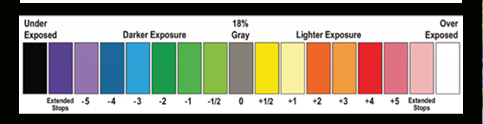
EL Zone 色标带:白=过曝6档以上,18%灰=标准中性曝光,黑=欠曝6档以上
EL Zone 色标 · 白色代表画面过曝6档及以上;18%灰色为标准中性曝光;黑色代表欠曝6档及以上。
怎么看见自己曝到哪一档:EL 分区把整帧按档上色,等于取景器里内置一支点测光表。注意:EL分区功能无法与LUT同时启用。
The on-set answer
Expose to the right
Short of clipping, push the image toward the bright side. Highlights around 95%, never on the ceiling.
Raise the ISO
More amplifier gain → brighter picture
Same photon count, noise amplified too
Expose to the right
Actually more light → more photons
Real SNR gain, not a visual one
So you are pushing how much light gets in, not the ISO number. Mix the two and you get "I raised the ISO, why is it still noisy" — because you never gave it more light.
You cannot remove noise. You can only move the signal away from it. The only way is more light.
EL Zone chart: white is six stops over, 18% grey is neutral, black is six stops under
EL Zone chart · white means six stops over or more; 18% grey is standard neutral exposure; black means six stops under or more.
How you see which stop you are on: EL Zone colours the whole frame by stop — a spot meter built into the viewfinder. Note: EL Zone cannot be enabled at the same time as a LUT.
第三幕 · ACT 3

方法

回到四个烂画面,现场修复。
ACT 3

The fixes

Back to the four broken pictures. Fixed live.
方法 0 / 4 · 动手之前
素材体检五步
第 1 看编码 · 位深 · 码率ffprobe,或媒体池属性面板。决定它能不能调。
第 2 看色度4:2:0 还是 4:2:2。决定它能不能抠像。
第 3 看空间与标签Log 还是 709;文件里有没有写色彩空间。
第 4 步做判断三步合起来:这条素材能调多狠。
第 5 步设阈值超过这条线就换素材或重出,别硬修。
这三看加起来不到两分钟。但它决定你后面两小时是在救火,还是在调色。
Fix 0 / 4 · before you touch anything
The five-step check
Look 1Codec · depth · bitrateffprobe, or the clip attributes panel. Decides whether it can be graded at all.
Look 2Chroma4:2:0 or 4:2:2. Decides whether it can be keyed.
Look 3Space & tagLog or 709; and whether the file declares a colour space.
Step 4Decideall three together: how hard can this be pushed?
Step 5Set a thresholdpast that line, replace the footage — do not keep patching.
Under two minutes. It decides whether the next two hours are firefighting or grading.
方法 1 / 4 · 颜色变了
色彩空间先对上
项目设置里三件事对齐:
素材的空间 · 时间线的空间 · 输出的空间
色彩管理是深坑,W10 专场细讲,今天只对齐。
在哪做
项目设置 → 色彩管理;个别片段右键 → 输入色彩空间。
怎么算对
灰片变正常、白不错位、波形不撞顶。
Fix 1 / 4 · shifted colours
Match the colour spaces first
Three things aligned in project settings:
the clip's space · the timeline's space · the output's space
Colour management is a deep pit — W10 covers it. Today we just align.
Where
Project Settings → Colour Management; or right-click a clip → Input Colour Space.
Done right
flat footage looks normal, white is white, the waveform does not clip.
方法 2 + 3 · 合并
套 LUT 之前,必须先做对这三件
LUT 是死的——你给它什么,它就翻译什么。它不会问你「这条素材对不对」。
① 输入色彩空间
先对上
LUT 假设的输入是它设计时那个。你给 709,它按 Log 翻 → 翻两遍 → 高光爆。
② 曝光
先正
LUT 按标准曝光设计。欠曝会被一起翻译进去,补回来噪点已经翻上来了。
③ 白平衡
先正
风格 LUT 本身就在加色偏。底子再偏,出来是灾难。
① 输入空间 → ② 曝光 → ③ 白平衡 → ④ 才套 LUT
LUT 之前,先把素材变成「它以为的样子」。顺序错了,LUT 再好也白搭。
Methods 2 + 3 · merged
Three things before you apply a LUT
A LUT is dead — it translates whatever you give it. It never asks whether the footage is right.
① Input colour space
Match it first
A LUT assumes the input it was built for. Give it 709 and it still translates as Log — twice — and the highlights blow.
② Exposure
Get it right
LUTs are designed around correct exposure. Underexposure gets translated too; lift it back and the noise has already risen.
③ White balance
Neutral first
A creative LUT adds its own cast. Add that on top of a wrong balance and it is a disaster.
① input space → ② exposure → ③ white balance → ④ only then the LUT
Before the LUT, make the footage what it expects. Wrong order and the best LUT still fails.
方法 4 / 4 · 彩噪
NR 最前,锐化最后
拍摄端:向右曝光,别指望后期救暗部。
后期端:时域降噪先清地板,锐化永远压轴。
锐化会把噪点一起锐化。
在哪做
NR 节点在最前,时域+空域;先降色度再降亮度。
怎么算对
放大 200% 看彩色斑点淡了、细节还在。
DEMO · NR 与锐化的顺序
Fix 4 / 4 · chroma noise
NR first, sharpening last
On set: expose to the right — post cannot save shadows.
In post: temporal NR cleans the floor first; sharpening always comes last.
Sharpening sharpens the noise too.
Where
NR first in the chain, temporal plus spatial; chroma before luma.
Done right
at 200% the colour blotches fade and detail survives.
DEMO · NR vs sharpening order
接下来你会听到的词 1 / 2
现场和后期,各有一套
前期 · 决定你拿到什么
DIT 现场数据管理与色彩管理
时码器 多机位同步的时间基准
监看 LUT 现场套 709 给导演看
场记条次 后期找素材唯一的索引
后期 · 交接天天撞
离线编辑 低码率先定剪
套底 Conform 时间线换回原素材
回批 Roundtrip 调色完成交回剪辑
EDL / XML / AAF 三种交接清单
听懂这些不是为了炫技——你听不懂,就没法提要求;提不了要求,后期只能猜。
Words you will hear next 1 / 2
On set and in post: two vocabularies
On set · what reaches you
DIT on-set data and colour management
Timecode one clock for every camera
Show LUT a 709 view for the director
Slate & take your only index into the footage
Post · where handoffs break
Offline edit cut on proxies first
Conform swap the timeline back to originals
Roundtrip graded result back to the edit
EDL / XML / AAF three handover lists
This is not showing off — if you cannot name it, you cannot ask for it; if you cannot ask, post can only guess.
接下来你会听到的词 2 / 2
交付和影院,是两套规矩
交付 · 客户按 spec 验收
母版 Mastering 一切交付都从它复制
QC 黑场、爆音、错字、技术规格
Deliverable spec 编码 / 码率 / 分辨率 / 色彩标签
同是「1080p」:H.264 八兆和 ProRes 422 HQ 差二十几倍
影院与播控 · 另一套世界
银幕亮度 参考约 48 nits
DCI-P3 影院色域
DCP = MXF + JPEG2000
安全区 · 响度 播控侧的硬规矩
别拿网络交付的经验去判断影院的问题——那是两套标准,不是谁对谁错。
Words you will hear next 2 / 2
Delivery and cinema: two rulebooks
Delivery · the client checks against spec
Mastering the one file everything is copied from
QC black frames, clipped audio, typos, technical spec
Deliverable spec codec / bitrate / resolution / colour tag
Same "1080p": H.264 at 8 Mbps vs ProRes 422 HQ differ by 20×+
Cinema & broadcast · another world
Screen luminance about 48 nits
DCI-P3 the cinema gamut
DCP = MXF + JPEG2000
Safe area · loudness hard rules on the broadcast side
Do not judge a cinema problem with web-delivery habits — two standards, neither wrong.
今天真正带走的东西
五步 · 一句 · 三条线
第 1 步看文件编码、位深、码率——决定它能不能调
第 2 步看色度4:2:0 还是 4:2:2——决定它能不能抠
第 3 步看空间Log 还是 709,有没有色彩标签
第 4 步做判断三步合起来:这条素材能调多狠
第 5 步设阈值超过这条线就换素材或重出,别硬修
一句口诀,卡住时先问自己是哪一个字:
灰 → Log · 崩 → 位深 / 码率 · 变 → 色彩空间
三条红线:① 不拿交付格式当素材调 ② 不套不认识的 LUT ③ 给客户的文件写清标签
What you actually take home
Five steps · one line · three red lines
Step 1Check the filecodec, bit depth, bitrate — can it be graded?
Step 2Check chroma4:2:0 or 4:2:2 — can it be keyed?
Step 3Check the spaceLog or 709, and is there a colour tag?
Step 4Decideall three together: how hard can you push it?
Step 5Set a thresholdpast that line, replace the footage — do not keep patching
One line for when you are stuck:
grey → Log  ·  crumbles → bit depth / bitrate  ·  shifts → colour space
Three red lines: 1) never grade a delivery codec as camera original  2) never apply a LUT you cannot identify  3) every file handed to a client carries a written colour tag
收尾
四个概念,都在那块体积的边上。
色彩空间 = 色彩容量 · Log = 动态范围 × 位深 · 噪点 = 动态范围的地板

顺序永远是:先还原,再风格。反了,你调的每一笔都在给错误打底。

W8 精细化实操:锐化会放大噪点,抠像要吃干净的色彩采样——今天埋的两个雷,下次拆。
还有一层,今天只留一句:连续,但不必统一。该稳定的关系必须稳定——肤色、光线方向、人物和空间的层级。有意义的差异必须留下——颗粒、锐度、介质的性格。
工具会越来越擅长 Match,而人的判断会越来越集中在:什么时候不应该 Match。
Wrap-up
All four concepts live on the edges of that volume.
Colour space = colour volume · Log = dynamic range × bit depth · Noise = the floor of dynamic range

The order is always: restore first, style second. Reverse it and every move you make is built on an error.

W8 Precision Craft: sharpening amplifies noise; keying feeds on clean colour sampling — two mines planted today, defused next time.
One more layer, just one line today: continuity without uniformity. The relationships that must hold, hold — skin tone, light direction, the hierarchy of subject and space. Differences that carry meaning stay — grain, sharpness, the character of the medium.
Tools will keep getting better at matching; human judgement will concentrate on when not to match.
课后阅读 · 技术扫盲六张卡
手机看卡没问题,动手练还是用电脑。
After class · six tech-primer cards
Reading on your phone is fine; practise on a computer.
ADVANCED 01 · 完

提问时间

卡住了记下来,群里问或带来下一场。
W8 · 精细化实操(锐化 · 抠像进阶)· 11-04 / 11-05
ADVANCED 01 · END

Questions

Stuck somewhere? Write it down — ask in the group or bring it next time.
W8 · Precision Craft (sharpening & keying) · Nov 4 / Nov 5