Blackmagic Cloud 协作Blackmagic Cloud Collaboration
学习目标LEARNING OBJECTIVES
学完你能说清 Blackmagic Cloud 协作解决了什么问题、云端项目库和本地项目库的区别,并讲清一次多人协作从建库到开工的完整流程。
概念说明CONCEPTS
Blackmagic Cloud 协作让多人同时打开同一个云端项目实时工作——剪辑、调色、特效、混音各自在擅长的页面里干活,改动彼此可见。
- 治的是接力病:传统后期靠导出工程文件逐棒交接,交接越多版本越乱;云协作里大家改的是同一个活项目,不存在版本合并。
- 项目库建在云上:在
Project Manager的 Cloud 标签页登录 Blackmagic Cloud ID,就能在云端项目库里建项目(库的三种形态见 项目库)。 - 最多 10 人同开:谁先打开某条时间线或媒体夹,谁就持有它的编辑权,其他人只读,直到持有者松手。
- 云上不存素材:云端只同步项目数据(时间线、设置、标记),体积小、同步快;每人本地留一份素材,进项目后 Relink 即可。
- 费用由建库者承担:云端项目库按月付费,被邀请者用自己的 Cloud ID 免费加入;素材量大的团队可再加 Cloud Store 配 Dropbox。
操作步骤STEPS
- 在 Blackmagic Cloud 官网注册一个 Blackmagic Cloud ID
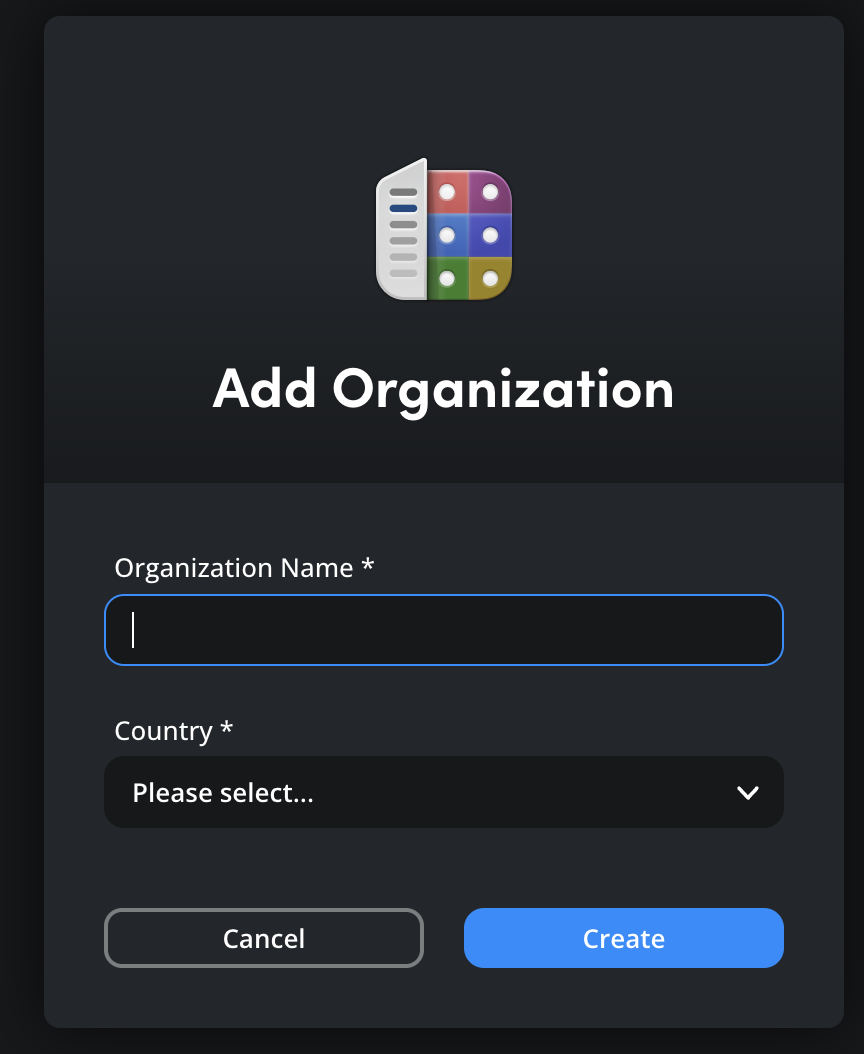
- 登录在线的 DaVinci Resolve Project Server,按指引创建云端项目库
- 打开 Resolve 的
Project Manager,切到 Cloud 标签页并登录
- 在云端项目库里新建项目(或把现有项目搬进去)
- 在 Project Server 网页端输入对方的 Blackmagic Cloud ID,邀请协作者
- 协作者打开项目,把媒体 Relink 到本地素材副本,开工——改动自动保存到云端
练习PRACTICE
动手任务
- 纸上推演:三人小组分别负责剪辑、调色、混音,画出"互传
.drp文件"和"云协作"两张流程图,对比工程转手次数。 - 打开
Project Manager的 Cloud 标签页看一眼登录界面(不用真建付费库),说出云端库和本地库在管理方式上的一个区别。
自检清单
做完任务后逐条自查,全部能打勾才算过。
常见问题FAQ
两个人同时改同一条时间线,会打架吗?
不会。谁先打开某条时间线,谁就持有编辑权,其他人只能看不能改。开工前最好先说清谁动哪部分。
用云协作是不是每个人都得花钱?
不是。按月付费的是云端项目库的托管,由建库的人付一次;被邀请的协作者登录自己的 Cloud ID 即可加入。
素材是不是也要全部上传到云上?
不用。云端只存项目数据。素材各自本地留一份,进项目后 Relink 到自己的副本即可。
和直接把 .drp 文件发给同学有什么区别?
.drp 发出去就是一张快照,两人各自改完就成了两个版本,合不回去。云协作里大家改的是同一个活项目。
Learning Objectives学习目标
After this card you can explain what problem Blackmagic Cloud collaboration solves, how a cloud project library differs from a local one, and walk through the full flow from creating a library to a team at work.
Concepts概念说明
Blackmagic Cloud collaboration lets several people open the same cloud-hosted project and work in it at once — editing, color, VFX and mixing each in the page they know best, with everyone's changes visible.
- It cures the relay race: traditional post hands exported project files down the line, and every handoff risks version chaos; in the cloud everyone edits one living project, so there's nothing to merge.
- The library lives in the cloud: sign in with a Blackmagic Cloud ID under the Cloud tab of the
Project Managerand you can create projects in a cloud library (for the three library shapes, see Project Library). - Up to 10 people at once: whoever opens a timeline or bin first holds the edit rights; everyone else gets read-only access until it's released.
- No media in the cloud: the cloud only syncs project data (timelines, settings, markers) — small and fast. Each person keeps a local copy of the footage and relinks to it after opening the project.
- The creator pays: the cloud library is billed monthly to whoever creates it; invited collaborators join free with their own Cloud ID. Media-heavy teams can add Cloud Store with Dropbox syncing.
Steps操作步骤
- Register a Blackmagic Cloud ID on the Blackmagic Cloud website
- Sign in to the online DaVinci Resolve Project Server and follow the prompts to create a cloud project library
- Open Resolve's
Project Manager, switch to the Cloud tab and sign in - Create a new project inside the cloud library (or move an existing project into it)
- On the Project Server web page, invite collaborators by their Blackmagic Cloud ID
- Each collaborator opens the project, relinks to their local copy of the media, and starts — changes save to the cloud automatically
Practice练习
Hands-on task
- Paper exercise: a three-person team splits editing, color and mixing. Draw the "passing a
.drparound" flow and the cloud flow, and compare how many times the project changes hands. - Open the Cloud tab of the
Project Managerand look at the sign-in screen (no need to create a paid library). Name one difference between how cloud and local libraries are managed.
Self-check
Work through the task, then tick every line; all checked means you own this card.
FAQ常见问题
What if two people edit the same timeline at once?
They can't. Whoever opens a timeline first holds the edit rights; everyone else can watch but not touch. Agree on who owns what before you start.
Does everyone have to pay to collaborate?
No. The monthly fee covers hosting the cloud library, paid once by its creator. Invited collaborators just sign in with their own Cloud ID.
Do we have to upload all our media to the cloud?
No. Only project data lives in the cloud. Media stays local for each person and gets relinked after opening the project.
How is this different from sending a classmate a .drp file?
A .drp is a snapshot the moment it's sent — once both of you edit, you have two versions that can't be merged. In the cloud everyone edits one living project.
本卡术语Terms in this card
媒体夹Bin 项目文件.drp 项目库Project Library 项目管理器Project Manager 时间线Timeline 导出Export 标记Marker 调色Grade 合并Merge PNGPNG