AFCT TECH TEAM · LTMO

第 0 课
导览

Lindsey
DaVinci Resolve Workshop · 2026-10-14(周三)18:30–20:30 · SIP 校区 AS116 Mac Lab
主讲:Lindsey · 中文场(周四为英文场,内容相同)
COURSE VALUE
这门课的价值 = ¥0 · 7 天
AFCT TECH TEAM · LTMO

Session 0
Orientation

Lindsey
DaVinci Resolve Workshop · 2026-10-15 (Thursday) 18:30–20:30 · SIP Campus AS116 Mac Lab
Host: Lindsey · English session (Wednesday runs the same content in Chinese)
COURSE VALUE
What this course is worth = ¥0 · 7 days
AFCT Tech Team · LTMO
实验室技术员
后期
· Lab 的设备与技术问题 —— 找我
· 非学分课 · 影视实验室办
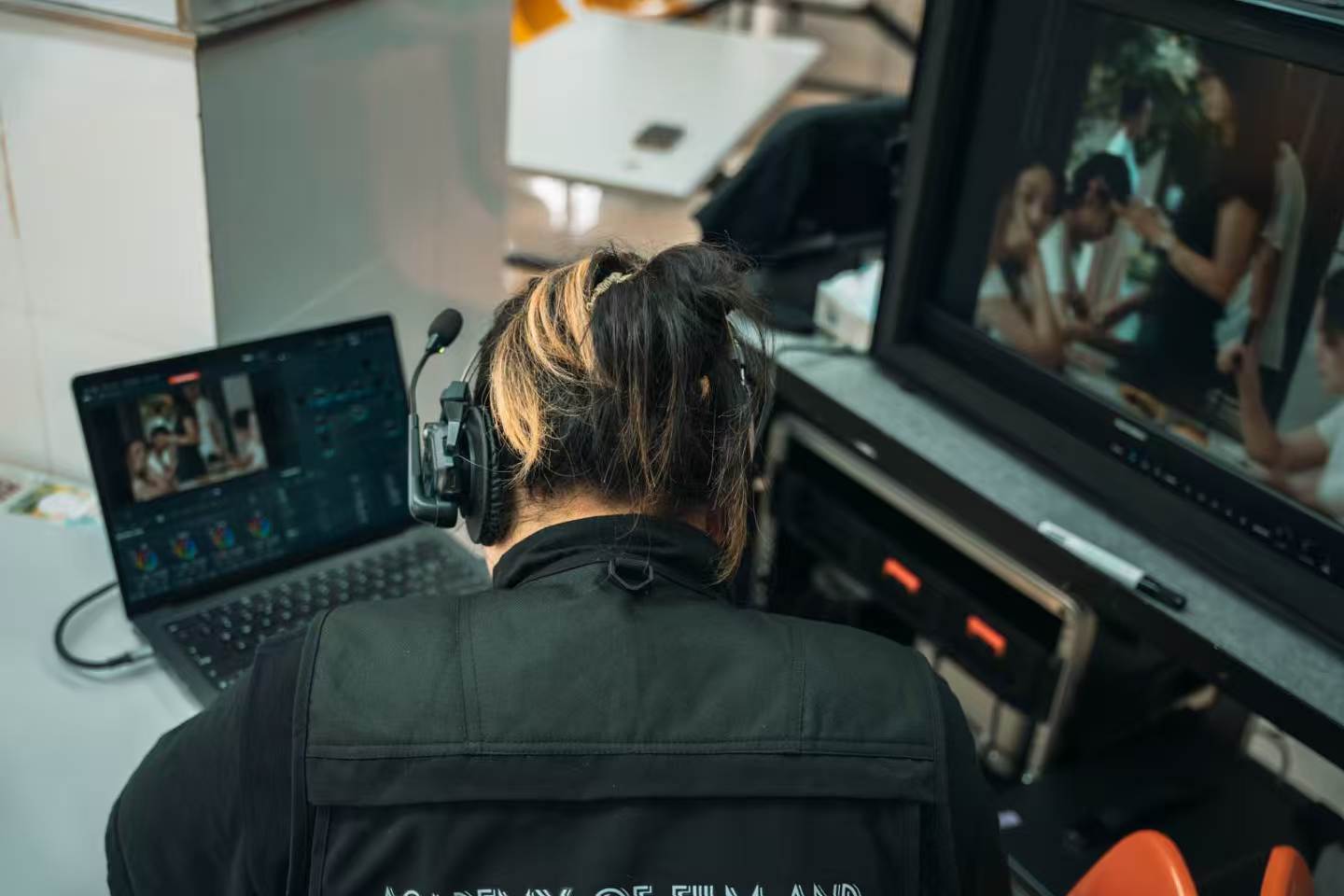
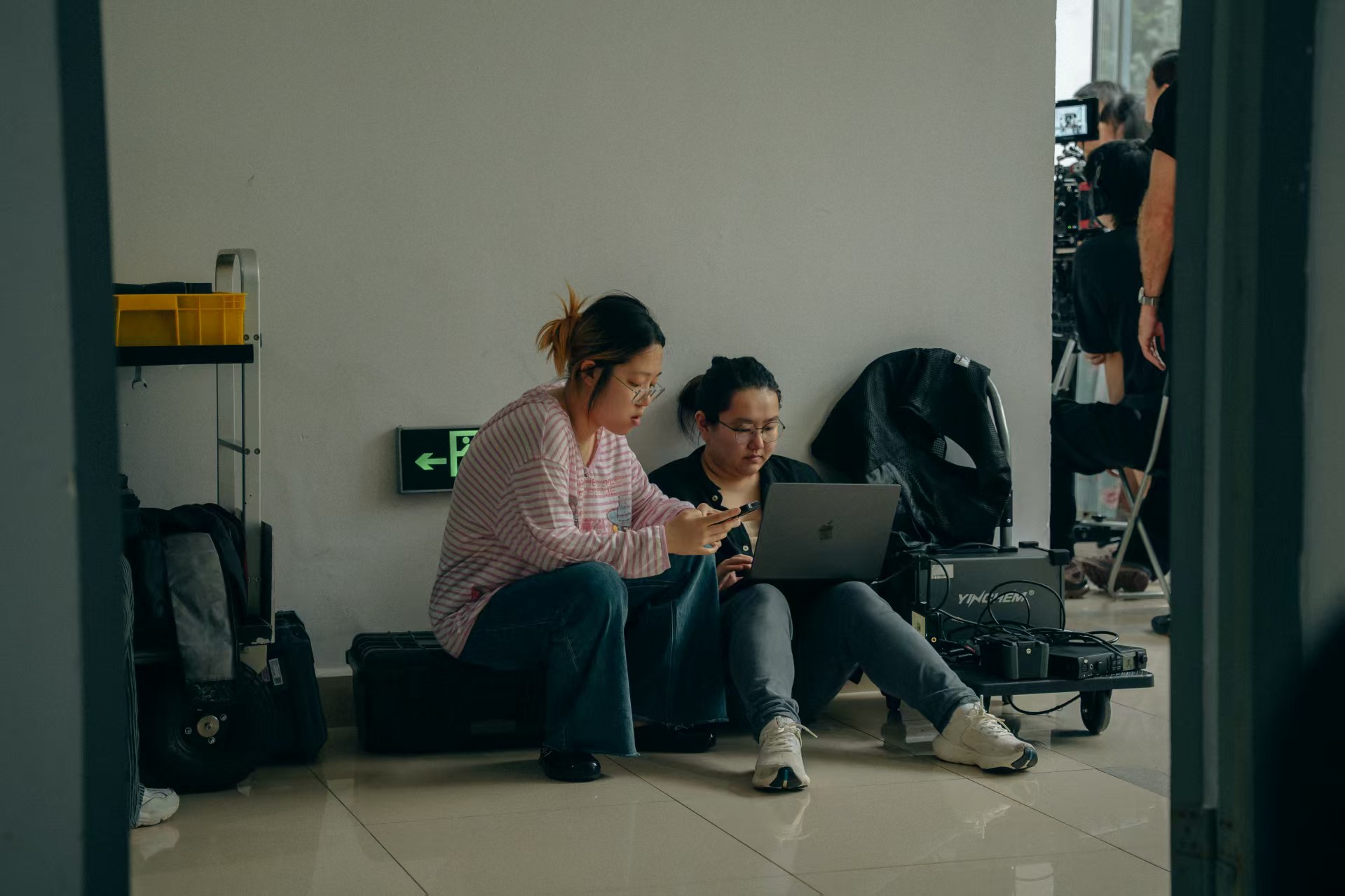
在调色台前 在片场
AFCT Tech Team · LTMO
Lab technician
post-production
· Lab equipment & technical issues — come to me
· Non-credit course · run by the Film Lab
At the grading suite On set
两条腿
力量 · 意义
人类有两条腿
Two legs
Power · Meaning
Humans stand on two legs
四条守则
我们彼此怎么相处
01
互相尊重
02
谦虚
03
感恩彼此
04
互相帮助
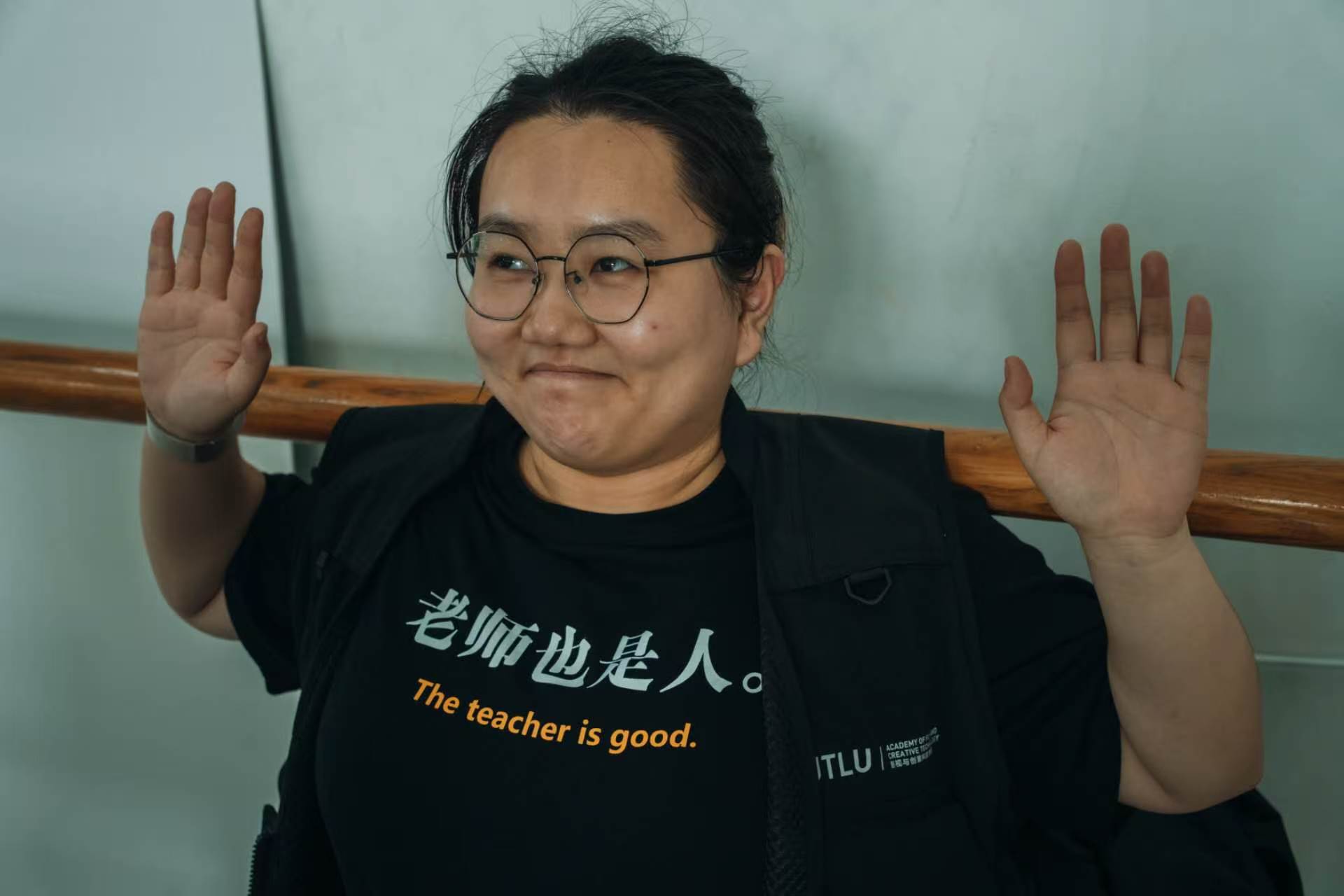
AFCT 院服
Four ground rules
How we treat each other
01
Mutual respect
02
Stay humble
03
Gratitude toward each other
04
Help each other
AFCT shirt
我为什么这么教
教的是一个视角
01
AI 的能力 ≠ 使用者的能力
02
技术员的 lens
03
教技术不是给你背数字
04
plan ahead · Show LUT
Why I teach like this
What I teach is a lens
01
An AI's capability ≠ the user's capability
02
The technician's lens
03
Teaching tech ≠ making you memorise numbers
04
plan ahead · Show LUT
两个问题
你为什么来这个 workshop?
为什么不去影视飓风花 9 块 9?
Two questions
Why are you in this workshop?
Why not just pay ¥9.9 for a MediaStorm course?
AI 时代,为什么还开这门课 · 1/2
软件 = 行业的 SOP
封成了一种 IO
· 闭源 —— 中间做了什么,你不知道
· AI 时代:闭源可被逆向
· 开了三年,为什么第三年还开
The AI era · why this course still exists · 1/2
Software = the industry's SOP
packed into one IO
· Closed source — what it does in between, you don't know
· In the AI era, closed source can be reversed
· Three years in — why open it a third year
AI 时代,为什么还开这门课 · 2/2
这不是大众赛道
· AI 只做「通识化」的方法
· 影视评论 = 大众赛道  影视制作 ≠ 大众赛道
· 要学的是 SOP:为什么 · 基础 · 参数 · 怎么描述
The AI era · why this course still exists · 2/2
This is not a mass-market track
· AI only does the generalised method
· Film criticism = mass-market track  Film production ≠ mass-market
· What you learn is SOP: why · basics · parameters · how to describe
比软件更底层的一件事
把你要什么说清楚,非常难
DP · 反复沟通  |  黑话 · 术语  |  翻译与核实
The thing beneath software
Saying what you want is genuinely hard
DP · back-and-forth  |  Jargon · terms  |  Translating & verifying
课上两件事
多问 · 允许开小差
01
多问
随时打断
02
允许开小差
mesmerize · ADHD
注意力 = 这个时代最稀缺的
Two things in class
Ask often · Let yourself drift
01
Ask often
Interrupt anytime
02
Let yourself drift
mesmerize · ADHD
Attention = the scarcest thing of this era
课程形态
7 天 × 9:00–17:00
→ 线上为主
线下 = 线上做不了的那部分
Course format
7 days × 9:00–17:00
→ online-first
In-person = the part online can't do
THE DEAL
这门课的
三条规则
知识在线上学,问题在线下解决。
不打卡、无监督——想学的人自己往前学。
RULE 01
知识在线上,问题在线下
网站自学:图文卡 + 跟练 + 自测。线下课不重复教材,只做三件事——演示实战里容易出的问题、回答你自学攒下的问题、解决你卡住的地方。
RULE 02
两条线:基础线 + 高级线
基础线从零到出片,自学 + 线下课 + 收官晚的官方认证考试。高级线给有基础的人,4 场进阶主题,不点名、不强制,哪场感兴趣来哪场。
RULE 03
一个晚上一个语言场
周三中文场、周四英文场,都是 18:30–20:30,都在这间机房,内容一样,按语言偏好任选一场跟到底。
THE DEAL
This course's
three rules
Knowledge lives online; problems get solved in person.
No check-ins, no supervision — the ones who want to learn move ahead on their own.
RULE 01
Knowledge online, problems in person
Self-study on the site: reading cards + exercises + self-tests. Class time never repeats the textbook — it does three things: demo the mistakes that show up in real work, answer the questions you've saved up, unstick wherever you're blocked.
RULE 02
Two tracks: basics + advanced
The basics track goes from zero to a finished film: self-study + in-person classes + the official certification exam on the closing night. The advanced track is for people with some base — 4 advanced sessions, no roll call, no obligation, come to whichever interests you.
RULE 03
One night, one language track
Wednesday Chinese, Thursday English, both 18:30–20:30, both in this Mac lab, same content — pick the language track you prefer and stay with it.
TRACK A · 基础线
从零到出片
+ 认证考试
· 网站 8 周内容自学(教材跟练卡 + 知识卡 + 自测)
· 线下 4 次:剪辑 → 调色 → 特效与声音 → 导出与协作
· 收官晚先上课、随堂考 Blackmagic 官方认证
· 只有认证考试要求本人到场并计入出勤;导览与其他教学场次不计出勤,可看直播或录播
· 考试按校区分场:太仓周三、SIP 周四
TRACK B · 高级线
4 场进阶主题
想来就来
· 画面技术素养扫盲(Log、LUT、色彩空间、噪点)
· 精细化实操(锐化、抠像进阶)
· 色彩管理与胶片风格
· AI 辅助剪辑与调色
· 不点名不强制;每场最后 40 分钟开放,可带自己的项目来现场处理
· 讲完 1–2 周,把精华落成卡片放上网站
TRACK A · Basics
From zero to a finished film
+ certification exam
· 8 weeks of self-study on the site (textbook cards + knowledge cards + self-tests)
· 4 in-person sessions: editing → grading → effects & sound → export & collaboration
· Closing night: class first, then the official Blackmagic certification exam
· Only the certification exam requires you in person and counts attendance; orientation and teaching sessions don't — watch live or the recording
· Exams split by campus: Taicang Wednesday, SIP Thursday
TRACK B · Advanced
4 advanced sessions
come when you like
· Picture-tech literacy (Log, LUT, colour space, noise)
· Fine-grain craft (sharpening, advanced keying)
· Colour management & film looks
· AI-assisted editing & grading
· No roll call, no obligation; the last 40 minutes of each session are open — bring your own project
· 1–2 weeks after each session, the best parts become cards on the site
TRACK A · 4 SESSIONS · 每节课解决什么问题
基础线拆开看
W7 · 10-28
剪辑入门
解决:素材怎么进项目、怎么挑出要的那几段、怎么切得干净、顺序怎么排,以及成片怎么快速导出。

课前自学:GS 入门准备 + L7 项目设置 + L1 粗剪 + L2 精剪 + L3 音频与快速导出

带走:一套能重复的粗剪 → 精剪流程,外加一条快速导出的路。
W9 · 11-11
调色
解决:画面先「调对」——暗部、中间调、亮部三个轮子各管什么;再谈局部调整。

课前自学:L4 一级调色 + L5 二级调整 + L6 完成与管理

带走:靠示波器读数,不靠肉眼猜。
W11 · 11-25
特效与声音
解决:字幕与图形怎么做、Fusion 在哪一步用;在第 1 次课音频的基础上深化——让音乐和人声都清楚。

课前自学:L8 Fairlight + L9 Fusion

带走:成片听起来像样、看起来完整。
W13 · 12-09
导出与协作
+ 认证考试
解决:交付格式怎么选、媒体怎么打包、别人接手时怎么不出错。

课前自学:L10 交付与媒体管理 + 复习前面所有跟练卡

先上完课,随堂考官方认证(本人到场)。
TRACK A · 4 SESSIONS · what each class solves
The basics track, taken apart
W7 · 10-28
Editing basics
Solves: getting media into a project, picking the takes you need, cutting clean, ordering the story — and getting a quick export out.

Before class: GS Getting Started + L7 project setup + L1 rough cut + L2 fine cut + L3 audio & quick export

You leave with: a repeatable rough cut → fine cut workflow, plus a quick export path.
W9 · 11-11
Grading
Solves: getting the image 'correct' first — what the lift, gamma and gain wheels each control; then local adjustments.

Before class: L4 primary + L5 secondary + L6 finishing & management

You leave with: reading the scopes, not guessing by eye.
W11 · 11-25
Effects & sound
Solves: how titles and graphics get made, where Fusion fits; deepening the audio work from session 1 — music and voices both clear.

Before class: L8 Fairlight + L9 Fusion

You leave with: a film that sounds right and looks finished.
W13 · 12-09
Export & collaboration
+ certification exam
Solves: choosing delivery formats, packaging media, handing over without breakage.

Before class: L10 delivery & media management + reviewing every walkthrough card from the earlier sessions

Class first, then the official exam (in person).
TRACK B · 4 SESSIONS · 每场解决什么问题
高级线拆开看
10-21 · 第 1 场
画面技术素养扫盲
解决:黑话到底在说什么——分辨率≠清晰度 · 8/10bit 与 banding · 4:2:0 与抠像边缘 · 码率与块状伪影 · Log 为什么是灰的 · LUT 为什么不能乱套 · 导出后颜色为什么变了。

形式:每个黑话 = 一个你在 Resolve 里能看见的实操现象(演示实操课,不是理论课)。
11-04 · 第 2 场
精细化实操
解决:怎么把画面做得更「精」——锐化与细节增强、抠像的进阶做法(为什么有些边抠不干净)。

⚠️ 题目已定,详细清单还没展开(计划里仍标「候选」),等你定。
11-18 · 第 3 场
色彩管理与
胶片风格
解决:「你真的想要胶片感吗」——想要的话怎么做,色彩管理嵌在哪一步。

承接第 1 场:Rec.709 / sRGB / P3 为什么导出后颜色会变。带走判断力,而不是套一个 LUT。
12-02 · 第 4 场
AI 辅助剪辑与调色
解决:AI 工具怎么用进真实流程、哪些环节它真的省事、哪些还得人判断。

最后一节还会讲:怎么用你自己的 personal agent,低成本地替你做一些软件里的简单操作。
TRACK B · 4 SESSIONS · what each session solves
The advanced track, taken apart
10-21 · Session 1
Picture-tech literacy
Solves: what the jargon actually means — resolution ≠ sharpness · 8/10-bit and banding · 4:2:0 and keying edges · bitrate and blocky artifacts · why Log looks flat · why you can't slap on any LUT · why colours shift after export.

Format: every term = one phenomenon you can see in Resolve (a hands-on demo class, not a theory class).
11-04 · Session 2
Fine-grain craft
Solves: making the image more 'refined' — sharpening and detail enhancement, advanced keying (why some edges never come clean).

⚠️ Topic is set, detailed list not expanded yet (still marked 'candidates' in the plan) — waiting on Lindsey.
11-18 · Session 3
Colour management &
film looks
Solves: 'do you really want the film look' — if yes, how to get it; where colour management sits in the chain.

Builds on Session 1: Rec.709 / sRGB / P3 — why colours change after export. You leave with judgement, not a LUT to copy.
12-02 · Session 4
AI-assisted editing & grading
Solves: how AI tools fit into a real pipeline, where they genuinely save time, where a human still decides.

The last part of the session: how to use your own personal agent to cheaply handle simple operations inside the software.
9 WEEKS · 基础线
接下来的九周
W5 · 10-14
导览(今天)
W7 · 10-28
剪辑入门
W9 · 11-11
调色
W11 · 11-25
特效与声音
W13 · 12-09
导出与协作
+ 认证考试
高级线占轮空周:10-21 画面扫盲 · 11-04 精细化实操
11-18 色彩管理与胶片风格 · 12-02 AI 辅助
周三中文场 · 周四英文场 · 18:30–20:30 · SIP AS116
9 WEEKS · basics track
The next nine weeks
W5 · 10-14
Orientation (today)
W7 · 10-28
Editing basics
W9 · 11-11
Grading
W11 · 11-25
Effects & sound
W13 · 12-09
Export & collaboration
+ certification exam
Advanced sessions fill the off weeks: 10-21 picture-tech literacy · 11-04 fine-grain craft
11-18 colour management & film looks · 12-02 AI-assisted
Wednesday Chinese · Thursday English · 18:30–20:30 · SIP AS116
CERTIFICATION EXAM
官方认证考试
60
分钟
考试时长
50
道选择题
中文或英文
85
分及格
考试内容与网站自学内容同源
3
次机会
两次之间隔 24 小时
CERTIFICATION EXAM
The official certification exam
60
minutes
exam length
50
multiple-choice questions
in Chinese or English
85
to pass
exam content comes from the same material as the site
3
attempts
24 hours between tries
干货 · 3 QUESTIONS
为什么要调色?
剪片子这个行为
到底是在做什么?
片子到底是什么?
这三个说透了,后面所有操作你自己就能推。
The substance · 3 QUESTIONS
Why do we grade?
What is the act of editing
actually doing?
What is a film, really?
Get these three clear, and everything that follows you can derive yourself.
从底层逻辑出发
不管黑猫白猫
抓到老鼠就是好猫
Pr
Premiere Pro
Adobe · 订阅制
VS
FCP
Final Cut Pro
Apple · 仅 Mac · 买断
VS
剪
剪映
免费 · 短视频常用
VS
DR
DaVinci Resolve
本课用的 · 免费版够用整门课
不管用什么样子的软件——只要能达成你的最终目标,它就是个好软件。
From first principles
Black cat or white cat
— catch the mouse, it's a good cat
Pr
Premiere Pro
Adobe · subscription
VS
FCP
Final Cut Pro
Apple · Mac only · one-time buy
VS
剪
Jianying (CapCut)
Free · short-video staple
VS
DR
DaVinci Resolve
What we use · free version covers the course
Whatever the software — if it gets you to your final goal, it's a good piece of software.
LIGHT → SCREEN
影像的来路
STEP 01
小孔成像
(轻微带过)
STEP 02
影像被印在
化学物质上
STEP 03
数码相机
转成信号
STEP 04
信号进电脑
用算法呈现
NOW
屏幕
发光的
传统电影:光外来,由胶片呈现。
现在:光是原生的;屏幕与相机各异。
LIGHT → SCREEN
Where images come from
STEP 01
Pinhole imaging
(in passing)
STEP 02
The image printed
onto chemistry
STEP 03
Digital cameras
turn it into signal
STEP 04
Signal into computers,
rendered by algorithms
NOW
The screen,
emitting light
Traditional film: light comes from outside, the stock shows it.
Now: light is native; screens and cameras all differ.
POST-PRODUCTION
后期在做什么
在一个空间里,复刻光落在不同材质上的样子。
THE POINT
这种反应,算不出来——这就是为什么要调色。
POST-PRODUCTION
What post-production does
In one space, recreate how light falls on different materials.
THE POINT
That response can't be computed — and that is exactly why we grade.
PICTURE QUALITY = 一块体积
五个方向围成的
那块「体积」
画质是五个方向围出来的空间。任何一个方向塌下去,整块体积就缺一角。
PICTURE QUALITY = one volume
The 'volume' enclosed by
five directions
Image quality is a space enclosed by five directions. If any one of them caves in, the whole volume loses a corner.
AI 生成视频 · 在这张五维图上的位置
它把哪一格改了,哪一格没改
它改的是哪一格
光的行为
从传感器记录变成模型输出:动态范围由模型给。
它并不占优
sRGB / 8bit
主要按 sRGB、8bit 交付,比 709 素材短一格。
它没改的是什么
交付链路
仍走 H.264/H.265;好看 ≠ 五个维度都站得住。
对判断意味着什么
新问题:一致性
一致性与可复现性成了新问题。
AI-GENERATED VIDEO · where it sits on this pentagon
Which cell it changed, and which it didn't
What it changes
Light behaviour
From sensor capture to model output: dynamic range is whatever the model gives.
Where it doesn't win
sRGB / 8bit
Delivered mostly as sRGB, 8-bit — one notch shorter than 709 footage.
What it didn't change
The delivery chain
Still H.264/H.265; looking good ≠ holding up on all five dimensions.
What it means for judgement
A new problem: consistency
Consistency and reproducibility become the new problem.
方向 1/5 · Image Size / Spatial resolution
尺寸 · 空间分辨率
画面有多少像素:现实被切成网格。
轴上的数值
480p
约 640×480 老视频、小窗口、素材预览
720p
1280×720 流媒体低档、代理(proxy)
1080p
1920×1080 今天最通用的交付尺寸
2160p / 4K
3840×2160 平台高规格、影院、重构图余量
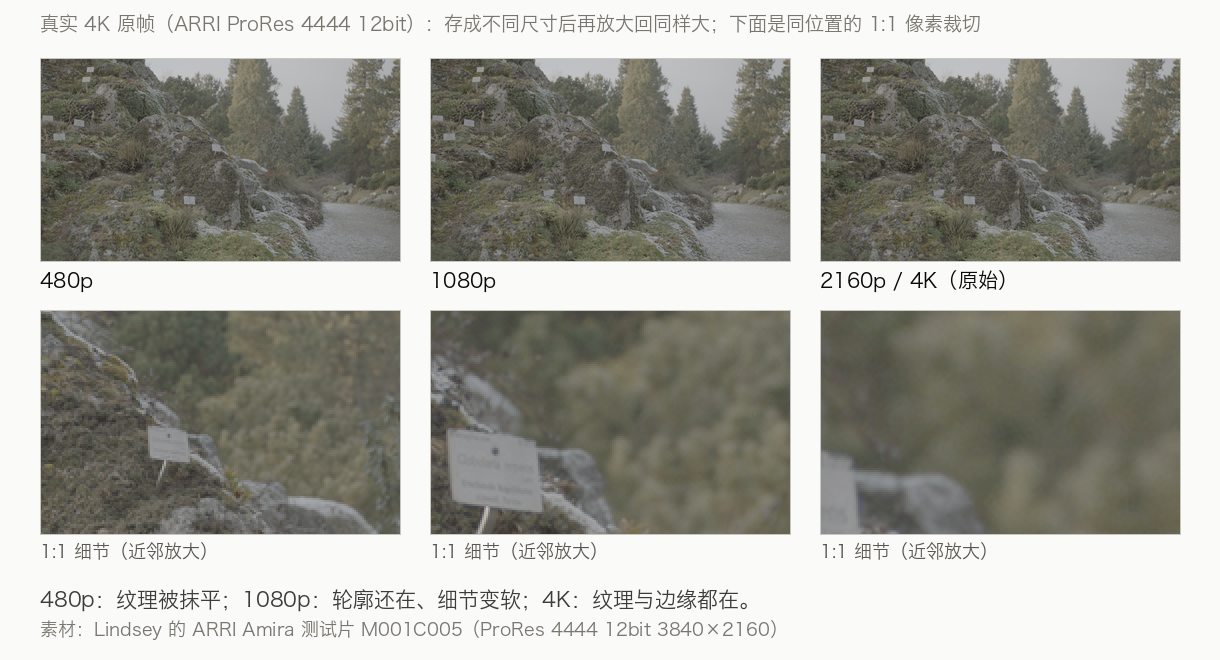
真实 4K 帧在 480p / 1080p / 4K 下的差别
同一机位、同一素材:480p 纹理被抹平 → 1080p 变软 → 4K 细节都在。
Axis 1/5 · Image Size / Spatial resolution
Size · Spatial resolution
How many pixels the frame has: reality cut into a grid.
Values on this axis
480p
about 640×480 old video, small windows, preview files
720p
1280×720 low streaming tier, proxies
1080p
1920×1080 today's default delivery size
2160p / 4K
3840×2160 premium platforms, cinema, reframing headroom
A real 4K frame at 480p / 1080p / 4K
Same camera, same take: at 480p texture is wiped → 1080p softens → 4K keeps it all.
方向 2/5 · Frame rate / Temporal resolution
帧率 · 时间分辨率
一秒记多少帧画面:时间上的采样密度。
轴上的数值
24
电影最熟悉的节奏 运动带轻微模糊,有「电影感」
25 / 30
电视与网络常规 新闻、访谈、大部分网络内容
50 / 60
顺滑 体育、游戏、运动镜头不容易抖
120
慢动作余量 后期放慢 4–5 倍仍然顺
按 24fps 采样(丢掉 3/5 的帧)· 放慢 4 倍
60fps 原样 · 同样放慢 4 倍
同一素材慢放 4 倍:左 24 采样、右 60 原样。源帧率必须高于目标帧率。
Axis 2/5 · Frame rate / Temporal resolution
Frame rate · Temporal resolution
How many frames per second: the sampling density of time.
Values on this axis
24
the rhythm cinema knows best slight motion blur, the 'film look'
25 / 30
TV and web standard news, interviews, most online content
50 / 60
smooth sports, games, fast movement holds up
120
slow-motion headroom slowed 4–5× in post and it stays smooth
Sampled at 24fps (3 of 5 frames dropped) · slowed 4×
60fps as-is · slowed 4×
Same footage slowed 4×: left sampled at 24, right 60 as-is. The source frame rate must exceed the target.
方向 3/5 · Color Precision / Bit depth
色深 · 色彩精度
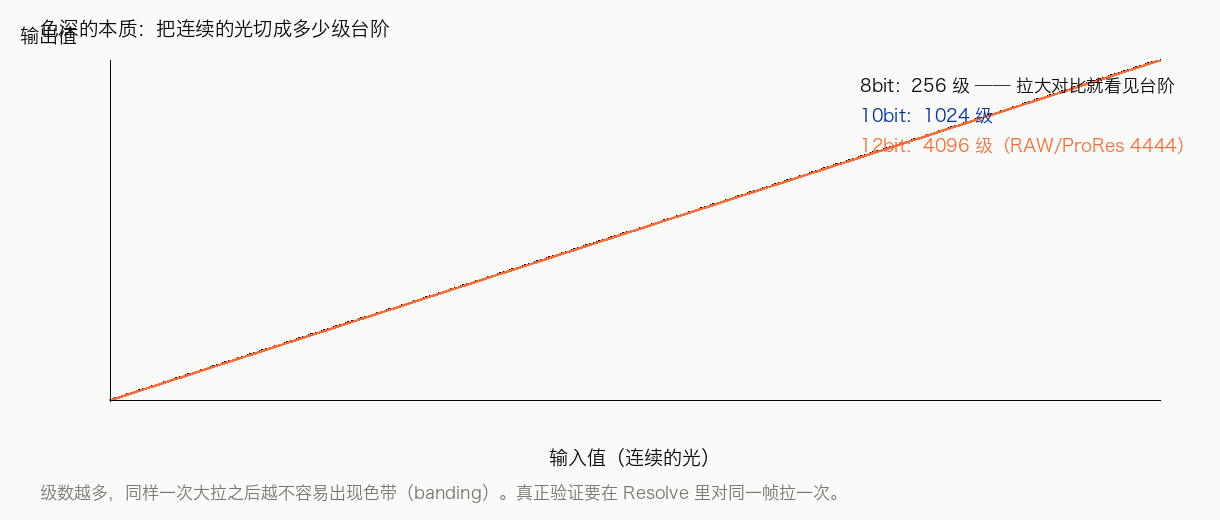
每个通道用多少位:明暗被切成多少级台阶。
轴上的数值
8bit
每通道 256 级 交付够用,但一拉曲线就容易出断层
10bit
每通道 1024 级 调色的实用起点,渐变顶得住
12bit
每通道 4096 级 摄影机 RAW 的富余空间,给强调整留量
8bit / 10bit / 12bit 的量化台阶
256 / 1024 / 4096 级。色带不是调坏了,是台阶被拉大了。
Axis 3/5 · Color Precision / Bit depth
Bit depth · Colour precision
How many bits per channel: how many steps brightness gets cut into.
Values on this axis
8bit
256 levels per channel fine for delivery, but a curve pull easily bands
10bit
1024 levels per channel the practical floor for grading; gradients hold up
12bit
4096 levels per channel cinema-camera RAW headroom, room for heavy grades
Quantisation steps at 8bit / 10bit / 12bit
256 / 1024 / 4096 levels. Banding isn't a mistake — the steps just got bigger.
方向 4/5 · Color Volume / Color space
色彩容量 · 色彩空间
能表示多大范围的颜色,以及这些数值怎么被解释。
轴上的数值
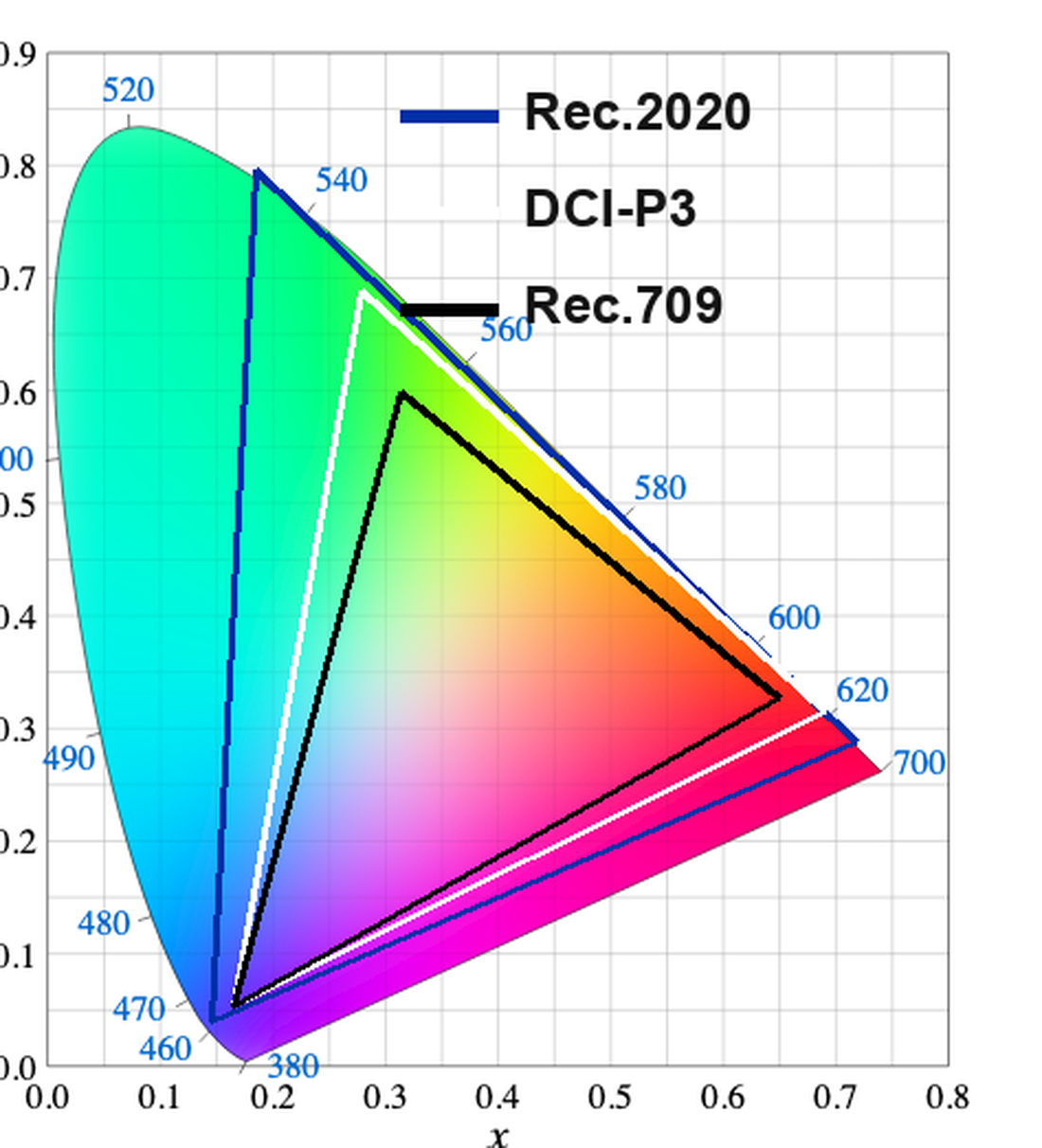
Rec.709 / sRGB
屏幕与网络的常规色域 绝大多数交付的默认容器
DCI-P3
影院放映、近年显示器 比 709 更大的红绿范围
Rec.2020
为 HDR 准备的大容器 能装更多颜色,但需要全链路支持
CIE 色域图:Rec.2020 / DCI-P3 / Rec.709
709 最小、P3 更大、2020 最大。色域是容器大小,不是画质高低。(Sakurambo / BenRG,CC BY-SA 3.0)
Axis 4/5 · Color Volume / Color space
Colour volume · Colour space
How wide a range of colours can be represented, and how those numbers get interpreted.
Values on this axis
Rec.709 / sRGB
the everyday gamut of screens & web the default container for nearly all delivery
DCI-P3
cinema projection, recent displays a wider red-green range than 709
Rec.2020
the big container waiting for HDR holds more colour, but the whole chain must support it
CIE gamut chart: Rec.2020 / DCI-P3 / Rec.709
709 smallest, P3 bigger, 2020 biggest. A gamut is container size, not quality. (Sakurambo / BenRG, CC BY-SA 3.0)
方向 5/5 · Dynamic Range & Luminance
动态范围与亮度
最暗到最亮能差多少,显示出来有多亮(nit)。
轴上的数值
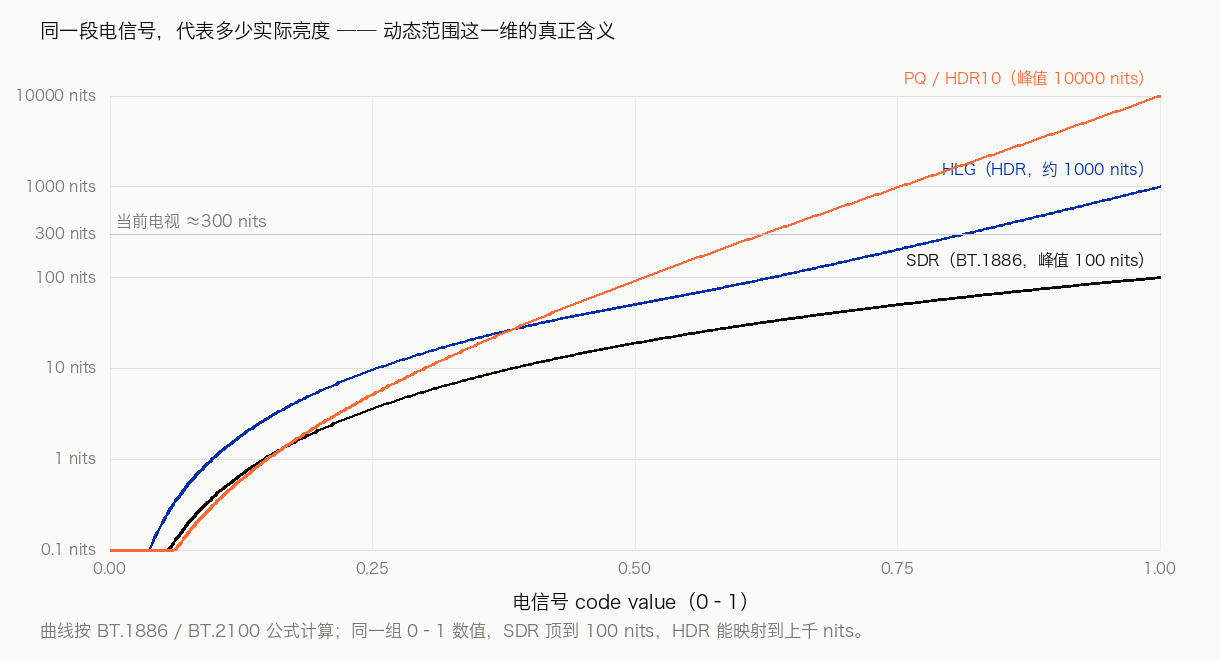
SDR ≈100 nits
传统标准 按约 100 nits 做基准
当前电视 ≈300 nits
消费级显示 比标准亮,但还谈不上 HDR
HDR
更高亮 + 更深的暗部 高光和阴影都留住了,需要全链路支持
SDR / HLG / PQ 的传递函数曲线
SDR 顶到 100 nits,HDR 能到上千。天花板由前期决定。(曲线按 BT.1886 / BT.2100)
Axis 5/5 · Dynamic Range & Luminance
Dynamic range & luminance
How far darkest to brightest can stretch, and how bright it gets shown (nits).
Values on this axis
SDR ≈100 nits
the traditional standard benchmarked at about 100 nits
Current TVs ≈300 nits
consumer displays brighter than the standard, not HDR yet
HDR
higher highlights + deeper shadows highs and lows both survive; needs the whole chain
Transfer function curves: SDR / HLG / PQ
SDR tops out at 100 nits; HDR reaches into the thousands. The ceiling is set in production. (curves per BT.1886 / BT.2100)
WHITE POINT · 1/2 · 什么是白点
「什么算是白」是被规定的
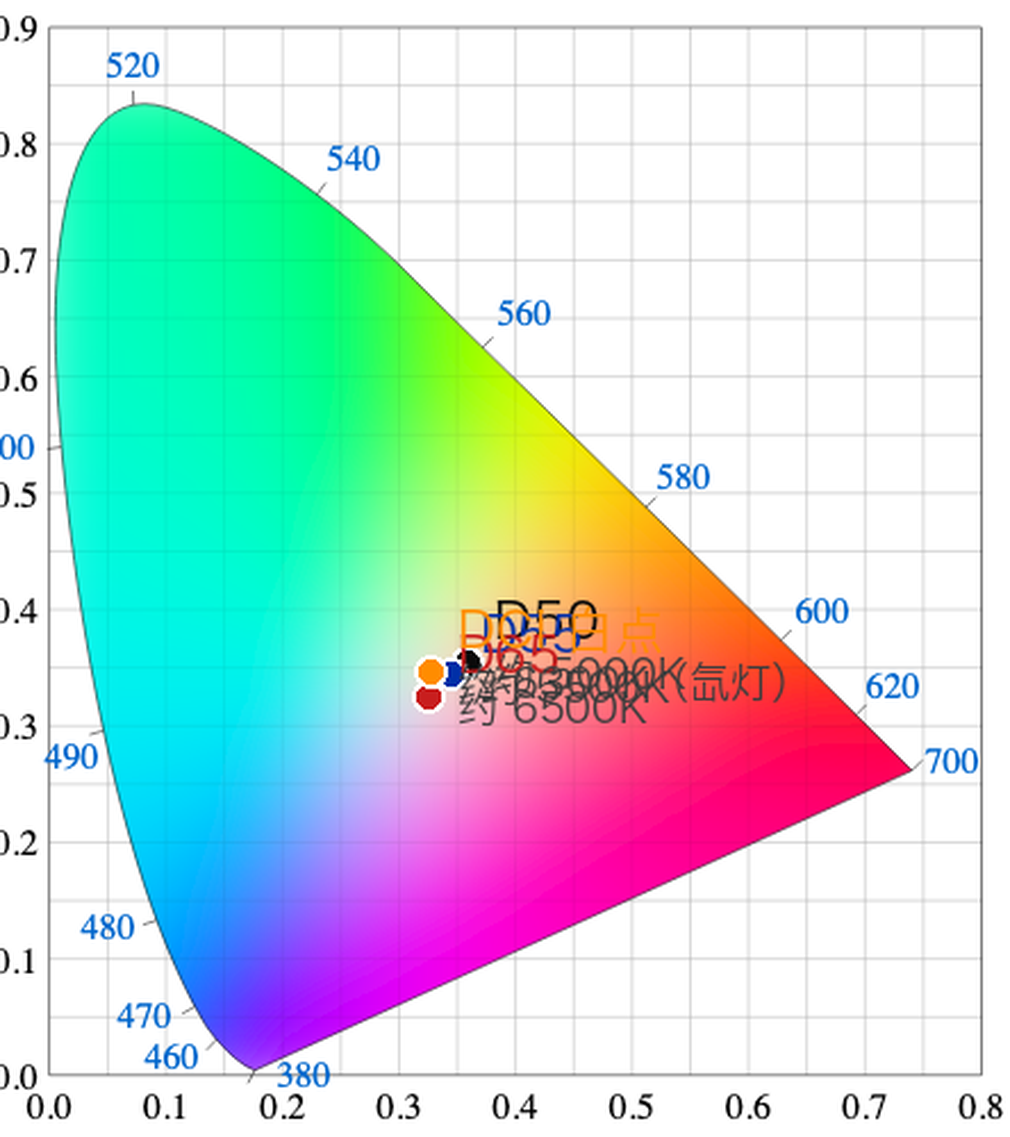
D50 / D55 / D65 / DCI 白点在 CIE 色度图上的位置
现实里的白没有标准答案。

数字影像必须挑一个参考白点(CIE 色度坐标)。

换标准 = 换白点 = 整张片子偏色。
「D」是什么
日光标准光源(Daylight),数字 ≈ 色温:D50 → 5000K、D55 → 5500K、D65 → 6500K。
为什么标准用坐标而不是只写 K
色温一样、色调可以不同。

标准写的是 x / y 坐标。

影院例外:DCI-P3 白点约 6300K,不等于 D65。
WHITE POINT · 1/2 · what a white point is
What counts as 'white' is decided by convention
D50 / D55 / D65 / DCI white points on the CIE chromaticity diagram
There is no standard answer for white in reality.

Digital imaging has to pick a reference white point (CIE chromaticity coordinates).

Change the standard = change the white = the whole film shifts colour.
What the 'D' means
Daylight standard illuminants, number ≈ colour temperature: D50 → 5000K, D55 → 5500K, D65 → 6500K.
Why standards write coordinates, not just K
Same colour temperature, different tint is possible.

Standards write x / y coordinates.

The cinema exception: the DCI-P3 white point is about 6300K, not D65.
WHITE POINT · 2/2 · 对不上会怎样
白点不匹配 = 整张片子偏色
症状 ①
整体偏冷 / 偏暖
6300K 素材放进 6500K 链路:所有颜色一起被推走。
症状 ②
「导出后颜色变了」
先查白点,再查 gamma,再查色域。
症状 ③
同一个 grade 两台设备不一样
两台设备白点不同,调出的「白」就不是白。
容易混
相机白平衡 ≠ 后期白点
拍摄时给传感器参考 vs 后期色彩管理按哪个标准解释。
实操
在链路上对齐
输入 / 时间线 / 输出三处都要对;跨标准要转换。
一句话
白点是基准,不是滤镜
它只决定「什么算白、其余往哪偏」。
WHITE POINT · 2/2 · what happens when they don't match
Mismatched white point = the whole film drifts
Symptom ①
Uniform cool / warm cast
6300K footage in a 6500K chain: every colour gets pushed along together.
Symptom ②
'Colours changed after export'
Check the white point first, then gamma, then gamut.
Symptom ③
Same grade, two devices differ
Two devices, two white points — the 'white' you graded to isn't white.
Easily confused
Camera white balance ≠ post white point
A reference for the sensor at shoot time vs which standard post interprets by.
In practice
Align it along the chain
Input / timeline / output — all three must match; convert when crossing standards.
In one line
A white point is a reference, not a filter
It only decides what counts as white — and which way everything else leans.
FORMAT GLOSSARY · PNG
PNG
便携式网络图形 · Portable Network Graphics
一句话
无损压缩的图片格式,支持透明通道。
什么时候用
图标、字幕条、带字图形、透明底素材、截图。
坑 / 代价
体积大(常是 JPG 的数倍);别拿它当整片素材,序列用 DPX / EXR。
一句话记法
PNG 是「原样」:改十次也不掉质量。
FORMAT GLOSSARY · PNG
PNG
Portable Network Graphics · lossless
In one line
A lossless image format, with transparency.
When to use it
Icons, lower thirds, graphics with text, transparent assets, screenshots.
Pitfalls / cost
Heavy files (often several × JPG); don't use it as footage — for sequences use DPX / EXR.
Remember it as
PNG keeps it 'as-is': edit ten times, lose nothing.
FORMAT GLOSSARY · JPG
JPG / JPEG
联合图像专家组 · 有损压缩
一句话
有损压缩:每存一次都会再掉质量。
什么时候用
照片、网页预览、给别人看的样片。
坑 / 代价
绝对不要当工作素材:一拉曲线就崩,不适合二次调色;保存时质量别拉满,体积暴涨而肉眼几乎看不出。
一句话记法
调色要拿有富余空间的格式。
FORMAT GLOSSARY · JPG
JPG / JPEG
Joint Photographic Experts Group · lossy compression
In one line
Lossy compression: every save costs more quality.
When to use it
Photos, web previews, viewing copies for other people.
Pitfalls / cost
Never as working media: it collapses under a curve, hopeless for regrading; don't max the quality slider when saving — the size explodes and the eye can't tell.
Remember it as
Grade from a format with headroom.
FORMAT GLOSSARY · PRORES
ProRes
Apple 的制作 / 中间格式 · 帧内压缩
一句话
每一帧独立压缩,剪辑随便跳、画面经得起调。
什么时候用
剪辑与调色的工作格式、交付母版、要交给后期的大文件。
坑 / 代价
体积大。家族递增:422 → 422 HQ → 4444 → 4444 XQ,另有 RAW,4444 带 alpha。
Windows 要装解码器;发平台转 H.264/H.265。
一句话记法
ProRes 是拿来干活的。
FORMAT GLOSSARY · PRORES
ProRes
Apple's production / intermediate format · intra-frame compression
In one line
Every frame compressed on its own: scrub freely, survives grading.
When to use it
The working format for editing and grading, delivery masters, big files handed to post.
Pitfalls / cost
Heavy. The family, rising: 422 → 422 HQ → 4444 → 4444 XQ, plus RAW; 4444 carries alpha.
Windows needs the decoder; platforms get H.264/H.265.
Remember it as
ProRes is for working.
FORMAT GLOSSARY · H264
H.264 / AVC
交付与网络最通用的压缩格式
一句话
帧间压缩:体积小、兼容性最好。
什么时候用
成片导出、发平台、发客户、手机上观看。
坑 / 代价
痕迹多、经不起二次调整;把交付格式当素材调,画质必崩。长 GOP 结构也让拖动和调色更卡。
一句话记法
H.264 是拿来看的。
FORMAT GLOSSARY · H264
H.264 / AVC
the most universal delivery & web compression format
In one line
Inter-frame compression: small, and the most compatible.
When to use it
Final exports, platforms, clients, phone viewing.
Pitfalls / cost
Lots of artifacts, won't survive a second pass; grading delivery-format footage = guaranteed collapse. Long GOP structure also makes scrubbing and grading stutter.
Remember it as
H.264 is for viewing.
FORMAT GLOSSARY · H265
H.265 / HEVC
H.264 的后继 · 同画质更省体积
一句话
同画质约省一半体积,更吃算力、兼容性略差。
什么时候用
4K / HDR 交付、存储或带宽受限的场合、发给支持 HEVC 的平台。
坑 / 代价
老设备不认;剪辑要先生成代理(proxy);许可结构比 H.264 更复杂。
一句话记法
平台支持、在意体积时选它;否则 H.264。
FORMAT GLOSSARY · H265
H.265 / HEVC
H.264's successor · same quality, smaller files
In one line
About half the size at the same quality; heavier to decode, slightly less compatible.
When to use it
4K / HDR delivery, tight storage or bandwidth, platforms that accept HEVC.
Pitfalls / cost
Older devices can't read it; editing needs proxies generated first; the licensing structure is messier than H.264.
Remember it as
Pick it when the platform supports it and size matters; otherwise H.264.
FORMAT MAP · 1/2 · 视频系
从拍摄到交付,格式各管一段
容器
MOV · MP4 · MKV · MXF
盒子:装几条轨道、带什么元数据;跟画质无关。MXF 多见于广播。
编码
H.264 · H.265 · ProRes · DNxHR · AV1
决定画质与体积的一层。AV1 更省体积、兼容性待追。
无损
FFV1 · ProRes 4444 · 未压缩
存档与母版用;体积很大,但一次都不再丢信息。
摄影机 RAW
BRAW · R3D · ARRIRAW · ProRes RAW · CinemaDNG
各家自己的传感器原始数据包,调整余量最大。
图像序列
DPX · EXR · TIFF 序列
一帧一个文件,合成的通用语言;EXR 带多通道与 HDR。
FORMAT MAP · 1/2 · the video family
From capture to delivery, each format runs one leg
Container
MOV · MP4 · MKV · MXF
The box: how many tracks, what metadata; has nothing to do with quality. MXF is broadcast-flavoured.
Codec
H.264 · H.265 · ProRes · DNxHR · AV1
The layer that decides quality and size. AV1 saves more; compatibility still catching up.
Lossless
FFV1 · ProRes 4444 · uncompressed
For archive and masters; huge, but never loses another bit.
Camera RAW
BRAW · R3D · ARRIRAW · ProRes RAW · CinemaDNG
Each maker's own sensor data package; the most room to adjust.
Image sequences
DPX · EXR · TIFF sequences
One frame, one file; the common language of compositing; EXR carries multi-channel & HDR.
FORMAT MAP · 2/2 · 图像 / 音频 / 交付
其余几种,一句话一个
图像 · 无损
PNG · TIFF
图形、截图、印刷与存档;TIFF 可存高位深。
图像 · 有损
JPG · WebP · AVIF
WebP / AVIF 更省体积;JPG 兼容最好但掉质量。
图像 · 工程
PSD · EXR(多通道)
带图层 / 通道的中间产物,只进制作链。
音频 · 无损
WAV · AIFF · FLAC
PCM 为主;FLAC 是无损压缩。
音频 · 交付
AAC · MP3
跟 H.264/H.265 配套出场,体积小、够听。
交付 · 影院
DCP(MXF + JPEG2000)
影院放映的封装与编码标准,不是普通 MP4。
FORMAT MAP · 2/2 · stills / audio / delivery
The rest, one line each
Stills · lossless
PNG · TIFF
Graphics, screenshots, print & archive; TIFF stores high bit depth.
Stills · lossy
JPG · WebP · AVIF
WebP / AVIF save more; JPG is the most compatible but decays.
Stills · working
PSD · EXR (multi-channel)
Layered / multi-channel intermediates; production chain only.
Audio · lossless
WAV · AIFF · FLAC
Mostly PCM; FLAC is lossless compression.
Audio · delivery
AAC · MP3
Ships alongside H.264/H.265; small, good enough.
Delivery · cinema
DCP (MXF + JPEG2000)
The cinema packaging & codec standard — not an ordinary MP4.
FFMPEG · 1/4 · 它是什么
一整套处理音视频的开源工具
转格式、裁切、合并、压制、抽音轨、截帧、推流。

不做剪辑界面,只做处理,命令行为主。

官网 ffmpeg.org · GitHub github.com/FFmpeg/FFmpeg

自带三条命令:ffmpeg · ffplay · ffprobe
FFMPEG · 1/4 · what it is
An open-source toolkit for processing audio & video
Convert, crop, merge, encode, pull audio tracks, grab frames, stream.

No editing UI — it only processes, mostly from the command line.

Site ffmpeg.org · GitHub github.com/FFmpeg/FFmpeg

Three commands built in: ffmpeg · ffplay · ffprobe
FFMPEG · 2/4 · 它到底能做什么
六个你会真的用到的场景
01 · 转格式
MOV / MKV → MP4
本机打不开、或平台只收 MP4:一条命令转掉。
02 · 压缩交付
指定码率 / 质量导出
不打开软件,直接压到平台要求的码率。
03 · 截帧与缩略图
某一秒抽一帧
封面、审片、对比图;批量也能做。
04 · 裁切与拼接
剪一段 / 接两段
用 -c copy 不重编码,画质零损失。
05 · 音视频分离
抽音轨 / 换音轨
转写人声、换配乐、出纯音频。
06 · 推流与录制
配合 OBS 等工具
直播编码、录屏存盘、批量转码——底层多半还是它。
FFMPEG · 2/4 · what it can actually do
Six scenarios you will really use
01 · Convert
MOV / MKV → MP4
Won't open locally, or the platform only takes MP4: one command converts it.
02 · Compress for delivery
Target bitrate / quality export
Hit the platform's required bitrate without opening an app.
03 · Frames & thumbnails
Pull one frame at t
Covers, review stills, comparison strips; batch works too.
04 · Cut & join
Trim a clip / join two
With -c copy: no re-encode, zero quality loss.
05 · Split audio & video
Pull / swap the audio track
Transcribing voices, new music, audio-only output.
06 · Stream & record
With OBS and friends
Live encoding, screen recording to disk, batch transcodes — underneath, usually still FFmpeg.
ESSENCE · 1/4
数字影像的本质:把连续的光切成数
空间
切成网格
像素 = 空间采样点。
格子外的信息永久丢失。
时间
切成瞬间
帧 = 时间采样点。
帧间的运动靠人眼补。
幅度
切成台阶
位深 = 亮度量化级数。
台阶不够,渐变就变成一圈圈色带。
颜色
约定坐标系
色域 + 传递函数 = 数字怎么被解释成颜色。
ESSENCE · 1/4
The nature of digital images: cutting continuous light into numbers
Space
cut into a grid
Pixels are spatial samples.
What's outside the grid is gone for good.
Time
cut into instants
Frames are temporal samples.
Your eye fills in the motion between frames.
Amplitude
cut into steps
Bit depth = quantisation levels.
Too few steps and gradients band.
Colour
a coordinate system by convention
Gamut + transfer function = how numbers become colour.
ESSENCE · 2/4
剪辑的时候,你实际上在剪什么
每个片段 = 一条引用:

· 用哪个文件
· 入点 / 出点(源文件第几帧)
· 时间线位置(第几帧)
· 元数据:速度、变换、不透明度、音频映射、调色

剪切 = 改这些数字。
这件事解释了三件常见怪事
· 工程文件小:它只是一张表

· 素材挪位置工程全红:路径失效

· 交换工程用 XML / AAF / EDL:换的就是这张表

只有导出 / 渲染才真正重算画面。
ESSENCE · 2/4
When you edit, what are you actually cutting
Each clip = a reference:

· which file to use
· in / out points (which frames of the source)
· timeline position (which frame)
· metadata: speed, transform, opacity, audio mapping, grade

Cutting = editing these numbers.
This explains three everyday oddities
· Project files are tiny: it's just a table

· Move the media and everything goes red: broken paths

· Exchanging projects via XML / AAF / EDL: you're swapping that table

Only export / render actually recomputes the picture.
ESSENCE · 3/4
调色的时候,你实际上在改什么
每个像素 = 一组数值。

调色 = 给这些数值套一个映射:(R,G,B) → (R',G',B')。

轮子、曲线、色条,都是函数。

LUT = 预算好的映射表(三维查找表):只查表,不判断。
节点图为什么讲究顺序
一串函数组合,顺序不同、结果不同。

同一个 LUT,放前放后完全两样。

色彩管理决定:数值在哪个空间被解释。
ESSENCE · 3/4
When you grade, what are you actually changing
Each pixel = a set of numbers.

Grading = applying a mapping to those numbers: (R,G,B) → (R',G',B').

Wheels, curves, colour bars — all functions.

A LUT = a precomputed lookup table (3D LUT): pure lookup, no judgement.
Why node order matters
A chain of composed functions: different order, different result.

The same LUT, before vs after, is a completely different picture.

Colour management decides: in which space the numbers get interpreted.
ESSENCE · 4/4
回到 FFmpeg:一条流水线,三种软件
第一步
解码
把编码数值还原成帧。
第二步
处理
缩放、色彩转换、滤镜、合成。
第三步
编码
把帧压回数值,写进容器。
FFmpeg 的位置
命令行驱动,一次一条或一批。
剪辑 / 调色软件的位置
同一条流水线,多了做决定的界面。
ESSENCE · 4/4
Back to FFmpeg: one pipeline, three kinds of software
Step 1
Decode
Turn the coded numbers back into frames.
Step 2
Process
Scale, colour-convert, filter, composite.
Step 3
Encode
Press frames back into numbers, write the container.
FFmpeg's spot
Command-line driven, one command or a batch at a time.
Edit / grade apps' spot
The same pipeline, plus an interface for making decisions.
FFMPEG · 3/4 · 一条命令拆开看
把一条命令读成人话
ffmpeg -i input.mov -c:v libx264 -crf 18 -preset slow -c:a aac -b:a 192k output.mp4
-i input.mov 输入文件
-c:v libx264 视频用 H.264 编码
-crf 18 质量(越小越好)
-preset slow 慢一点,换更小体积
-c:a aac -b:a 192k 音频 AAC 192kbps
output.mp4 输出(格式由后缀决定)

看素材信息:
ffprobe -v error -show_entries stream=codec_name,width,height,bit_depth -of default=nw=1 in.mov
crf 怎么选(H.264 / H.265 通用)
18:接近无损,母版留档。
23:日常交付。
28+:暗部和渐变出块。
为什么值得学这一层
「重复、批量、要求一致」的活一次做完。
FFMPEG · 3/4 · one command, taken apart
Read a command like a sentence
ffmpeg -i input.mov -c:v libx264 -crf 18 -preset slow -c:a aac -b:a 192k output.mp4
-i input.mov the input file
-c:v libx264 video encoded as H.264
-crf 18 quality (lower = better)
-preset slow slower, smaller file
-c:a aac -b:a 192k audio AAC 192kbps
output.mp4 the output (format follows the extension)

To inspect media:
ffprobe -v error -show_entries stream=codec_name,width,height,bit_depth -of default=nw=1 in.mov
Choosing crf (same for H.264 / H.265)
18: near-lossless, archive masters.
23: everyday delivery.
28+: blocks in shadows and gradients.
Why this layer is worth learning
'Repeated, batched, must be consistent' jobs, done in one pass.
FFMPEG · 4/4 · 衍生物与生态
都建在这套库上
GUI 转码
HandBrake
命令行转码的图形界面,压缩最常用。
录制 / 直播
OBS Studio
录屏与直播的编码层。
剪辑软件内核
Shotcut · Kdenlive
开源剪辑软件,底层就是 FFmpeg。
下载 / 合并
yt-dlp
音视频分别下载,用它合并。
还有 · 怎么上手
ffsubsync 字幕自动对齐 | macOS:brew install ffmpeg Windows:官网包 → bin 加 PATH
核实日期 2026-10-13;其余为业界通行的「基于 FFmpeg 库」项目。
FFMPEG · 4/4 · derivatives & ecosystem
They all sit on this library
GUI transcoding
HandBrake
The graphical face of command-line transcoding; the usual compressor.
Recording / live
OBS Studio
The encoding layer for screen recording and streams.
Editor cores
Shotcut · Kdenlive
Open-source editors, FFmpeg underneath.
Downloading / merging
yt-dlp
Downloads audio and video separately; merges with it.
ALSO · how to get it
ffsubsync auto-aligns subtitles | macOS: brew install ffmpeg Windows: official build → add bin to PATH
Verified 2026-10-13; the rest are the industry's usual 'built on the FFmpeg libraries' projects.
WHY ONE APP
为什么在达芬奇里
走全流程
全流程做完,可以直接过渡到调色,不用切软件。

一口一条走掉,从头到尾快速出片。
WHY ONE APP
Why run the full pipeline
inside DaVinci
Finish the whole pipeline in one place and you flow straight into grading — no switching apps.

One film at a time, straight through.
剪映
捏造一个
跟现实相差较远的东西
用它的特效、AI 功能和素材去捏造。
达芬奇
creative:
用 creative 的方式
呈现你的现实
represent the reality in the creative way
CapCut (剪映)
Fabricate something
far from reality
Its effects, AI features and stock materials, used to fabricate.
DaVinci Resolve
creative:
present your reality
in a creative way
represent the reality in the creative way
网站 · resolve.lindseyhe.top
不用登录 · 不用注册
01
已备案
02
微信知识库
03
教材按 Resolve 20
页脚「备份」:导出 JSON → 换机器导入
The site · resolve.lindseyhe.top
No login · no account
01
ICP-filed
02
WeChat knowledge base
03
Textbook tracks Resolve 20
'Backup' in the footer: export JSON → import on a new machine
三条使用建议
手机看卡 · 电脑练习
01
设备
02
节奏
03
问题
Three usage tips
Small screens stall · practise on a computer
01
Device
02
Pace
03
Questions
关于证书
敲门砖 ≠
真实水平
真实水平 = 训练 + 真实场景干活
About certificates
A door-knocker ≠
real skill
Real skill = training + doing real work in real settings
一句实话
烂活儿是常态
AI 片也是烂活儿  |  八面玲珑,什么都会一点
One honest line
Mediocre work is the norm
AI films are mediocre too  |  smooth all-rounders, a bit of everything
FAQ
常见问题速查
Q1
零基础真能考过官方认证吗?
考试内容和网站自学同源。教材跟练卡过完、练习做完,就是按这个考试准备的。
Q2
我要用什么电脑?
能装 DaVinci Resolve 就行,免费版够用整个课程。跑不动就用这间机房。
Q3
能线上参加吗?
教学场次有腾讯会议直播和录播,入口在 Workshop 工作台。认证考试必须本人到场。
Q4
缺席一次怎么办?
教学场次不计出勤,错过后看录播并完成自学;只有认证考试要求到场。
Q5
高级线要什么基础?
建议先跟基础线打底。已经会剪、只想深入调色和风格的,可以直接挑高级场来。
Q6
还有问题找谁?
群里直接 @ 我,我会很快回;也可以发公邮 AFCT.Tech@xjtlu.edu.cn(工作日 48 小时内回)。
FAQ
FAQ quick reference
Q1
Can a total beginner really pass the official exam?
The exam draws from the same material as the site. Finish the textbook cards and exercises and you've been preparing for exactly this exam.
Q2
What computer do I need?
Anything that runs DaVinci Resolve; the free version covers the whole course. If yours can't, use this Mac lab.
Q3
Can I join online?
Teaching sessions stream on Tencent Meeting with recordings; the entry is on the Workshop hub. The certification exam is in person only.
Q4
What if I miss one?
Teaching sessions don't count attendance — watch the recording and do the self-study; only the certification exam requires you there.
Q5
Does the advanced track assume experience?
The basics track first is recommended. If you already edit and want depth in grading and looks, pick the advanced sessions directly.
Q6
Who do I ask?
@ me in the group — I reply fast; or write to AFCT.Tech@xjtlu.edu.cn (within 48 hours on weekdays).
真实问答 · 中文场现场提问 · 2026-10-14
同学们昨晚问的——答案在这里
中文场现场被问 · 英文场收录进 FAQ 页
现场监视器看着很好,为什么导出到客户的电脑上不一样?
画面最终什么样,取决于甲方用什么容器在看——最好的办法是把甲方请到你的剪辑室,跟你看同一块屏幕。都给 1080P,他套个 LUT 美化两下当然好看,但你实际拿到的画面完全不一样。这种工作流要带 show LUT 去现场,避免现场的摄影师在他的监视器上犯下后期无法挽回的错误。
两个语言场
英文场讲的内容跟中文场一样吗?
一样的。之后周四是英文场,内容都一样——我上两遍,一遍中文,一遍英文。
自学方法
已经完整看过一遍了,想再精进怎么办?
开着 workshop 页面自己做一遍,做完一步勾一步;全部过完有一张自测卡,看看你哪里懂了、哪里没懂。
剪辑软件
这些剪辑软件到底有什么区别?
很简单,没有区别。本质一样——不看用的是什么,只看最后得到的结果是不是想要的。
认证考试
考试能不能提前来考?
可以,早点来考完。我四五点就在这里,4 点半开始在这里等你们;6 点之前考完,再过去上课。(她当场的口头安排,不是固定排期)
REAL Q&A · FROM YESTERDAY'S SESSION
Questions your classmates asked — the answers
MONITOR & EXPORT
It looks right on my monitor — why is the export different on their machine?
What your picture finally looks like depends on what container the client is viewing it in. So the best move: invite the client into your edit room and look at the same screen together. Everyone delivers 1080p — if they throw a LUT on it and pretty it up, of course it looks nice, but what you actually got is a different picture. So in this workflow I recommend bringing your own show LUT to set — so the on-set camera operator doesn't make, on a good-looking monitor, mistakes that post can't undo.
THE ENGLISH SESSION
Is the English session the same as the Chinese one?
Yes. Thursdays from now on are all in English, and the content is the same — I teach it twice: once in Chinese, once in English.
GOING DEEPER
I already went through it once — how do I get better?
Open the workshop site beside you and do it yourself, one step at a time — tick each step as you finish it. When you've been through the whole course, there's a self-test card at the end: see what you know and what you don't yet.
WHICH APP
What's actually the difference between all these editing apps?
Simple — there is no difference. The essence is the same: don't look at what you're using; look at whether the final result is what you wanted.
EXAM DAY
Can I take the exam before class starts?
Yes — come early and get it done before 6, then head straight to class. I'm here from around four, and I'll start waiting here at 4:30. (her on-the-spot offer, not a fixed schedule)

WRAP-UP
最后五件事
一 确认在微信群里(第一份文件 = 课前清单)。
二 软件没装好的,现在到前面来。
三 问题发公邮 AFCT.Tech@xjtlu.edu.cn。
四 答疑时段发在群里和工作台。
五 网站还在补,录播字幕会更准。
NEXT
下次见面:10-28(周三)
剪辑入门
来之前,把网站的「入门准备」和第 1 课过完。
真心诚意地,不仅仅是拿一个证——做点好东西出来。
WRAP-UP
Five last things
1 Confirm you're in the WeChat group (the first file = the pre-class checklist).
2 Software not installed? Come to the front now.
3 Questions to AFCT.Tech@xjtlu.edu.cn.
4 Office hours go out in the group and on the hub.
5 The site is still growing; recording subtitles will keep getting better.
NEXT
Next meeting: 10-28 (Wednesday)
Editing basics
Before then, finish the site's 'getting ready' section and Lesson 1.
In all sincerity — not just for the certificate. Make something good.
JOIN
进群 · 打开网站
微信群二维码
微信群
开课通知、会议链接、考场安排都在群里发

群里 @ 我,我会很快回
resolve.lindseyhe.top
不用登录、不用注册,打开就能用。
手机看卡;练习用电脑。

页脚「备份」:换机器前导出一次。
JOIN
Join the group · open the site
WeChat group QR code
WeChat group
Announcements, meeting links and exam rooms all land in the group

@ me in the group — I reply fast
resolve.lindseyhe.top
No login, no account — open it and use it.
Small screens stall; practise on a computer.

'Backup' in the footer: export once before switching machines.